PulseGrid
PulseGrid is an open-source, local-first DJ workstation that runs in a browser with two decks.
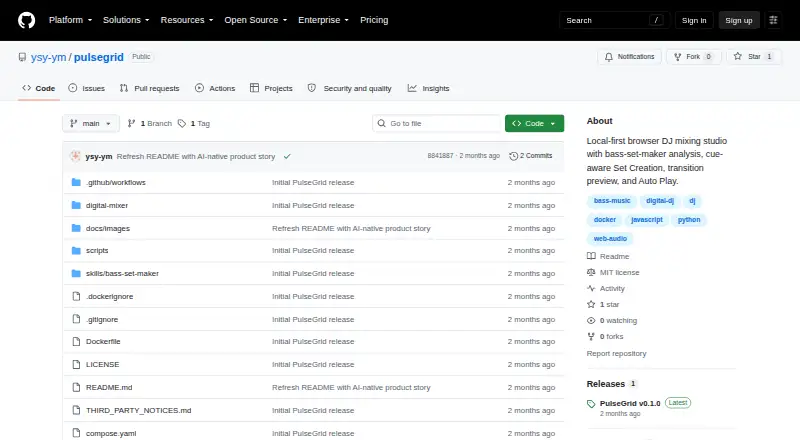
What PulseGrid is
PulseGrid is an open-source, local-first DJ workstation that runs in a browser with two decks. It analyzes local tracks for BPM, key, beatgrid, waveform, energy, drops, and musical structure. Users can describe a set in natural language, and PulseGrid plans track order, transition points, and mixing automation. Planned transitions can be previewed and reviewed before Auto Play; users can edit cues or take control manually. Mixing tools include Sync, loops, EQ, effects, and up to eight Hot Cues per track, as well as browser master-output recording. Supported formats include WAV, MP3, AIFF, M4A, AAC, FLAC, OGG, and Opus, with a 600 MB limit per local file. Music and analysis jobs stay on the user’s computer rather than being uploaded to an external PulseGrid server. Some interface state, cues, ratings, and tags may be stored in the current browser, and libraries do not sync automatically across devices or browser profiles. Docker installation is documented for Mac, Windows, and Linux, with native installation for macOS. Chrome or Edge is recommended for first use.
Good
- Analyzes BPM, key, beatgrid, energy, and structure.
- Set planning can start from a natural-language brief.
- Transitions can be reviewed before Auto Play.
- Supports common audio formats including WAV and FLAC.
- Audio and analysis jobs stay local.
Watch out
- Local uploads are limited to 600 MB per file.
- Libraries do not automatically sync across devices or browser profiles.
- Structure detection can be inaccurate in some cases.
- Docker setup requires a local Node.js API, Python, and audio tools.
Who it suits
PulseGrid suits DJs who want to analyze local tracks, plan sets, and rehearse or perform editable transitions. It may also fit those who want audio and analysis to remain on their computer.
Verdict
PulseGrid combines local track analysis with set planning and editable mixing automation in a browser-based dual-deck workspace. Its local-first approach comes with per-file upload and library-sync limits, and its structure detection may be inaccurate on some material.
The facts
Each one read from PulseGrid's own pages, with the date it was checked.
What it does
- Analysis
- It analyzes BPM, key, beatgrid, energy, waveform, double drops, and musical structure for user-uploaded tracks.checked 3 Oct 2001
- Audio formats and limit
- It supports WAV, MP3, AIFF, M4A, AAC, FLAC, OGG, and Opus, with a local upload limit of 600 MB per file.checked 3 Oct 2001
- Data storage
- Uploads and analysis jobs are stored locally, some state may be saved in browser local storage, and libraries do not sync automatically across devices or browser profiles.checked 2 Oct 2001
- Deployment
- PulseGrid requires a local Node.js API, Python, and audio tools, so the maker says hosting only its static files on GitHub Pages is insufficient.checked 3 Oct 2001
- Installation
- The maker documents Docker installation for Mac, Windows, or Linux and a native installation for macOS.checked 3 Oct 2001
- Integrations
- The documented setup uses Docker or Docker Compose, with a native macOS installation option; no third-party music service integration is listed.checked 2 Oct 2001
- Intended users
- The project presents itself for DJs who want to analyze tracks, plan and review sets, and rehearse or perform transitions with editable automation.checked 2 Oct 2001
- License
- The maker says PulseGrid's original source code is released under the MIT License unless a file states otherwise, while third-party components retain their own licenses.checked 3 Oct 2001
- Local privacy
- The project says music, uploads, analysis service, and results run locally and tracks are not uploaded to an external PulseGrid server.checked 2 Oct 2001
- Local storage
- Some interface state, cues, ratings, and tags may be stored in the current browser's local storage, and libraries do not automatically sync across devices or browser profiles.checked 3 Oct 2001
- Mixing features
- The workstation includes dual decks, waveforms, Sync, loops, EQ, filters, effects, crossfader, and up to eight Hot Cues per track.checked 3 Oct 2001
- Privacy
- The maker says audio files and analysis jobs stay on the user's computer and music is not uploaded to an external PulseGrid server.checked 3 Oct 2001
- Product
- PulseGrid is an open-source, local-first, dual-deck DJ workstation that analyzes tracks and helps create and perform DJ sets.checked 3 Oct 2001
- Security and compliance
- The repository describes local data handling but does not state security certifications or compliance attestations.checked 2 Oct 2001
- Set creation
- A natural-language brief can guide set planning, including track order, transition points, and EQ, Filter, FX, and Crossfader automation.checked 2 Oct 2001
- Set duration
- Target set duration is a soft goal, and PulseGrid prioritizes safer structure and transitions if the available material is insufficient.checked 3 Oct 2001
- Supported audio
- Common supported formats include WAV, MP3, AIFF, M4A, AAC, FLAC, OGG, and Opus, with a 600 MB per-file local upload limit.checked 2 Oct 2001
- Technical limits
- Heuristic structure detection can be inaccurate with half-time BPM, complex live intros, weak downbeats, or ambiguous drops, so low-confidence results need manual review.checked 3 Oct 2001
- Track analysis
- It analyzes local tracks for BPM, key, beatgrid, waveform, energy, drops, and musical structure.checked 2 Oct 2001
- Transition review
- Users can preview and audit transitions before Auto Play, and can take manual control at any time.checked 3 Oct 2001
Where it runs
- Browser support
- The maker recommends Chrome or Edge for first use and says those browsers provide the most complete Web Audio and AudioWorklet support.checked 3 Oct 2001
- Platform requirements
- Docker is documented for use on Mac, Windows, or Linux; native installation is documented for macOS, and Chrome or Edge is recommended for first run.checked 2 Oct 2001
Money
- Set planning
- Users can describe a set in natural language, and PulseGrid plans track order, transition-specific Cue 8 to Cue 5 handoffs, and mixing automation.checked 3 Oct 2001
The full review of PulseGrid
Overview
PulseGrid is a browser-based DJ workstation for people who want to build a set from their own music library. It suits DJs who value analysis and editable automation more than polished hardware-equivalent processing. Its strongest case is a private, integrated workspace for planning and reviewing transitions.
The workflow moves from local track analysis to a proposed set and then to transition review. A natural-language brief can shape track order, handoffs and mixing automation; users can preview the plan before Auto Play, change cues or take over manually. That combination makes PulseGrid useful for rehearsal as well as automated playback, though its structural analysis needs human scrutiny.
PulseGrid is one option in AI DJ Software.
Key features
Analysis and set planning
PulseGrid analyzes BPM, key, beatgrid, waveform, energy, drops and musical structure, including double drops. The planner turns a natural-language brief into a track order, transition points and EQ, Filter, FX and Crossfader automation, with transition-specific Cue 8 to Cue 5 handoffs. Set length is a soft target: when the available tracks do not support it, PulseGrid favors safer structures and transitions over forcing the requested duration.
Structure detection is heuristic, so it can misread half-time BPM, complex live intros, weak downbeats or ambiguous drops. Treat the plan as a starting point to inspect, not a dependable substitute for listening and editing.
Decks and control
The dual-deck workspace includes waveforms, Sync, up to eight Hot Cues per track, loops, EQ and FX. Browser master-output recording supports capturing a mix in the same workspace. Preview and audit controls, editable cues and manual control provide a useful counterweight to automation; users who want the software to make every decision without review may find the need to verify transitions limiting.
Common formats include WAV, MP3, AIFF, M4A, AAC, FLAC, OGG and Opus, with a 600 MB local upload limit per file. Browser key shifting and DSP do not match dedicated DJ hardware or audio engines, so PulseGrid is less suited to workflows where that processing fidelity is central.
Pricing
PulseGrid is free, with a free plan and no paid tiers described. That makes it an accessible choice for experimenting with local analysis, set planning and mixing automation, but the 600 MB per-file upload cap still applies. Installation also has a technical cost: the documented setup uses Docker or Docker Compose, with a native installation option for macOS; the application requires a local Node.js API, Python and audio tools, so static hosting alone is insufficient.
Platforms
PulseGrid supports Linux, macOS, Windows and web use, with self-hosting also supported. Docker is documented for Mac, Windows and Linux, while native installation is documented for macOS. Chrome or Edge is recommended for first use because those browsers provide the most complete Web Audio and AudioWorklet support. The local-first model keeps music, uploads, analysis jobs and results on the user's computer rather than an external PulseGrid server, but libraries do not automatically sync between devices or browser profiles. Some interface state, cues, ratings and tags may live in the current browser's local storage. The project describes local data handling but makes no security certifications or compliance attestations.
Who it's for
PulseGrid is best for DJs who want to analyze their own tracks, sketch a set from a brief, and rehearse or perform transitions with automation they can adjust. It is also a reasonable fit for privacy-conscious users willing to install and maintain local dependencies. Look elsewhere if you need automatic cross-device library syncing, a third-party music service integration, or processing equivalent to dedicated DJ hardware. The original source code is released under the MIT License unless a file states otherwise.
Pros and cons
- Pros: Local analysis and storage keep tracks off an external PulseGrid server, suiting users who prefer a computer-based library.
- Pros: Planning, transition preview, cue editing and manual control form a continuous workflow rather than an opaque Auto Play button.
- Pros: Free access and broad audio-format support make it practical to explore without a subscription.
- Cons: Heuristic structure detection can misread challenging material, making review essential before relying on a proposed transition.
- Cons: The 600 MB per-file cap and lack of automatic library sync complicate large libraries and multi-device workflows.
- Cons: Local dependencies and browser-based DSP make setup and hardware-equivalent processing less straightforward.
Alternatives
CortexDJ is worth considering for home users who want AI auto-mix and mashups, live decks, rendered mixes, and exports to rekordbox and Serato on up to two computers under its free plan.
djay is the alternative to consider if you need mobile support on Android or iOS, as well as desktop platforms, and want a free download with core mixing features and an optional PRO subscription.
Offtrack is another freemium choice for readers comparing DJ software, with support for Android, iOS and macOS.
SetPrep offers a free plan limited to three mixes per month and a Pro Monthly plan at £5.99 a month; consider it if a mix quota and those desktop platforms suit your workflow.
automixer.ai has a web free plan capped at three projects, six tracks per project and five exports per month, with MP3 320kbps and 1 GB storage; it may suit users who want a defined project-and-export allowance.
AuraJam offers web access, five free exports a day with a small mark on exports, and unmetered on-device tools, making it a relevant comparison for export-focused users.
CRATELAB is another freemium option for web, Windows and macOS.
DJ TITAN is a paid alternative for users who prefer a browser product with no installation and cloud sync; its TITAN Browser plan costs $20 a month, billed monthly.
Verdict
Choose PulseGrid if you want a free, local-first way to analyze tracks, shape a set and review editable transitions in one browser-based workspace. Its main advantage is that coherent planning-to-mixing workflow without sending music to an external PulseGrid server. Choose something else if you need reliable structure detection without manual checking, automatic library sync, or dedicated-hardware-level audio processing.
Alternatives to PulseGrid
- 1

djay
Free planAndroidiOSmacOSWindows8.1From $4.17 a month - 2

CortexDJ
Free planWebAPImacOSWindows7.6From $4.92 a month - 3

CRATELAB
Free planWebLinuxmacOSWindows7.6From $9.99 a month - 4
NeonDeck
Free planWeb7.2From €4.99 a month - 5
Offtrack
Free planAndroidiOSmacOS7.1From $3.33 a month - 6
MIXX Intelligence
Free planmacOS6.6From $7.99 a month