PStart
PStart is a free Windows tray tool for launching applications you choose, including portable programs stored on USB keys or removable disks.
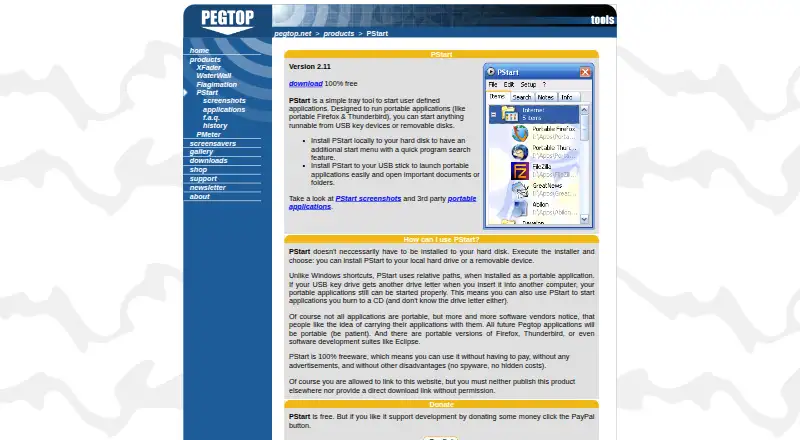
What PStart is
PStart is a free Windows tray tool for launching applications you choose, including portable programs stored on USB keys or removable disks. It can be installed on a hard disk or directly on a removable device. In portable mode, relative paths keep applications launchable when a USB drive receives a different letter. Incremental search finds programs on the local disk and portable applications on the drive. The tray menu supports custom folders and subfolders, hot keys, mouse sensors, and hiding the tray icon. PStart can carry notes on a USB drive and show reminders while running or at the next start. Making the settings file read-only disables or hides modification options. The maker recommends portable applications such as Firefox, Thunderbird, FileZilla, and Eclipse. Downloads include version 2.11, a 768 KB installer, and a 618 KB U3 version 2.09. It is freeware without advertisements, spyware, or hidden costs.
Good
- Freeware with no advertisements or spyware
- Portable relative paths handle drive-letter changes
- Incremental application search
- Custom folders, hot keys, and mouse sensors
- Notes and reminders travel on USB
Watch out
- Windows only
- Portable installations have no uninstaller
- Portable files must be removed manually
- No free trial because it is freeware
Who it suits
It suits Windows users who launch portable applications from removable media. It is also useful for organizing shortcuts, notes, and reminders in a tray menu.
Verdict
PStart provides portable application launching and organization without a listed cost. Its manual removal requirement for portable installations is the main limitation to note.
Plans and prices
From PStart's own pricing page, checked 10 Oct 2026.
| Plan | Price | What it gives you |
|---|---|---|
| PStart | Free | 100% freeware · no advertisements · no spyware · no hidden costs |
The facts
Each one read from PStart's own pages, with the date it was checked.
What it does
- Download
- The maker lists PStart version 2.11 as a 768 KB Windows installer and also lists PStart U3 version 2.09 as a 618 KB download.checked 10 Oct 2026
- Install options
- PStart can be installed locally on a hard disk or to a removable device.checked 10 Oct 2026
- Limit
- Portable installations have no uninstaller, and their files must be removed manually.checked 10 Oct 2026
- Notes and reminders
- Users can carry notes on a USB drive and set reminders that appear while PStart is running or the next time it starts.checked 10 Oct 2026
- Portable paths
- In portable mode, PStart uses relative paths so applications can still launch when a USB drive receives a different drive letter.checked 10 Oct 2026
- Purpose
- PStart is a tray tool for launching user-defined applications, including portable applications on USB keys and removable disks.checked 10 Oct 2026
- Quick search
- PStart includes incremental search for programs on the local hard disk and portable applications on a USB drive.checked 10 Oct 2026
- Settings protection
- Making the settings file read-only disables or hides settings, item, and note modification options.checked 10 Oct 2026
- Support
- The FAQ directs users whose questions are not answered to contact the maker.checked 10 Oct 2026
- Tray menu
- The tray menu supports user-defined folders and subfolders, mouse sensors, hot keys, and hiding the tray icon.checked 10 Oct 2026
- U3 version
- PStart is available in a U3 version for launching other portable applications from a U3 device.checked 10 Oct 2026
The company
- Maker
- PEGTOP Software describes itself as a one-person software company in southern Germany, founded in 1996.checked 10 Oct 2026
Where it runs
- Portable app compatibility
- The maker recommends portable applications such as Firefox, Thunderbird, FileZilla, and Eclipse for use from a portable device.checked 10 Oct 2026
Alternatives to PStart
- 1

Raycast
Free planiOSAPIExtensionmacOS7.9From $96 a year - 2

Alfred
Free planiOSAPImacOS7.7£34 one-time - 3
Launchy
Free planOpen sourceAndroidAPILinuxmacOS7.7Free plan - 4
Dropzone
Free planAPImacOS7.4Free plan - 5
PortableApps.com Platform
Free planOpen sourceLinuxmacOSWindows7.4Free plan - 6
True Launch Bar
Free planWindows7.3$19.90 one-time