Planua
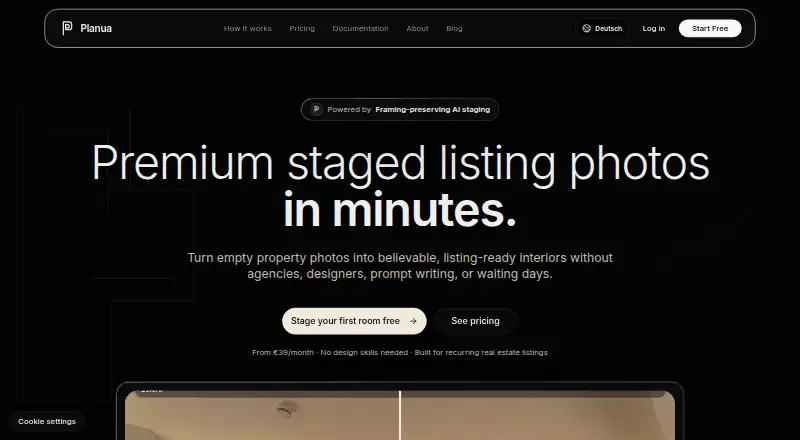
Planua turns photos of empty property rooms into AI-staged interiors for listings.
What Planua is
Planua turns photos of empty property rooms into AI-staged interiors for listings. Its editing workflow lets users change furniture, styling, and details while retaining the room’s perspective and layout. Staging can be guided by room type, style, buyer profile, mood, color direction, brands, or specific furniture. Shared project folders support work with properties, drafts, client review, approvals, and final exports. The homepage lists 4K exports and commercial use in listings, portals, brochures, and campaigns. Planua runs on the web and is designed for real estate agencies, staging teams, architects, and interior professionals. A free plan and trial are available. The homepage lists Essential at €39/mo and Agency at €249/mo, while a linked pricing guide gives different names and amounts: Starter at €19/mo, Pro Studio at €59/mo, and Agency at €149/mo. Its privacy policy says uploaded content and prompts may be sent to Google Generative Language API services and Replicate for image generation and editing; some providers may process data outside the EU or EEA.
Good
- Adjust furniture and styling while preserving room perspective.
- Guide staging with styles, colors, brands, or furniture.
- Shared folders support review, approvals, and exports.
- 4K exports and commercial use are listed.
Watch out
- Runs on the web only.
- Pricing schedules show different plan names and amounts.
- Uploaded content and prompts may go to external AI providers.
Who it suits
Planua suits real estate agencies, staging teams, architects, and interior professionals who need staged property imagery and shared project review. It may also suit users who want to direct furniture and style choices or export 4K images for commercial use.
Verdict
Planua combines guided AI staging with editing and team review tools for property imagery. Check the differing pricing schedules and its stated handling of uploaded content before choosing a plan.
Plans and prices
From Planua's own pricing page, checked 15 Oct 2026.
| Plan | Price | What it gives you |
|---|---|---|
| Free | Free | 3 staged images/month · watermarked HD previews · guided room/style controls · limited brand controls · commercial usage · monthly |
| Free Tier | Free | 15 credits · HD staging drafts · watermarked outputs · structured furnish/refine workflow · commercial license |
| Starter | €19 a month | 50 credits · 4K exports · commercial license · no watermark · bulk staging · monthly |
| Essential | €39 a month | 25 staged images/month · watermark-free exports · 4K · commercial usage · bulk processing · monthly |
| Pro Studio | €59 a month | 350 credits · bulk processing · priority queue · 3 shared seats · rollover credits · monthly |
| Pro Studio | €99 a month | 100 staged images/month · priority generation · saved presets · 3 seats · 25-image rollover · monthly |
| Agency | €149 a month | 1,300 credits · unlimited shared seats · priority support · bulk workflows · 50-credit rollover · monthly |
| Agency | €249 a month | 300 staged images/month · full bulk processing · 10 seats · project/client workspaces · 100-image rollover · monthly |
The facts
Each one read from Planua's own pages, with the date it was checked.
What it does
- AI infrastructure
- Image generation and editing use Google Generative Language API services and Replicate, according to the privacy policy.checked 15 Oct 2026
- AI limitation
- The terms warn that generated output can be incomplete, inaccurate, or unsuitable for a specific commercial purpose.checked 15 Oct 2026
- API
- Planua’s FAQ says no public API is described in its current documentation.checked 4 Oct 2026
- Audience
- Planua says it is designed for real estate agencies, staging teams, architects, and interior professionals.checked 4 Oct 2026
- Availability limitation
- The terms disclaim guarantees of uninterrupted availability or defect-free AI output.checked 15 Oct 2026
- Bulk processing
- Paid plans include bulk processing for staging multiple listing photos or room sets.checked 15 Oct 2026
- Commercial rights
- The homepage states that staged images can be used in listings, portals, brochures, and campaigns.checked 15 Oct 2026
- Compliance limitation
- Planua does not guarantee MLS compliance; users must check local disclosure and watermark rules before publishing.checked 15 Oct 2026
- Controls
- Users can guide staging with room type, style, buyer profile, mood, color direction, brands, or exact furniture pieces.checked 4 Oct 2026
- Core input
- Users upload empty or lightly furnished room photos with visible walls, windows, and floor lines.checked 15 Oct 2026
- Data transfers
- The policy says some processors may handle data outside the EU/EEA, using adequacy decisions or safeguards such as standard contractual clauses.checked 15 Oct 2026
- Documentation depth
- Public documentation consists of getting-started guidance, pricing/credits information, and a short FAQ aimed at prospective buyers.checked 15 Oct 2026
- Editing
- Its refine workflow lets users adjust furniture, styling, and details while preserving the original room perspective and layout.checked 4 Oct 2026
- Export resolution
- The homepage advertises 4K exports on paid plans and lists 4K exports among free-tier capabilities.checked 15 Oct 2026
- Exports
- The homepage lists 4K exports and commercial use for staged images in listings, portals, brochures, and campaigns.checked 4 Oct 2026
- Founder background
- The founder's letter says Piro is building Planua as a bootstrapped company while studying AI in Business.checked 15 Oct 2026
- Important pricing difference
- The homepage lists Free, Essential, Pro Studio, and Agency at €0, €39/mo, €99/mo, and €249/mo, while the linked pricing guide lists Free Tier, Starter, Pro Studio, and Agency at €0, €19/mo, €59/mo, and €149/mo.checked 4 Oct 2026
- Integrations
- No third-party product integrations are listed on the public product and documentation pages opened.checked 15 Oct 2026
- Integrations and infrastructure
- The privacy policy names Vercel, Supabase, Stripe, Resend, Upstash, Google Generative Language API services, and Replicate as service providers or processors.checked 4 Oct 2026
- International data
- Planua says some providers may process data outside the EU or EEA, with transfers relying on adequacy decisions where available or safeguards such as Standard Contractual Clauses.checked 4 Oct 2026
The company
- Company
- The imprint identifies the provider as Alibra AI Piro Scheibe, a sole proprietorship based in Lüneburg, Germany.checked 4 Oct 2026
- Company stage
- The founder says Planua is being built as a bootstrapped company while he studies AI in Business.checked 4 Oct 2026
- Company structure
- The imprint states there is no commercial-register entry and no VAT ID has yet been issued.checked 15 Oct 2026
- Headquarters
- Lüneburg, Germanychecked 28 Sep 2026
The full review of Planua
Planua turns empty property-room photos into staged interiors for listing work. It is best suited to real estate and design teams that need control over image styling and a shared review process. Its professional workflow is appealing, but the conflicting subscription schedules make it important to confirm the price and limits before paying.
Overview
Planua uses AI to furnish empty rooms while retaining the source photo’s perspective and layout. That constraint matters for property marketing: a staged image should help prospective buyers picture a room without changing how its proportions appear. Users can refine furniture, styling, and details after generation, rather than relying on a single result.
Shared project folders bring property work together across drafts, client review, approvals, and final exports. The homepage says staged images can be exported in 4K for commercial use in listings, portals, brochures, and campaigns. That combination makes Planua more relevant to recurring professional work than to occasional personal decorating.
Key features
Guided staging and refinement
Users can steer staging with room type, style, buyer profile, mood, color direction, brands, or exact furniture pieces. This range gives teams more ways to match an image to a property and its intended audience than a broad style prompt alone. The refine workflow then allows adjustments while preserving the original perspective and layout, a useful safeguard when visual edits need to stay faithful to the room.
Shared review and exports
Shared folders support drafts, client feedback, approvals, and final exports in one property workflow. That is a practical advantage for agencies and staging teams coordinating with clients; solo users may have less need for the collaboration structure. The 4K export and commercial-use claims suit marketing materials, though Planua’s FAQ describes no public API in its current documentation.
Privacy and data handling
Uploaded content and prompts may be sent to Google Generative Language API services and Replicate for image generation and editing. Some providers may process data outside the EU or EEA, with transfers relying on adequacy decisions where available or safeguards such as Standard Contractual Clauses. Teams handling property images or client material should weigh that processing before adopting the service.
Pricing
Planua’s homepage and older pricing guide show different schedules, names, prices, and quotas. The homepage lists Free, Essential, Pro Studio, and Agency; the guide lists Free Tier, Starter, Pro Studio, and Agency. Confirm the applicable offer and limits with Planua before choosing a paid plan.
| Plan | Price and terms | What it includes |
|---|---|---|
| Free | €0.00 per free | 3 staged images per month, watermarked HD previews, and limited brand controls. |
| Free Tier | €0.00 per free | 15 credits, 15 HD staging drafts, and watermarked outputs. |
| Essential | €39/mo | 25 staged images per month, watermark-free 4K exports, and bulk processing. |
| Starter | €19/mo | 50 credits, 4K exports, commercial license, no watermark, and bulk staging. |
| Pro Studio | €99/mo on the homepage; €59/mo in the guide | The homepage describes 350 credits, a priority queue, 3 shared seats, and rollover credits. The guide describes the same 350 credits, priority queue, and 3 shared seats, with rollover credits. |
| Agency | €249/mo on the homepage; €149/mo in the guide | The homepage describes 1,300 credits, unlimited shared seats, priority support, and 50-credit rollover. The guide describes the same inclusions. |
The free offers provide a way to try staging, but both limit output and watermark results; the homepage version also caps monthly staged images and limits brand controls. Essential trades a larger per-month image count for €39/mo, while Starter costs €19/mo for 50 credits and includes commercial use and bulk staging. The higher tiers add team capacity and queue or support benefits, but their price difference makes it especially important to verify which schedule applies. Planua also offers a free trial, but its length and terms are not given.
Platforms
Planua is available on the web. Its browser-based workflow fits teams sharing property projects, but no public API is described in its current documentation.
Who it's for
Planua says it is designed for real estate agencies, staging teams, architects, and interior professionals. Its precise staging controls, commercial exports, and shared approvals are strongest for teams producing listing imagery. A casual user seeking one-off inspiration may find the team workflow and plan differences less useful than a simpler staging option.
Pros and cons
- Pros: Staging controls cover audience, mood, colors, brands, and exact furniture, helping professionals work to a specific brief.
- Pros: Refinement preserves the source perspective and layout, supporting edits that remain faithful to the photographed room.
- Pros: Shared project folders cover drafts through approvals, while 4K commercial exports suit property marketing.
- Cons: The two pricing schedules disagree on paid plan names and prices, making the cost and quota difficult to assess without confirmation.
- Cons: Free outputs are watermarked and limited, so they are previews rather than a substitute for professional exports.
- Cons: Uploaded content and prompts may be processed by external AI providers, including providers that may handle data outside the EU or EEA.
- Cons: No public API is described, which may rule it out for teams seeking a documented integration.
Alternatives
Virtual Staging Software is a useful category starting point for readers comparing staging tools. Choose StageHQ if Android or iOS access matters alongside web, or if three watermarked previews are enough for evaluation. Pristage is another freemium web option with API access; its free plan provides three standard-quality watermarked images, while Pro offers 100 renders per month for $49.00 per month.
VirtualStage is worth considering if API access and a five-image free allowance are priorities. Stuccco is another freemium web alternative. For a paid option with mobile apps as well as web and API access, consider PadStyler AI; its Premium plan is $39.00 per year, billed yearly, and includes 60 photos per month. RestageHQ offers pay-as-you-go credits at $3.00 per staged photo, which may suit buyers avoiding a subscription. Roomood is a freemium web alternative with a Starter plan at $19.90 per month, billed annually. StagerGo is another web alternative with free trial access and pay-as-you-go credit options.
Verdict
Planua is a strong fit for property professionals who need guided AI staging, edits that preserve room perspective, and shared client approvals. Its combination of detailed controls and commercial 4K exports is the main reason to choose it. Look elsewhere if you need an API, prefer a simpler solo workflow, or cannot commit before the conflicting plan prices and quotas are clarified.
Getting started
- Open the Planua website
- Choose the Free option or a listed paid plan
- Upload empty property-room photos
- Set room, style, buyer, mood, color, brand, or furniture guidance
- Refine the generated staging
- Use shared folders for review and approvals
- Export the finished images
Limits worth knowing
The Free plan lists three staged images per month, watermarked HD previews, and limited brand controls. The separate Free Tier lists 15 credits, 15 HD staging drafts, and watermarked outputs.
Questions
Does Planua have a free plan?
Yes. A Free plan is listed, and a separate Free Tier is also shown in the pricing guide.
What does Planua cost?
Its pricing guide lists Starter at €19/mo, Pro Studio at €59/mo, and Agency at €149/mo.
Where can Planua be used?
Planua runs on the web.
Can staged images be used commercially?
The homepage lists commercial use for listings, portals, brochures, and campaigns.
Does Planua offer a public API?
Its FAQ says no public API is described in the current documentation.
Who provides Planua?
The provider is Alibra AI Piro Scheibe, a sole proprietorship based in Lüneburg, Germany.
Alternatives to Planua
- 1
Stagently
AndroidiOSWebAPI7.6From $29 a month - 2

StageHQ
Free planAndroidiOSWeb7.3$19 one-time - 3

Pristage
Free planWebAPI7.2From $49 a month - 4

BoxBrownie
Free planiOSWebAPI6.9Free plan - 5
PadStyler AI
AndroidiOSWebAPI6.9From $192 a year - 6
Stagerize
Web6.9$49 one-time