Pexels
Pexels is a free photo and video library for designers, bloggers, and anyone who needs downloadable visuals.
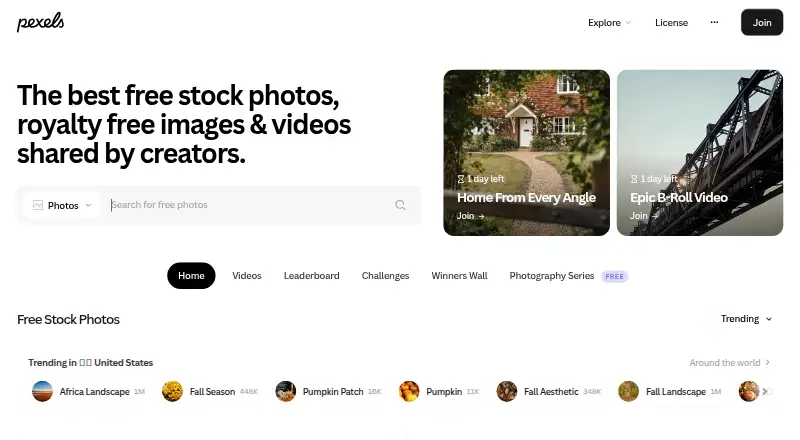
What Pexels is
Pexels is a free photo and video library for designers, bloggers, and anyone who needs downloadable visuals. Its photos and videos can be used for personal or commercial projects without attribution. The service lists vector, illustration, and editorial assets, and offers Android and iOS apps, a web service, and browser and design-tool add-ons. Accounts can save collections and likes, track downloads, follow photographers, upload content, and receive a personalized homepage. Developers can use its free REST API to access the library in JSON; default API keys allow 200 requests per hour and 20,000 per month. Pexels lists Canva, Typeform, Sketch, and Airtable as API partners. The API cannot be used to reproduce Pexels or build wallpaper and image-gallery apps. Pexels also says generative-AI-created uploads are not allowed. The listed Free plan costs nothing.
Good
- Photos and videos permit commercial use without attribution.
- Free plan includes API access.
- Accounts offer collections and download history.
- Apps and plugins cover several platforms and tools.
Watch out
- API defaults to 200 requests per hour.
- API cannot power wallpaper or image-gallery apps.
- Generative-AI-created uploads are not allowed.
Who it suits
Pexels suits people looking for reusable photos and videos, as well as developers who need programmatic library access. Its apps, extension, and design-tool integrations also suit people who want to work with visuals across those tools.
Verdict
Pexels combines a downloadable visual library with account tools and a free API. Check the API limits and restrictions if you plan to build with its content.
Plans and prices
From Pexels's own pricing page, checked 14 Oct 2026.
| Plan | Price | What it gives you |
|---|---|---|
| Free | Free | free photo/video downloads · personal and commercial use · no attribution required |
The facts
Each one read from Pexels's own pages, with the date it was checked.
What it does
- Account features
- Registered users can create collections, view download history, follow photographers, like media, receive a personalized homepage, and upload their own work.checked 14 Oct 2026
- AI content policy
- Pexels says uploads of content created with generative AI are not allowed.checked 1 Oct 2026
- API
- The RESTful JSON API provides programmatic access to the full Pexels photo and video library, free of charge.checked 1 Oct 2026
- API access
- Anyone with a Pexels account can request an API key and receive it instantly.checked 1 Oct 2026
- API availability
- Pexels offers a free API for searching photos and videos, browsing curated content, and embedding media in applications or websites.checked 14 Oct 2026
- API integrations
- Pexels identifies Canva, Typeform, Sketch, and Airtable as API users or integration partners.checked 14 Oct 2026
- API limits
- New API keys default to 200 requests per hour and 20,000 requests per month.checked 14 Oct 2026
- API restrictions
- Pexels prohibits using its API to replicate a competing stock library or standalone wallpaper service.checked 14 Oct 2026
- API technology
- The developer interface is a RESTful JSON API requiring an API key in an Authorization header.checked 14 Oct 2026
- Audience
- Pexels says hundreds of thousands of photographers and videographers contribute and millions of people use the media, from startups to global brands.checked 1 Oct 2026
- Canva integration
- Pexels content is available through a Canva add-on that lets users discover free media inside Canva designs.checked 14 Oct 2026
- Commercial rights
- Pexels states that its photos and videos may be used free of charge for commercial projects.checked 14 Oct 2026
- Content licence
- Uploaded photos and videos use the Pexels License, allowing free personal and commercial use without required attribution.checked 14 Oct 2026
- Contributor community
- Pexels says hundreds of thousands of photographers and videographers share work on the platform.checked 14 Oct 2026
- Crunchbase profile
- Crunchbase lists Pexels as a private Berlin company acquired by Canva and shows an 11–50 employee range.checked 14 Oct 2026
- Curation
- A Pexels review team selects content for featured search placement, and the best featured work is hand-curated to the homepage.checked 14 Oct 2026
- Editorial assets
- Yeschecked 21 Sep 2026
- Generative AI policy
- Pexels states that contributors may not upload content created with generative AI.checked 14 Oct 2026
- Higher API limits
- Pexels says limit increases are free for eligible applications that show acceptable Pexels and contributor attribution, although increases are currently paused.checked 14 Oct 2026
Where it runs
- Android requirements
- The Android app listing reports Android 7.0 or later as the requirement.checked 14 Oct 2026
- Apps and plugins
- Official tools include iOS and Android apps, a Chrome extension, Google Slides add-on, Figma plugin and Sketch plugin; a community MS Office add-in is also listed.checked 1 Oct 2026
The company
- Company ownership
- Pexels is part of Canva, which announced its acquisition of Pexels and Pixabay.checked 14 Oct 2026
- Company profile
- LinkedIn lists Pexels as privately held, founded in 2014, headquartered in Berlin, with 11–50 employees.checked 14 Oct 2026
Money
- Free plan
- Yeschecked 21 Sep 2026
The full review of Pexels
Pexels is a free library of photos and videos, with apps and creative tools for finding and saving visuals. It suits creators and publishers who need usable media without a stock subscription. Its no-attribution license is a clear advantage; developers must work within API quotas and usage restrictions.
Overview
Photos and videos are free for personal and commercial use without attribution, a practical fit for publishing and design workflows where budgets or crediting requirements are concerns. Pexels also offers vector, illustration and editorial assets, extending its usefulness beyond standard stock photography. It says hundreds of thousands of photographers and videographers contribute, with users ranging from startups to global brands.
Accounts add collections, download history, photographer follows, a personalized homepage, likes and uploading. These tools help organize repeat work, though they are not necessary to access the media. Contributors should also know that Pexels does not allow uploads created with generative AI.
Key features
Library and integrations
The library combines downloadable photos and video with vector, illustration and editorial assets. Official tools include Android and iOS apps, a Chrome extension, Google Slides add-on, and Figma and Sketch plugins; a community MS Office add-in is also available. Pexels identifies Canva, Typeform, Sketch and Airtable as API partners, which may suit teams already using those services.
API access
The free REST API returns JSON and gives programmatic access to the full photo and video library. Default keys allow 200 requests per hour and 20,000 per month. That is useful for modest integrations, but developers should check whether their expected traffic fits both caps. The API cannot be used to replicate Pexels or to build wallpaper and image-gallery apps, so it is not a general-purpose feed for competing visual libraries.
Pricing
Pexels has one plan: Free — free. It includes free photo and video access, plus API allowances of 200 requests per hour and 20,000 per month. There is no paid tier to increase those quotas; projects that outgrow the caps or need a permitted use outside the API restrictions should look elsewhere.
Platforms
Pexels is available on the web, Android and iOS, and through an API and browser extension. Its Google Slides add-on and Figma and Sketch plugins bring it into common creative workflows without requiring a separate library subscription.
Who it's for
Pexels is a strong choice for designers, bloggers, publishers and businesses that need photos or videos for personal or commercial projects without attribution fees. Its account tools suit people who want to save collections or follow photographers, while the API serves developers building allowed integrations within its limits. It is a poor fit for apps that reproduce Pexels or offer wallpaper and image galleries through its API.
Pros and cons
- Pro: Free personal and commercial use without attribution avoids both media charges and crediting work.
- Pro: Photos, videos, vectors, illustrations and editorial assets cover more than one visual format.
- Pro: Apps, plugins and account tools support discovery and organization across several workflows.
- Con: API keys default to hourly and monthly request caps, which can constrain higher-volume integrations.
- Con: API restrictions rule out replication, wallpaper and image-gallery apps.
- Con: Generative-AI-created uploads are not permitted, limiting contributors who want to share that kind of work.
Alternatives
Pixabay is another free option for media downloads; full-resolution photo and video downloads require sign-up, so Pexels may be preferable when avoiding that step matters.
Vecteezy offers a free plan and distinct image-only, video-only and unlimited-access bundles, making it worth considering when those bundle choices suit the project.
Adobe Stock is a paid service with a free trial and plans that include standard assets and video, for buyers considering a trial-based paid library.
VectorStock has a free plan and a pay-per-image option with a single-vector purchase and Pro license, making it a more focused alternative when vectors are the priority.
Shutterstock is a paid alternative with image-download and unlimited-image plans for readers considering a paid library.
Depositphotos offers a free plan alongside monthly and annual unlimited-download plans, for readers comparing download models.
Yay Images has a free plan and options including a one-seat membership, a lifetime membership capped at five downloads per day, and a 50-credit purchase.
iStock is a paid alternative with annual plans starting at $29 a month for 10 downloads per month, for readers seeking a subscription with a stated download allowance.
Browse Stock Photo Websites or Stock Video Websites to compare more libraries by category.
Verdict
Choose Pexels if you want a broad selection of usable photos and videos at no cost, particularly for projects that benefit from a no-attribution license and supporting creative tools. Look elsewhere if your application needs to reproduce the library, serve wallpapers or galleries, or exceed the API's default quotas.
Getting started
- Open the Pexels website or use its Android or iOS app.
- Create an account to use collections, download history, photographer follows, likes, uploads and a personalized homepage.
- For programmatic access, use the RESTful JSON API and an API key.
- Use a Chrome extension, Google Slides add-on, Figma plugin or Sketch plugin if it suits your workflow.
Limits worth knowing
The Free plan costs nothing and provides free photos and videos. API keys default to 200 requests per hour and 20,000 requests per month; API use is prohibited for Pexels replicas and wallpaper or image-gallery apps.
Questions
How much does Pexels cost?
The Free plan is free.
Can Pexels media be used commercially?
Photos and videos are free for personal and commercial use without attribution.
What platforms are available?
Pexels lists Android, iOS, web, an API and an extension. Official tools also include a Google Slides add-on and Figma and Sketch plugins.
What are the API limits?
API keys default to 200 requests per hour and 20,000 requests per month.
Which services does Pexels name as API partners?
Pexels identifies Canva, Typeform, Sketch and Airtable as API partners.
Can users upload generative AI content?
No. Pexels does not allow uploads of content created with generative AI.
Alternatives to Pexels
- 1

Dreamstime
AndroidiOSWebAPI8.4 - 2

123RF
AndroidiOSWebAPI8.4From $16.10 a month - 3
Adobe Stock
AndroidiOSWebAPI8.2 - 4

Vecteezy
Free planWebAPI8.1Free plan - 5
Pixabay
Free planAndroidiOSWebAPI8.0Free plan - 6
Yay Images
Free planWebAPI8.0Free plan