
Perfect Ear
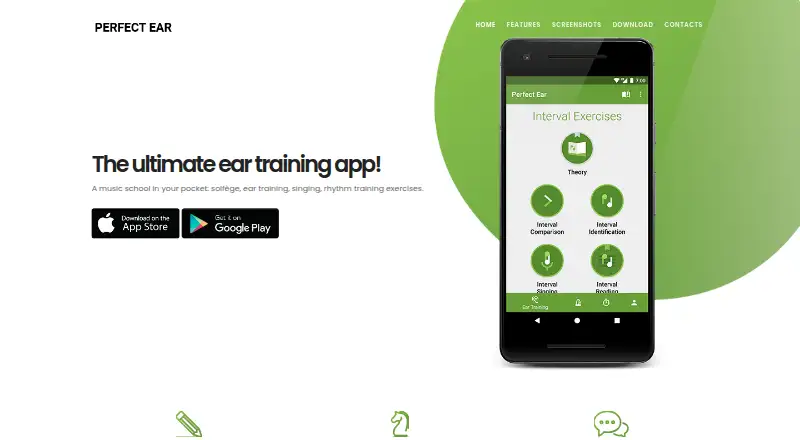
Perfect Ear is a music-learning app for ear training, rhythm, solfège, music theory, and note reading.
What Perfect Ear is
Perfect Ear is a music-learning app for ear training, rhythm, solfège, music theory, and note reading. Its exercises cover interval comparison and recognition, chords, inversions, progressions, scales, and rhythm reading, writing, and imitation. It also includes melodic dictation, absolute-pitch training, note-singing drills, and sight-reading practice. Musicians can create custom exercises, chords, scales, and rhythm patterns. Ear-training exercises can be practiced with piano or guitar, and a MIDI keyboard can be used with the sight-reading trainer. The App Store listing describes guided courses from beginner to advanced and a daily practice dashboard. Perfect Ear is available on Android, iOS, and macOS. It has a free plan, with in-app purchases listed for individual exercise packs and other items. The maker describes the exercises as suitable for musicians at all levels, from amateurs to professionals.
Good
- Covers intervals, chords, scales, and rhythm.
- Includes melodic dictation and absolute-pitch exercises.
- Users can create custom practice exercises.
- Guided courses span beginner to advanced.
Watch out
- Some exercise packs require in-app purchases.
- Available platforms are Android, iOS, and macOS.
Who it suits
Perfect Ear suits beginners and experienced musicians looking for structured practice in ear training, rhythm, music theory, or sight reading. It may also suit learners who want to create custom exercises or use piano, guitar, or a MIDI keyboard in practice.
Verdict
Perfect Ear brings several kinds of musicianship practice together, from interval and rhythm drills to sight reading. Its free plan is available, while specific packs and other in-app purchases are listed separately.
Plans and prices
From Perfect Ear's own pricing page, checked 15 Oct 2026.
| Plan | Price | What it gives you |
|---|---|---|
| Free | Free | Free download · some content locked |
| Classical Piano | $0.99, paid once | Classical piano sounds · one-time in-app purchase |
| Chord exercises pack | $0.99, paid once | Chord exercises · one-time in-app purchase |
| Interval Exercises Pack | $0.99, paid once | Interval exercises · one-time in-app purchase |
| Rhythm exercises pack | $0.99, paid once | Rhythm exercises · one-time in-app purchase |
| Scales exercises pack | $0.99, paid once | Scale exercises · one-time in-app purchase |
| Custom exercise editor | $1.99, paid once | Create custom exercises · one-time in-app purchase |
| Christmas Sale | $2.99, paid once | Sale unlock · one-time in-app purchase |
| Full Exercise Pack | $4.99, paid once | Full exercise pack · one-time in-app purchase |
| Perfect Ear Premium | $14.99, paid once | Premium unlock · one-time in-app purchase |
The facts
Each one read from Perfect Ear's own pages, with the date it was checked.
Where it runs
- Android data safety
- Google Play says the app may collect app activity and app info and performance data, shares no data with third parties, and encrypts data in transit.checked 3 Oct 2026
- Apple privacy disclosure
- The App Store listing says diagnostics may be collected but are not linked to the user.checked 3 Oct 2026
- Apple requirements
- The App Store requires iOS 17 or later, iPadOS 17 or later, or macOS 14 or later on a Mac with Apple M1 or newer.checked 15 Oct 2026
What it does
- API and SDK
- The reviewed official and store pages identify no public API or SDK.checked 15 Oct 2026
- Chord training
- Chord exercises cover identification, inversions, reading and progressions from basic through advanced.checked 15 Oct 2026
- Courses and practice tracking
- The App Store listing describes guided courses from beginner to advanced and a daily practice dashboard.checked 3 Oct 2026
- Customisation
- Google Play says users can create custom ear-training and rhythm exercises, chords, scales and rhythm patterns.checked 15 Oct 2026
- Customization
- Users can create custom ear-training and rhythm exercises, chords, scales, and rhythm patterns.checked 3 Oct 2026
- Data safety
- Google Play states that no data is shared with third parties, activity and performance data may be collected, transit is encrypted and data cannot be deleted.checked 15 Oct 2026
- Distribution and developer
- The app is listed on Google Play and the Apple App Store under developer Crazy Ootka Software AB.checked 3 Oct 2026
- Intended users
- The maker describes its exercises as suitable for musicians of all levels, including amateurs and professionals.checked 3 Oct 2026
- Interval and chord practice
- Exercises cover interval comparison and recognition, chord recognition, inversions, and progressions.checked 3 Oct 2026
- Interval training
- Interval exercises teach comparison, identification and reading of intervals.checked 15 Oct 2026
- Legal entity and founding
- Bloomberg LEI records identify Crazy Ootka Software AB as a Swedish entity created on 24 January 2020.checked 15 Oct 2026
- Licence
- AlternativeTo labels Perfect Ear proprietary and freemium, with a free limited version and one-time purchase model.checked 15 Oct 2026
- Limit: custom ranges
- A reviewer said the paid custom editor could not set a C3–C4 range on treble clef for ukulele or guitar practice.checked 15 Oct 2026
- Limit: rhythm feedback
- Chrome-Stats summaries report confusing rhythm feedback, no repeat after failed tasks and inconsistent metronome timing.checked 15 Oct 2026
- Limit: rhythm quantisation
- GiveMeApps reported that rhythm tapping marks answers wrong when timing is only a few ticks early or late.checked 15 Oct 2026
- Limit: sight-reading controls
- App Store reviewers report that failed rhythm taps cannot be retried and sight reading lacks selectable key signatures.checked 15 Oct 2026
- Limit: stability
- An App Store reviewer reported crashes after completing drills for months and said paid-user support emails received no response.checked 15 Oct 2026
- Melody, singing, and pitch
- Features include melodic dictation, absolute-pitch training, and note-singing drills.checked 3 Oct 2026
- MIDI integration
- Google Play says the sight-reading trainer can be used with a plugged-in MIDI keyboard and that exercises work with piano or guitar.checked 15 Oct 2026
The company
- Headquarters
- The developer listing gives Höglandstorget 8, Lgh 1202, 167 71 Bromma, Sweden.checked 15 Oct 2026
- Maker
- The app is developed by Crazy Ootka Software AB.checked 15 Oct 2026
The full review of Perfect Ear
Perfect Ear is a music-training app for musicians who want to practice listening, rhythm, theory and reading in one place. It suits learners from beginners through professionals, especially those who want to shape exercises around their own practice. Its free plan and low-cost one-time packs make it possible to start small, though the benefits of Premium are not defined.
Overview
Perfect Ear spans interval and chord recognition, scales, rhythm, melodic dictation, singing and sight reading. That breadth is its strongest case: a learner can work on several parts of musicianship without choosing a narrowly focused trainer. Guided courses run from beginner to advanced, and a daily practice dashboard supports a regular routine.
The app also allows users to create custom ear-training and rhythm exercises, chords, scales and rhythm patterns. This is useful for musicians with specific practice goals, but those custom-building tools are a separately priced purchase rather than an assumed part of the free plan.
Key features
- Ear training: Exercises cover interval comparison and recognition, chord recognition, inversions and progressions. Piano or guitar can be used for ear-training practice.
- Rhythm and scales: Users can read, write and imitate rhythms, and practice scales. Custom rhythm patterns and scales offer more control over what to work on.
- Melody, singing and pitch: Melodic dictation, absolute-pitch training and note-singing drills extend practice beyond identifying intervals and chords.
- Sight reading: Drills and a sheet-music reading trainer give users a way to practice notation; the trainer supports a MIDI keyboard.
This range is valuable for broad musicianship practice, but it may be more than someone needs if the priority is one specific skill, such as sight singing alone.
Pricing
The free plan costs nothing and is free to download, with in-app purchases available. It is the sensible starting point for deciding whether the app’s mix of drills suits your routine; the free-plan caps are not defined.
Individual one-time purchases let users add selected content or tools: Classical Piano, Interval Exercises Pack, Rhythm exercises pack, Chord exercises pack and Scales exercises pack each cost $0.99, paid once. The Custom exercise editor costs $1.99, paid once. These are a better fit for someone who knows which area or customization tool they want than for a buyer seeking everything at once.
The Full Exercise Pack costs $4.99, paid once and is the clearest option for a user who wants the complete exercise pack rather than buying several subject packs separately. Perfect Ear Premium costs $9.99, paid once, but its included benefits are not defined, so it is difficult to judge against the packs. A Christmas Sale purchase is also offered at $2.99, paid once; the name does not establish what it includes. All listed purchases are one-time rather than subscriptions.
Platforms
Perfect Ear is available on Android, iOS and macOS. Google Play says the app may collect app activity and app info and performance data, shares no data with third parties, and encrypts data in transit. Apple’s privacy disclosure says diagnostics may be collected but are not linked to the user.
Who it's for
Perfect Ear is a strong fit for musicians who want one app for ear training, rhythm, theory, singing and sight reading, with guided courses for a progression from beginner to advanced. Its custom exercise options also suit learners who want to tailor practice. It is less compelling for someone who only needs a specialized trainer or who wants to know precisely what a premium tier unlocks before paying.
Pros and cons
- Pro: The mix of listening, rhythm, scales, singing and notation practice supports a broad musicianship routine in one app.
- Pro: Custom exercises, chords, scales and rhythm patterns can make practice more specific than a fixed drill sequence.
- Pro: One-time prices for individual packs allow users to buy a focused addition without taking on a recurring subscription.
- Con: The free plan’s caps are not defined, making it hard to know how far a learner can progress before paying.
- Con: Premium’s benefits are not defined, so the 9.99 USD one-time purchase is a less transparent choice than the named packs.
- Con: Users focused on a single narrow discipline may not need the app’s broad set of practice areas.
Alternatives
For more options, browse Ear Training Software. Choose Complete Ear Trainer instead if you want a free first chapter of each mode and a 6.99 USD one-time full version, or need web and Windows alongside mobile and macOS. Coco is another freemium option on Android, iOS and web, with game lineups, daily workouts and challenges subject to daily session limits on its free plan. ToneGym offers limited free access to training and learning tools, with a 13.95 USD monthly Pro plan for those who prefer a subscription.
Nootka is a free, open-source alternative for Android, Linux, macOS and Windows. SightSing may suit users focused on sight singing: its free plan covers levels 1–3, while its 4.99 USD monthly plan covers all 18 levels and includes rhythm and interval training. The Ear Gym offers free drills at your own pace, with guided mode available as a 2.99 USD one-time purchase. Trill has limited ear-training access on its free plan and a 59.99 USD yearly Pro plan after a 7-day free trial. EarMaster is available on Android, iOS, macOS and Windows, with yearly and monthly subscription options.
Verdict
Choose Perfect Ear if you want a wide range of musicianship drills, guided courses and customizable practice in one app, with the option to pay once for specific packs. Look elsewhere if you need clearly defined free-plan limits or a transparent explanation of what a premium purchase includes.
Getting started
- Download Perfect Ear from Google Play or the Apple App Store.
- Choose a practice area such as intervals, rhythm, scales, or sight-reading.
- Use piano or guitar for ear-training exercises, or a MIDI keyboard with the sight-reading trainer.
- Create custom exercises, chords, scales, or rhythm patterns if desired.
- Purchase exercise packs or tools in-app if needed.
Questions
Is Perfect Ear free?
It is free to download, with in-app purchases available.
Which platforms is it available on?
Perfect Ear is available on Android, iOS, and macOS.
What do the listed purchases cost?
Individual exercise packs are listed at 0.99 USD once, the custom exercise editor at 1.99 USD once, the full exercise pack at 4.99 USD once, and Premium at 9.99 USD once.
Who develops Perfect Ear?
It is listed under developer Crazy Ootka Software AB.
Can users make their own exercises?
Yes. Users can create custom ear-training and rhythm exercises, chords, scales, and rhythm patterns.
What privacy details are listed for the app?
Google Play says it may collect app activity and app info and performance data, shares no data with third parties, and encrypts data in transit. The App Store says diagnostics may be collected but are not linked to the user.
Alternatives to Perfect Ear
- 1
EarMaster
Free planAndroidiOSWebmacOS8.1From $10.50 a year - 2

Complete Ear Trainer
Free planAndroidiOSWebmacOS8.0$5.99 one-time - 3
Functional Ear Trainer
Free planAndroidiOSmacOSWindows7.2$19.99 one-time - 4

ToneGym
Free planAndroidiOSWeb7.2From $74.99 a year - 5

Auris
Free planAndroidiOSWeb7.1From €4.99 a month - 6
Note Precision: Intervals
Free planAndroidiOSmacOS7.1€9.99 one-time