
PDiff
PDiff is desktop software for comparing PDFs and identifying changes in layout, formatting, and page breaks.
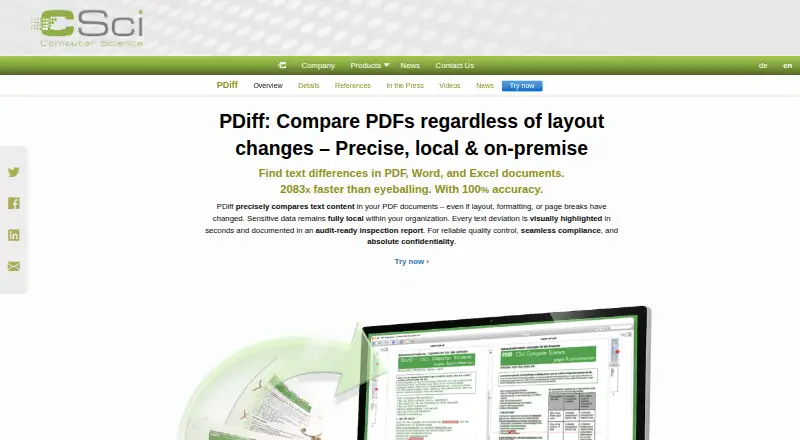
What PDiff is
PDiff is desktop software for comparing PDFs and identifying changes in layout, formatting, and page breaks. It displays documents side by side, synchronizes extracted text, and highlights differences in both views. Reviewers can navigate changes, accept them, hide less relevant items, and add comments. Filtering tools include exclusion areas, page ranges, text-flow and table controls, replacement rules, comments, and OK checkmarks. PDFs can be compared with DOC, DOCX, RTF, TXT, XLS, and other common files, which are converted through their native applications. Output options include tabular, annotated, and side-by-side PDFs, XML, CSV, PDiff project files, and command-line return codes. PDiff Professional adds GUI batch processing and command-line operation. It supports Unicode text, including Chinese, Japanese, Korean, Arabic, and Hebrew. CSci says processing occurs locally and files are not transferred over the internet, with offline operation available by arrangement. Uses include quality assurance, regulatory compliance, contract and legal review, pharmaceutical packaging, and technical documents. Pricing is available by contacting CSci; business customers can request a full-functionality trial.
Good
- Compares layout, formatting, and page breaks
- Supports PDF and office-file comparisons
- Provides multiple report formats
- Includes batch and command-line options
- Handles multilingual Unicode text
Watch out
- Pricing requires a tailored offer
- Trial has specific hardware requirements
- Internet access is listed for trial
- Offline operation requires arrangement
Who it suits
It suits teams reviewing business-critical documents, including quality assurance, legal, regulatory, and pharmaceutical workflows. Local processing may appeal to organizations that cannot send documents through cloud services.
Verdict
PDiff combines detailed visual and text comparison with filtering, reporting, and automation options. Buyers should confirm edition differences, trial requirements, and the offer from CSci.
Plans and prices
From PDiff's own pricing page, checked 7 Oct 2026.
| Plan | Price | What it gives you |
|---|---|---|
| PDiff Desktop, PDiff QA, PDiff Professional | Priced on request | Editions differ in features; Windows 64-bit and macOS 14+ are listed. · Contact CSci for an offer tailored to your requirements. |
The facts
Each one read from PDiff's own pages, with the date it was checked.
What it does
- Automation
- PDiff Professional supports GUI batch processing and command-line operation for integration into other software and workflows.checked 7 Oct 2026
- Comparison display
- The interface shows PDFs side by side with synchronized extracted text and highlighted differences.checked 7 Oct 2026
- Data handling
- The maker says PDiff works locally without cloud processing and that documents are never transferred over the internet.checked 7 Oct 2026
- File formats
- It imports DOC/DOCX, RTF, TXT, XLS, and other common formats by converting them through their native applications, allowing comparisons with PDFs.checked 7 Oct 2026
- Filtering
- Its six listed tools include exclusion areas, page ranges, text-flow and table tools, replacement rules, and comments or OK checkmarks.checked 7 Oct 2026
- Filtering tools
- PDiff lists exclusion areas, page ranges, text flow and table tools, replacement, comments, and OK checkmarks as tools for filtering or managing differences.checked 7 Oct 2026
- Intended use
- The maker describes uses including quality assurance, regulatory compliance, contract review, pharmaceutical packaging, legal texts, and technical documents.checked 7 Oct 2026
- Languages
- PDiff supports Unicode, including Chinese, Japanese, Korean, Arabic, and Hebrew text.checked 7 Oct 2026
- Other document formats
- PDiff can import formats including DOC/DOCX, RTF, TXT, and XLS for comparison with PDFs; non-PDF formats are converted through their native applications.checked 7 Oct 2026
- PDF processing
- PDiff uses the Adobe PDF Library for PDF processing and text analysis.checked 7 Oct 2026
- Purpose
- PDiff compares text in PDF documents across layout, formatting, and page-break changes and highlights deviations.checked 7 Oct 2026
- Reports
- It can produce tabular PDF, annotated PDF, side-by-side PDF, XML, CSV, PDiff project, and CLI return-code outputs.checked 7 Oct 2026
- Requirements
- The trial requirements list Windows 64-bit or a Mac with Apple Silicon and macOS 14 or newer, at least 8 GB RAM, and internet access.checked 7 Oct 2026
- Review controls
- Users can navigate differences, mark changes as accepted, hide less relevant changes, and optionally add comments.checked 7 Oct 2026
- Review display
- It shows compared PDFs side by side with synchronized extracted text and highlights differences in both views.checked 7 Oct 2026
- Security
- The maker says document processing occurs locally, documents are not transmitted over the internet, and the software can operate offline by arrangement.checked 7 Oct 2026
- Support
- The maker invites trial users who want to continue to contact it for an offer for a full version tailored to their requirements.checked 7 Oct 2026
- Technical network use
- The maker says internet access may be used for license verification, update checks, and downloading updated help files; license information is sent via HTTPS.checked 7 Oct 2026
The company
- Founded
- 2009checked 28 Sep 2026
- Headquarters
- Hamburg, Germanychecked 28 Sep 2026
- Maker
- CSci Computer Science GmbH says it was founded in January 2009 and is based in Hamburg.checked 7 Oct 2026
Money
- Trial
- Business customers can request a free, full-functionality trial by download; it stops working when the trial ends and does not automatically convert to a paid version or subscription.checked 7 Oct 2026
- Trial conditions
- The trial stops functioning at the end of its period and does not automatically convert to a paid version or subscription.checked 7 Oct 2026
- Trial requirements
- The trial page lists 64-bit Windows or Apple Silicon Mac with macOS 14 or newer, at least 8 GB RAM, and an internet connection as requirements.checked 7 Oct 2026
Alternatives to PDiff
- 1

Formable
Free planAndroidiOSWebAPI8.0$0.35 one-time - 2

Gavel
WebAPImacOSWindows7.0From $417 a year - 3
LegalSifter
Web6.5From $3,500 a year - 4

BlackBoiler
WebAPI6.4From $1,250 a year - 5

Draftable Compare
Self-hostedWindows6.2From $129 a year - 6
Robin AI
WebExtension6.2