PC Equalizer
PC Equalizer is Windows software for customizing a computer’s audio output and accessing Equalizer APO features.
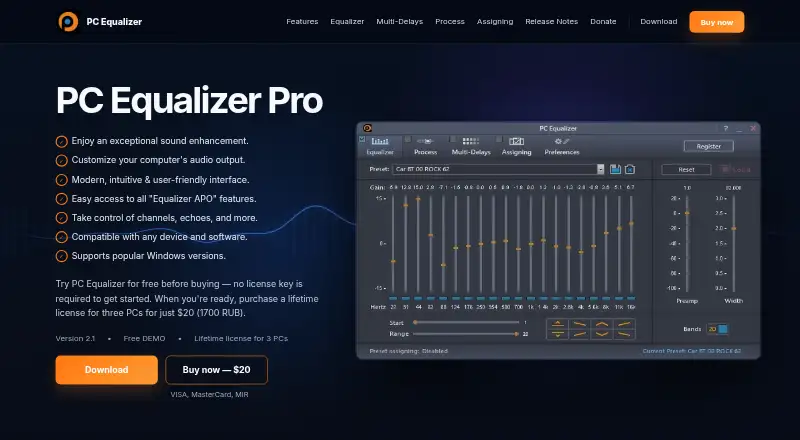
What PC Equalizer is
PC Equalizer is Windows software for customizing a computer’s audio output and accessing Equalizer APO features. Its 10- or 20-band equalizer supports all channels, with controls for Stereo, Mono, Swap, Invert and Balance. Pan/Expand adjusts the stereo image, while Multi-Delays can add echoes, delay and reverb with up to 16 taps. Choose a built-in preset or save and delete your own, then assign presets to applications such as Winamp, Windows Media Player or PotPlayer. The software can detect active audio players and load their assigned presets. It can launch at startup, minimize to the System Tray and notify you when an assigned preset changes. Equalizer APO setup is included with the PC Equalizer 2.1 installer; if the program does not run properly, the product page advises trying a manual Equalizer APO installation. A free demo requires no license key, and a free trial is offered.
Good
- 10- or 20-band equalizer supports all channels
- Assign presets to individual applications
- Multi-Delays supports up to 16 taps
- Free demo requires no license key
Watch out
- Windows platform only
- Equalizer APO may need manual installation if issues occur
Who it suits
PC Equalizer suits Windows users who want to adjust audio across channels or tailor presets to individual audio applications. Its startup and tray options may also suit people who want it available in the background.
Verdict
PC Equalizer combines channel and stereo controls with application-specific presets and audio effects. A free demo and trial are available, while the product is listed as paid from $20.
Plans and prices
From PC Equalizer's own pricing page, checked 15 Oct 2026.
| Plan | Price | What it gives you |
|---|---|---|
| Free DEMO | Free | No license key required to start · demo version 2.1 |
| Lifetime license for three PCs | $20, paid once | Three PCs · 1700 RUB equivalent shown · one-time payment |
| Lifetime license for 3 PCs | — | 3 PCs · Lifetime license |
The facts
Each one read from PC Equalizer's own pages, with the date it was checked.
What it does
- 10 or 20 band equalizer
- The product provides selectable 10-band or 20-band equalization.checked 15 Oct 2026
- All-channel equalization
- Its fixed standard equalizer can operate across all audio channels.checked 15 Oct 2026
- Automatic control
- Saved presets appear automatically while the equalizer is being adjusted.checked 15 Oct 2026
- Channel controls
- Processing controls include stereo, mono, swap, invert and balance modes.checked 15 Oct 2026
- Dependency
- Equalizer APO setup is included in the PC Equalizer 2.1 installer; the page advises trying a manual Equalizer APO installation if PC Equalizer does not run properly.checked 7 Oct 2026
- Developer documentation
- The official page provides installation guidance and release notes but describes no public API, SDK or developer documentation.checked 15 Oct 2026
- Download size
- Mloads lists the PC Equalizer 2.0.0.6 package as 18.0 MB.checked 15 Oct 2026
- Effects
- Multi-Delays creates echoes, delay, and reverb, with up to 16 taps.checked 7 Oct 2026
- Equalizer
- It offers a 10 or 20 band equalizer and supports all channels.checked 7 Oct 2026
- Equalizer APO integration
- Version 2.1 includes Equalizer APO setup in its installer, although the maker says APO can still be installed manually if needed.checked 15 Oct 2026
- Licence listing
- SourceForge labels the project licence as “Other License” rather than naming an open-source licence.checked 15 Oct 2026
- License activation
- Version 2.1 release notes say license key handling and activation reliability were improved.checked 7 Oct 2026
- Limit: activation failures
- A SourceForge reviewer reported paid registration becoming invalid and the program reverting to demo mode in April 2024.checked 15 Oct 2026
- Limit: antivirus conflicts
- A SourceForge reviewer said McAfee repeatedly deleted the software and the program shut down while adjusting levels.checked 15 Oct 2026
- Limit: audio distortion
- A reviewer reported occasional extreme volume increases followed by distorted sound.checked 15 Oct 2026
- Limit: configuration errors
- Another reviewer reported that the program repeatedly claimed its Equalizer APO configurator was not installed even after installation.checked 15 Oct 2026
- Limit: Equalizer APO dependency
- Software Informer says the older PC Equalizer build cannot operate by itself because Equalizer APO must already be installed.checked 15 Oct 2026
- Limit: home-theater codecs
- An Audiokarma user said the software may not help when multichannel codecs bypass the computer and are decoded directly by an AV receiver.checked 15 Oct 2026
- Limit: website outage report
- The same reviewer reported that pcequalizer.com returned a 403 error at that time.checked 15 Oct 2026
- Multi-delays
- The Multi-Delays module creates echoes, delay and reverb effects with up to 16 taps.checked 15 Oct 2026
- Pan and stereo expansion
- Pan/Expand can widen or contract the stereo image.checked 15 Oct 2026
Where it runs
- Application assignments
- Presets can be assigned to applications such as Winamp, Windows Media Player and PotPlayer, with tray notifications when assignments change.checked 15 Oct 2026
Money
- Independent free-software description
- Software Informer describes the older PC Equalizer 1.3 product as free and donation-supported.checked 15 Oct 2026
The company
- Maker identity
- Software Informer identifies the developer as Bilal Salem, while SourceForge uses the maintainer name bils7922.checked 15 Oct 2026