OpSee
OpSee is a modular manufacturing execution and industrial data platform for factory MES, OEE, historian, analytics, and AI work.
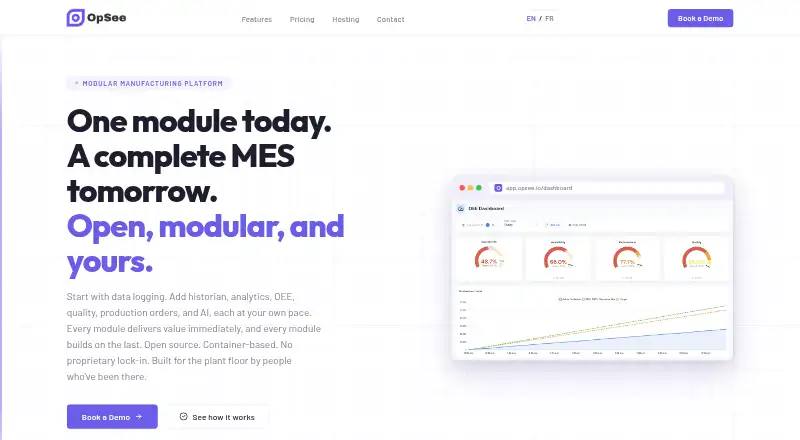
What OpSee is
OpSee is a modular manufacturing execution and industrial data platform for factory MES, OEE, historian, analytics, and AI work. Its data logging module connects to MQTT brokers, OPC-UA endpoints, and industrial protocols, and is described as always free. The historian stores and retrieves time-series process data. Analytics tools include trend charts, Pareto analysis, custom KPIs, interpolation, annotations, and multi-axis support; OEE features include live gauges, production trends, downtime categorization, and loss analysis. MES functions cover production orders, operator screens, quality checks, traceability, and material tracking. AI features include anomaly detection, predictive insights, root-cause assistance, and plain-language queries about historical data. OpSee can run at the edge, on premises, or in managed cloud hosting on AWS, Azure, or GCP. Edge deployment supports Docker Compose and lists a requirement of less than 8 GB RAM. Starter is €59 a month per equipment; Pro is €95 a month per equipment.
Good
- Connects to MQTT brokers and OPC-UA endpoints
- Includes time-series storage and retrieval
- MES covers orders, quality checks, and traceability
- Runs at the edge, on premises, or in the cloud
Watch out
- Edge deployment requires less than 8 GB RAM
- Starter includes one feature module
- Starter and Pro are billed per equipment
Who it suits
OpSee is aimed at operators, plant managers, and IT teams working with manufacturing data and production workflows. Its deployment options suit organizations considering edge, on-premises, or cloud hosting.
Verdict
OpSee brings production execution, equipment data, analytics, and AI features into a modular platform. Compare the modules and per-equipment plan terms with the factory’s needs.
Plans and prices
From OpSee's own pricing page, checked 15 Oct 2026.
| Plan | Price | What it gives you |
|---|---|---|
| Starter | €59 a month | 1 feature module · data logging and trending included · email support · per equipment |
| Pro | €95 a month | all modules · data logging and trending included · priority support · per equipment |
| Enterprise | €595 a month | 30+ equipments · multi-site rollouts · dedicated onboarding and rollout support · starting from 30 equipments; Starter €39/month or Pro €59/month included |
| Site Unlimited | €8,333 a month | all modules, features and integrations · no equipment, site or usage caps · white-glove support |
The facts
Each one read from OpSee's own pages, with the date it was checked.
What it does
- A6K acceleration
- A LinkedIn post says OpSee entered the A6K accelerator to structure its commercial and financial development in Belgium and beyond.checked 15 Oct 2026
- AgiNtech relationship
- AgiNtech’s LinkedIn page identifies the company as an industrial automation, robotics and industrial-IT integrator that developed OpSee after its earlier work.checked 15 Oct 2026
- AI
- AI features include anomaly detection, predictive insights, AI-assisted root-cause analysis and natural-language questions over historical data.checked 15 Oct 2026
- AI workshop
- A LinkedIn event post says a workshop demonstrated AI production-data analysis, live MES configuration documentation and natural-language configuration and exploration.checked 15 Oct 2026
- Analytics
- Analytics provides trend charts, Pareto analysis, custom KPIs, interpolation, annotations and multi-axis views.checked 15 Oct 2026
- API documentation
- The opened official page describes protocol connectivity but does not provide a public REST API, SDK or developer-documentation link.checked 15 Oct 2026
- Cloud hosting
- The hosted option is offered on AWS, Azure or GCP with managed updates, backups and Kubernetes scaling.checked 15 Oct 2026
- Data control
- The maker says on-premises deployment keeps data inside the network and gives customers control over data, backups, and security policies.checked 3 Oct 2026
- Data logging
- The data-logging module captures machine signals and connects to MQTT brokers, OPC-UA endpoints and other industrial protocols.checked 15 Oct 2026
- Deployment model
- OpSee is container-based and described as Docker and Kubernetes ready.checked 15 Oct 2026
- Deployment requirements
- The edge deployment supports Docker Compose and lists a requirement of less than 8 GB RAM.checked 3 Oct 2026
- Documentation/support limit
- The opened official site offers email, priority, dedicated or white-glove support by plan but exposes no public documentation or help-centre content.checked 15 Oct 2026
- Edge hosting
- Edge deployment supports industrial PCs, NUCs and x86 devices, offline operation and Docker Compose with less than 8 GB RAM.checked 15 Oct 2026
- External business description
- A 2025 Wallonia trade-mission profile describes OpSee as AgiNtech’s MES platform based on an open-source development stack and positioned for lower total cost of ownership.checked 15 Oct 2026
- External project record
- Mind & Market lists OpSee as a Belgium-based MES project created on 11 March 2025, originating as a student project supported by INEO.checked 15 Oct 2026
- Historian
- The historian stores time-series process data for long-term retrieval and querying of tags and values.checked 15 Oct 2026
- Hosting
- OpSee can run at the edge, on premises, or in the cloud, and its hosting page names AWS, Azure, and GCP for managed cloud hosting.checked 3 Oct 2026
- Integration claim
- OpSee states that its modules integrate with one another and that the unlimited plan includes all integrations.checked 15 Oct 2026
- Integrations
- OpSee names MQTT brokers, OPC-UA endpoints, and industrial protocols as ways to connect machine data.checked 3 Oct 2026
- Intended users
- The product is designed for operators and plant managers as well as IT teams.checked 3 Oct 2026
- Licence
- OpSee describes itself as open source and built on an open-source stack, but the opened pages do not name a specific software licence.checked 15 Oct 2026
- Limit: maturity
- The Mind & Market listing classified OpSee as being at the idea stage when created in March 2025.checked 15 Oct 2026
The company
- Company profile
- LinkedIn describes OpSee as a privately held information-services company with 11–50 employees and a 2025 founding year.checked 15 Oct 2026
Money
- Free entry
- Data logging is advertised as free forever, with paid modules added as needed.checked 15 Oct 2026
The full review of OpSee
Overview
OpSee is a modular manufacturing platform for bringing machine data, production execution, and performance analysis together. It is best suited to factories that want to combine shop-floor data with MES or OEE workflows while choosing their own deployment model. Its broad module set and self-hosting options are compelling, but per-equipment pricing and the sharp jump to enterprise tiers call for careful scoping.
For a wider category comparison, see Manufacturing Analytics Software.
Key features
Machine data and history
The always-free data logging module connects to MQTT brokers, OPC-UA endpoints, and industrial protocols. It gives factories a way to collect machine data without first buying a broader module. The historian adds long-term storage and retrieval of time-series process data, useful when teams need historical context rather than only live readings.
Production analysis and execution
Analytics combines trend charts, Pareto analysis, custom KPIs, interpolation, annotations, and multi-axis support. That breadth suits teams investigating production patterns from several angles, though the value depends on having relevant data to analyze. OEE adds real-time gauges, production trends, downtime categorisation, and loss analysis; MES covers production orders, operator screens, quality checks, traceability, and material tracking. Together they span monitoring and shop-floor execution rather than focusing on analytics alone.
AI and deployment
AI features include anomaly detection, predictive insights, assisted root-cause analysis, and plain-language questions about historical data. These capabilities broaden the platform’s analysis options, while plants should assess whether they need them before paying for an all-module tier. OpSee can run at the edge, on premises, or in the cloud; managed cloud hosting names AWS, Azure, and GCP. Edge deployment supports Docker Compose and requires less than 8 GB RAM. On-premises operation keeps data inside the network and lets customers control data, backups, and security policies, making it a meaningful option for factories with local data-control requirements.
Pricing
OpSee has a free plan and paid plans priced per equipment except where a tier sets a broader threshold. The always-free data logging module is a useful starting point, but paid modules and support determine how far a plant can take the platform.
| Plan | Price and terms | Best fit |
|---|---|---|
| Starter | €59 a month, billed per equipment. One feature module, data logging and trending included, email support. | A plant needing one paid module and basic support. The single-module limit means it is not the choice for a team seeking the full suite. |
| Pro | €95 a month, billed per equipment. All modules, data logging and trending included, priority support. | Teams that need MES, OEE, analytics, or AI together and value faster support. Its per-equipment basis can make costs scale with the installed footprint. |
| Enterprise | €595 a month starting from 30 equipments, plus Starter or Pro discounted cost; Starter at €39/month and Pro at €59/month included. Dedicated onboarding and rollout support. | 30+ equipment operations and multi-site rollouts that need implementation support. The starting threshold and added discounted plan cost make it a poor fit for smaller deployments. |
| Site Unlimited | €8,333 a month. Full access to all modules, features, and integrations; no equipment, site, or usage caps; white-glove support and strategic guidance. | Large operations that need uncapped scope and high-touch guidance. The substantial monthly price is difficult to justify for a limited deployment. |
Platforms
OpSee supports Linux, Windows, web, and self-hosted use. Hybrid deployment gives factories a choice of edge, on-premises, and cloud operation rather than forcing every workload into one environment.
Who it's for
Operators and plant managers can use its production, downtime, quality, and execution modules, while IT teams can evaluate connectors, hosting, and data control. It is strongest for factories that want several of these functions in one modular system. A team seeking only a narrow analytics tool may find the per-equipment structure and broad suite unnecessary.
Pros and cons
- Pros: The free logging module connects to common industrial data sources, allowing machine data collection without a paid module.
- Pros: MES, OEE, historian, analytics, and AI can be combined, covering both shop-floor workflows and performance analysis.
- Pros: Edge, on-premises, and cloud deployment accommodate different infrastructure and data-control priorities.
- Cons: Starter includes only one feature module, so access to the full suite requires Pro or a higher tier.
- Cons: Starter and Pro are billed per equipment, so totals rise with deployment scale.
- Cons: Enterprise begins at 30 equipments and adds discounted Starter or Pro cost; Site Unlimited is €8,333 a month, placing uncapped use in a high-cost tier.
Alternatives
Choose L2L Manufacturing Intelligence if you want a paid option with Android, iOS, macOS, web, and Windows support.
Zoho Analytics may suit teams seeking a general analytics alternative with a free plan for 2 users, 10,000 rows, and 5 workspaces, plus a free trial.
Consider Sight Machine for a paid platform scoped by custom enterprise agreement to a specified number of manufacturing lines or plants.
Tulip is an alternative for teams seeking production visibility and quality features through a paid Essentials plan, with a 10-interface minimum and up to 50 interfaces.
GE Vernova Proficy Plant Applications is another paid option for process, discrete, and mixed manufacturing, with hosted or on-premises deployment mix.
LineView Navigator is another paid alternative.
For energy monitoring and power-quality analysis, ABB Nsight offers a paid real-time plan with unlimited users and integrations including DER, BMS, SCADA, and AMI.
QualityLine is another paid alternative.
Verdict
OpSee is a strong fit for factories that want machine-data collection, production execution, OEE, and analytics under one modular platform, especially when edge or on-premises control matters. Its main reason to choose is that breadth paired with deployment flexibility; its main reason to look elsewhere is the per-equipment cost and steep enterprise pricing when a plant needs only a narrow set of functions.
Alternatives to OpSee
- 1

GE Vernova Proficy Plant Applications
AndroidiOSWebAPI7.7From $5,800 a month - 2

Zoho Analytics
Free planSelf-hosted7.3Free plan - 3
Tulip
AndroidiOSWebAPI6.9From $100 a month - 4

Factbird
WebAPI6.5From $399 a month - 5

L2L Manufacturing Intelligence
AndroidiOSWebmacOS6.5 - 6

TrendMiner
WebAPILinuxSelf-hosted6.5