Open-Typer
Open-Typer is a free, open-source typing tutor for learning touch typing on Windows, Linux, and macOS.
What Open-Typer is
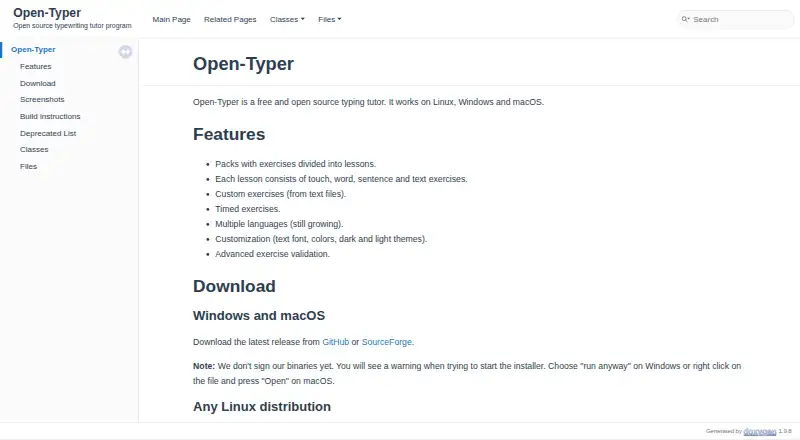
Open-Typer is a free, open-source typing tutor for learning touch typing on Windows, Linux, and macOS. Its exercise packs organize practice into lessons using touch, word, sentence, and text exercises. Learners can also use timed exercises, practice with text built from error words, or try reverse text. Users can create their own exercises from text files, and automatic exercise validation is available for schools. The tutor supports multiple languages, with language support still growing. Text fonts and colors can be customized, and users can choose a dark or light theme. Desktop downloads are available for Windows, macOS, and Linux; Linux options include an AppImage, Snap, and Ubuntu PPA. The project is distributed under the GNU General Public License version 3.0. An online version is listed as beta. The download page says the binaries are not digitally signed, so running an installer may trigger an operating-system warning. Bug reports and feature requests can be sent through GitHub issues.
Good
- Free and open source.
- Lessons cover touch, word, sentence, and text exercises.
- Users can create exercises from text files.
- Offers timed practice and automatic validation.
- Available for Windows, Linux, and macOS.
Watch out
- Online version is listed as beta.
- Binaries are not digitally signed.
- Language support is still growing.
Who it suits
Open-Typer suits learners seeking structured touch-typing lessons and custom text exercises. Its automatic validation may also fit school use.
Verdict
Open-Typer offers several lesson formats, timed practice, and user-created exercises across desktop platforms. Keep the unsigned installers and beta status of the online version in mind.
The facts
Each one read from Open-Typer's own pages, with the date it was checked.
What it does
- Binary signing
- The site says its binaries are not signed and warns that installers may trigger operating-system warnings.checked 4 Oct 2026
- Custom exercises
- Users can create custom exercises from text files.checked 4 Oct 2026
- Customization
- Customization includes colors and dark and light themes; the current site also lists background, paper, and top panel customization.checked 11 Oct 2026
- Custom practice
- Users can create custom exercises from text files.checked 11 Oct 2026
- Downloads
- The site provides downloads for Windows, macOS, and Linux, including a Linux AppImage and Snap installation.checked 4 Oct 2026
- Installer signing
- The installer executable is not digitally signed, according to the download page.checked 11 Oct 2026
- Languages
- Open-Typer is available in multiple languages, and its older feature page says language support is still growing.checked 11 Oct 2026
- Lessons
- Lessons include touch, word, sentence, and text exercises organized into exercise packs.checked 11 Oct 2026
- License
- The project repository identifies the software as distributed under the GNU General Public License version 3.0.checked 11 Oct 2026
- Online version
- The maker's site lists an online version as beta.checked 4 Oct 2026
- Operating systems
- The project says the desktop software works on Windows, Linux, and macOS.checked 11 Oct 2026
- Practice modes
- The site lists timed exercises, text made from error words, and reverse text as practice options.checked 11 Oct 2026
- Practice options
- The tutor offers timed exercises and advanced exercise validation.checked 4 Oct 2026
- Purpose
- Open-Typer is a free, open-source touch-typing tutor.checked 11 Oct 2026
- Support
- The repository directs users to report bugs or request features through GitHub issues.checked 11 Oct 2026
- Validation
- The site says Open-Typer offers automatic exercise validation for schools.checked 11 Oct 2026
- Web version
- The site offers an online beta version of Open-Typer.checked 11 Oct 2026
Where it runs
- Linux installation
- Linux installation options include an AppImage, Snap, and Ubuntu PPA.checked 11 Oct 2026
Alternatives to Open-Typer
- 1
Touch Typer
Free planOpen sourceLinuxmacOSSelf-hostedWindows7.7From $2.39 a month - 2
TypeTastic
Free planAndroidiOSWeb7.4From $680 a year - 3
Avidemux
Free planOpen sourceWebLinuxmacOSWindows7.3Free plan - 4
Typing Instructor
WebmacOSWindows7.3From $29.95 a year - 5
Typesy
AndroidiOSWebmacOS6.9From $72 a year - 6
TypingClub
Free planiOSWeb6.9From $120 a year