OctoPrint
OctoPrint is free, open-source software that provides a web interface for controlling consumer 3D printers.
What OctoPrint is
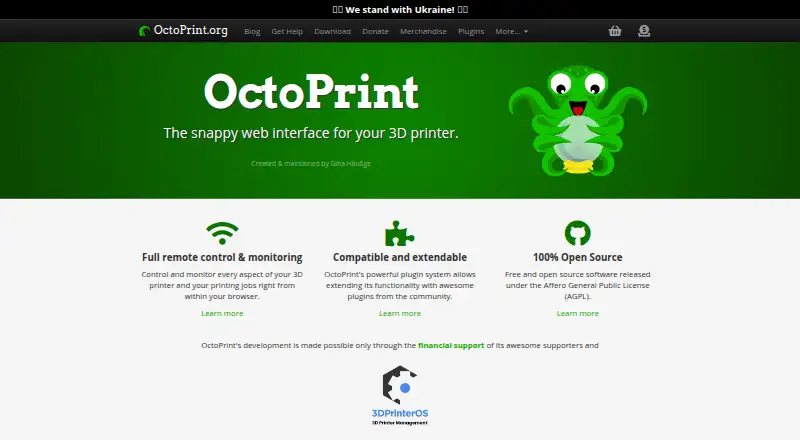
OctoPrint is free, open-source software that provides a web interface for controlling consumer 3D printers. From a browser, users can check print progress and temperatures, move the print head, and start, stop, or pause a job. The interface can show an embedded webcam feed and a visualization of the G-code being printed. OctoPrint also has a plugin system, with its official plugin repository available for installing plugins. Other features listed include timelapse recording, STL slicing, built-in access controls, system commands, and event hooks. It works out of the box with most consumer 3D printers. Hosting options include Raspberry Pi, Android phone, Docker, Linux, Windows, and manual Mac installation. For OctoPi, Raspberry Pi 3B, 3B+, 4B, or Zero 2 is recommended; configurations outside that hardware guidance are not officially supported. Anonymous access is denied by default, and the documentation advises a VPN or added protection for internet access. The embedded webcam is not controlled by OctoPrint, so its access controls cannot limit access to the webcam URL.
Good
- Free and open-source under the AGPL.
- Monitors print progress and temperatures.
- Can start, stop, or pause print jobs.
- Includes an integrated plugin repository.
Watch out
- Non-recommended OctoPi hardware is not officially supported.
- Access controls cannot restrict the webcam URL.
- Internet access calls for a VPN or added protection.
Who it suits
OctoPrint suits people who want browser-based control and monitoring for a consumer 3D printer. It may also fit users who want to extend the interface through plugins.
Verdict
OctoPrint combines printer controls, monitoring, and plugins in a browser interface. Consider the hardware guidance and webcam access limitation when choosing how to host or expose it.
Plans and prices
From OctoPrint's own pricing page, checked 11 Oct 2026.
| Plan | Price | What it gives you |
|---|---|---|
| OctoPrint | Free | Free and open-source software under the GNU Affero General Public License (AGPL) |
The facts
Each one read from OctoPrint's own pages, with the date it was checked.
What it does
- Additional features
- The site lists timelapse recording, STL slicing, built-in access controls, system commands, and event hooks among OctoPrint’s features.checked 11 Oct 2026
- Extensibility
- OctoPrint has a plugin system, and its official plugin repository is integrated into OctoPrint for plugin installation.checked 11 Oct 2026
- Funding
- The creator says her full-time work on OctoPrint is crowd funded, with recurring and one-time contributions accepted.checked 11 Oct 2026
- Hardware guidance
- For OctoPi, Raspberry Pi 3B, 3B+, 4B, or Zero 2 is recommended; setups outside the recommended hardware are not officially supported.checked 11 Oct 2026
- Hosting options
- The download page lists Raspberry Pi, Android phone, Docker, Linux, Windows, and manual Mac installation options.checked 11 Oct 2026
- Printer compatibility
- The site says OctoPrint is compatible out of the box with most consumer 3D printers.checked 11 Oct 2026
- Printer control
- From a browser, users can monitor print progress and temperatures, move the print head, and start, stop, or pause a print job.checked 11 Oct 2026
- Purpose
- OctoPrint provides a web interface for controlling consumer 3D printers.checked 11 Oct 2026
- Security
- OctoPrint’s access control denies access to anonymous users by default, and its documentation advises using a VPN or additional protection for internet access.checked 11 Oct 2026
- Security reporting
- The security policy asks reporters to disclose vulnerabilities privately and allow at least 90 days for a fix before public disclosure.checked 11 Oct 2026
- Support
- The official support channels are the community forum and Discord; individual one-to-one support may be available through paid consulting.checked 11 Oct 2026
- Webcam access limit
- OctoPrint embeds the webcam feed but does not control it, so its access controls cannot restrict access to the webcam URL.checked 11 Oct 2026
- Webcam and G-code
- The interface can embed a webcam feed and display a visualization of the G-code being printed.checked 11 Oct 2026
The company
- Founded
- 2012checked 19 Oct 2026
- Maker and location
- The legal notice identifies Gina Häußge as responsible for the site’s content and gives an address in Hamburg, Germany.checked 11 Oct 2026
The full review of OctoPrint
OctoPrint is a browser-based control layer for consumer 3D printers, aimed at makers who are comfortable hosting software themselves. It is the strongest fit when you want broad printer compatibility, remote oversight, and extensibility without a software charge.
Overview
OctoPrint puts printer operation in a web interface. You can watch progress and temperatures, move the print head, and start, pause, or stop a job from a browser. An embedded webcam view and a visualization of the active G-code add valuable context during unattended or long prints.
Most consumer 3D printers are supported out of the box, so OctoPrint can add a common control surface without replacing the printer. The important trade-off is responsibility for the host: you select the hardware, install the software, and maintain the environment rather than receiving a managed cloud service.
Key features
- Printer control and monitoring: Browser access to temperatures, progress, head movement, and job controls makes it practical to supervise a printer from another device and intervene when a job needs to pause or stop.
- Webcam and G-code views: A camera feed and live G-code visualization help you see both the physical print and the instructions being executed. OctoPrint embeds the feed but does not control the camera itself, so its access controls cannot restrict the webcam URL.
- Plugin ecosystem: The plugin system, with the official repository integrated into OctoPrint, gives advanced users a straightforward way to extend the installation. That flexibility is a reason to choose OctoPrint over a narrowly defined controller, although extensions also increase the amount you may need to manage.
- Workflow and administration tools: Timelapse recording, STL slicing, built-in access controls, system commands, and event hooks cover more than basic start-and-stop operation. They are useful for repeatable workflows and automation, provided the host and printer are configured appropriately.
- Security controls: Anonymous access is denied by default. For internet exposure, the documentation advises a VPN or additional protection, and the webcam limitation means securing the main interface alone is not sufficient.
Pricing
OctoPrint — free. This is free and open-source software under the GNU Affero General Public License (AGPL), with no free trial because there is no paid trial tier. The software fee is zero, but hosting hardware and its upkeep remain your responsibility.
That model suits hobbyists, classrooms, and workshops that prefer control over their own installation and do not want a recurring application bill. OctoPrint is supported through recurring and one-time contributions to its creator, while individual one-to-one help may be available through paid consulting. There is no separate paid OctoPrint plan with additional seats, quotas, or storage.
Platforms
OctoPrint is available across Android, Linux, macOS, Windows, web access, an API, and self-hosted deployments. Hosting choices listed for download include a Raspberry Pi, Android phone, Docker, Linux, Windows, and a manual Mac installation. For OctoPi, Raspberry Pi 3B, 3B+, 4B, or Zero 2 is recommended; configurations outside that guidance are not officially supported. This breadth helps owners reuse available hardware, but it also makes setup and maintenance part of the product decision.
Who it's for
Choose OctoPrint if you own a compatible consumer printer and want browser control, remote monitoring, camera visibility, and a large extension surface without paying for software. It is particularly well suited to technically confident makers and teams that can operate a Raspberry Pi, container, computer, or phone as a host.
Look elsewhere if you want a fully managed service, a guaranteed supported host outside the recommended OctoPi hardware, or a single security boundary that also protects webcam access. Internet-facing installations need deliberate VPN or additional protection rather than relying on default access controls alone.
Pros and cons
Pros
- Free AGPL software: There is no subscription or trial clock, making long-term use economical when you can provide the host.
- Broad hardware reach: Out-of-the-box compatibility with most consumer printers and several hosting methods lowers the barrier to adding browser control.
- Useful operational visibility: Printer telemetry, G-code visualization, and an embedded webcam feed support active supervision of jobs.
- Extensible by design: The integrated official plugin repository and event hooks allow installations to grow with a maker's workflow.
Cons
- Self-hosting overhead: You must supply and maintain the host, and unsupported hardware falls outside official OctoPi support.
- Webcam security gap: OctoPrint cannot apply its access controls to the camera URL, creating a separate exposure to secure.
- Remote access needs care: Internet use calls for a VPN or additional protection, which adds configuration beyond enabling the web interface.
Alternatives
Polar Cloud is a freemium browser and API service with a free tier limited to one printer, five print jobs per month, seven-day history, 300 MB storage, mesh files, and a 30 MB file limit; choose it when those managed quotas are preferable to self-hosting.
AstroPrint offers a free tier for two printers, one user, and 1 GB of file storage, with a $9.90-per-month Premium plan; it suits users seeking a hosted service with explicit account limits.
PrusaSlicer is free, open-source slicing software; pick it when preparing print files is your priority rather than browser-based printer operation.
SimplyPrint provides a free tier for up to two printers with one user, one location, 15 cloud slices per month, and 12 AI Failure Detection hours per month, plus a free trial; choose it for a quota-based hosted workflow.
UltiMaker Cura is free, open-source desktop slicing software for Linux, macOS, web, and Windows, making it the better choice when slicing is the central task.
Bambu Studio is free slicing software for Linux, macOS, and Windows, with optional networking and SD-card printing without the plugin; choose it for that slicer-focused workflow.
CHITUBOX offers a free Basic slicer and paid Dental plans, including a three-year $499.00 option; it is an alternative for users whose needs center on its slicing tools.
Craftware Pro has a free Standard tier and a $9.99 monthly Premium tier; choose it when you want a slicer with optional paid features.
Verdict
OctoPrint is the right choice for a technically capable maker or team that wants broad consumer-printer support, browser control, monitoring, and plugins at no software cost. Choose it for ownership and flexibility; look elsewhere if self-hosting, host support boundaries, or separate webcam security make a managed alternative more practical.
Alternatives to OctoPrint
- 1
Polar Cloud
Free planAndroidiOSWebAPI8.1From $79 a year - 2
AstroPrint
Free planAndroidiOSWebAPI7.4From $9.90 a month - 3
SimplyPrint
Free planAndroidiOSWebAPI7.3From €254.15 a month - 4

Obico
Free planAndroidiOSWebAPI7.1From $6.99 a month - 5

3DPrinterOS
AndroidiOSWebAPI7.0From $19 a month - 6

CHITUBOX
Free planLinuxmacOSWindows6.9$499 one-time