
MC Seed View
MC Seed View is a free browser-based Minecraft tool for inspecting a world seed before loading a world.
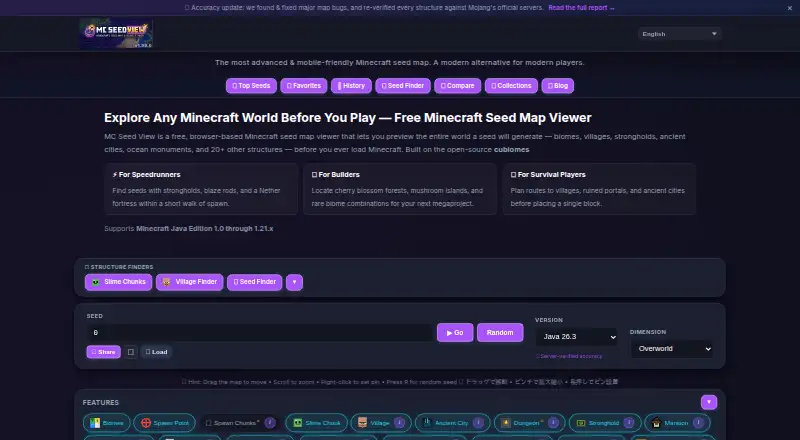
What MC Seed View is
MC Seed View is a free browser-based Minecraft tool for inspecting a world seed before loading a world. Its interactive maps cover the Overworld, Nether, and End, with views ranging from a world overview to chunk-level detail. It can locate more than 20 structure types and show coordinates and teleport commands. Seed search can match criteria and grade results from S to F based on nearby structures, biome diversity, and spawn quality. You can load a level.dat file to identify the seed, Minecraft version, and spawn point. Biome and structure calculations run locally in the browser, and seed values are not sent to the operator's servers. The site says it works offline after its first page load and can be installed as a Progressive Web App. It supports Java and Bedrock editions, though Bedrock biome accuracy is still improving. The map does not predict variable details such as trees, ore veins, and tall grass.
Good
- Free to use without an account.
- Maps cover the Overworld, Nether, and End.
- Finds more than 20 structure types.
- Loads level.dat files to identify seed details.
- Seed values are processed locally in the browser.
Watch out
- Bedrock biome accuracy is still improving.
- Maps do not predict trees, ore veins, or tall grass.
- Technical identifiers are handled by listed third parties.
Who it suits
It suits Minecraft players who want to inspect biomes, find structures, or search for seeds before starting a world. It supports Java and Bedrock editions, with Bedrock biome accuracy still improving.
Verdict
MC Seed View brings map previews, structure lookup, and seed scoring into a browser tool. Keep its Bedrock accuracy caveat and limits on predicting world decorations in mind.
Plans and prices
From MC Seed View's own pricing page, checked 30 Sep 2026.
| Plan | Price | What it gives you |
|---|---|---|
| Free | Free | Free to use · no account required · all features available |
The facts
Each one read from MC Seed View's own pages, with the date it was checked.
What it does
- Accuracy limitation
- The map does not predict decorations such as trees, ore veins, and tall grass, which the site says can vary with chunk generation.checked 30 Sep 2026
- Affiliation
- The site describes itself as an unofficial fan-made tool not affiliated with Mojang AB or Microsoft Corporation.checked 30 Sep 2026
- Integrations and infrastructure
- The site lists Cloudflare Pages and Workers for hosting and edge routing, and Supabase for gallery and feedback storage.checked 30 Sep 2026
- Local processing
- Biome and structure calculations run in the browser using cubiomes compiled to WebAssembly; seed values are not sent to the operator's servers.checked 30 Sep 2026
- Map coverage
- The interactive map covers the Overworld, Nether, and End and can zoom from a world overview to chunk-level detail.checked 30 Sep 2026
- Minecraft compatibility
- The homepage states support for Java Edition and Bedrock Edition, while noting Bedrock biome accuracy is still improving.checked 30 Sep 2026
- Mobile support
- The site supports smartphone and tablet browsers with touch gestures and can be installed as a Progressive Web App.checked 30 Sep 2026
- Offline use
- The site says it works offline after the first page load through Progressive Web App service-worker caching.checked 30 Sep 2026
- Privacy and third parties
- Seeds are processed locally, but the privacy policy says Google AdSense, Google Analytics, Cloudflare, and Supabase process technical identifiers when visitors use the site.checked 30 Sep 2026
- Purpose
- MC Seed View is a browser-based Minecraft seed map viewer for previewing biomes and structures before loading a world.checked 30 Sep 2026
- Seed finder and scoring
- The tool searches for seeds matching criteria and grades seeds from S to F based on nearby structures, biome diversity, and spawn quality.checked 30 Sep 2026
- Structure finder
- It locates more than 20 structure types and displays coordinates and ready-to-use teleport commands.checked 30 Sep 2026
- Support
- The contact page says contact-form submissions are reviewed within 2–3 business days and also offers in-app feedback and X for brief questions.checked 30 Sep 2026
- World file import
- Users can load a level.dat file to detect the world's seed, Minecraft version, and spawn point.checked 30 Sep 2026
The company
- Founded
- 2025checked 28 Sep 2026
- Maker
- The About page says MC Seed View is independently developed and maintained by Satoru, a software engineer, and that the project began in 2025.checked 30 Sep 2026
The full review of MC Seed View
Overview
MC Seed View is a free browser tool for mapping Minecraft worlds and finding seeds that meet chosen criteria. It is a strong fit for players who want to inspect several dimensions or compare candidate worlds without creating an account. Its broad map and search tools are useful, but Bedrock biome accuracy is still improving and it does not model world decorations.
Key features
The map covers the Overworld, Nether, and End, and zooms from a world overview to chunk-level detail. This makes it practical for both surveying a seed and checking a particular location; players looking for detailed terrain analysis will need another tool.
Structure search covers more than 20 types, with coordinates and ready-to-use teleport commands. Seed search matches criteria and grades candidates from S to F using nearby structures, biome diversity, and spawn quality. Those tools help narrow a shortlist, though the score is a guide based on those factors rather than a guarantee of an ideal world.
For an existing world, importing a level.dat file can identify its seed, Minecraft version, and spawn point. Biome and structure calculations run in the browser using cubiomes compiled to WebAssembly, so seed values are not sent to the operator's servers. That protects seed values from server-side processing, but does not mean the site handles no visitor data: Google AdSense, Google Analytics, Cloudflare, and Supabase process technical identifiers.
The site says it can work offline after its first load through Progressive Web App caching, and it supports touch gestures on phones and tablets. It can also be installed as a Progressive Web App. Java and Bedrock are supported, but Bedrock biome accuracy is still being improved. The map does not predict decorations such as trees, ore veins, or tall grass, which can vary with chunk generation.
Pricing
MC Seed View is free to use at no cost, with all features available and no account required. There is no free trial because access is free; there are no paid tiers, seat limits, or quotas to weigh against the free plan.
Platforms
It runs in a browser on Android, iOS, and the web, and supports smartphone and tablet browsers. PWA installation and offline use after the first page load make it more convenient away from a desktop, though offline use depends on having loaded the page first.
Who it's for
Choose MC Seed View if you want a no-cost way to preview biomes, find structures, search for seeds, or inspect a saved world's basic seed and spawn information. Its cross-dimension maps and browser-based processing are useful for players who value broad coverage and keeping seed values off the operator's servers. It is a weaker fit if you rely on precise Bedrock biome results or need predicted decorations or terrain analysis.
Pros and cons
- Pros: Overworld, Nether, and End maps reach chunk-level detail, making one free tool useful across dimensions.
- Pros: Structure coordinates, teleport commands, and criteria-based seed grades support both world planning and exploration.
- Pros: All features are free without an account, and seed values are processed locally rather than sent to the operator's servers.
- Cons: Bedrock biome accuracy is still improving, so Java players have the clearer case for relying on biome previews.
- Cons: Trees, ore veins, tall grass, and other decorations are not predicted, limiting how closely the map represents a generated world.
- Cons: Technical identifiers are processed by Google AdSense, Google Analytics, Cloudflare, and Supabase, despite local seed processing.
Alternatives
For a broader set of options, browse Minecraft Seed Finders. Consider Seed Map Pro if you use iOS or macOS and want saved seeds and custom pins; its free tier caps these at three seeds and ten pins per map.
SeedLander is a web alternative with a 14-day trial for its per-world Premium World plan, which adds unlimited markers and portal pairs. Choose ChunkSeeds Seed Finder if Java reverse search is the priority: its free standard scan covers up to 350,000 seeds per pass.
Ezseed Minecraft Seed Finder is another free browser option, with stated support for Java 1.20–26.2 and Bedrock up to 26.30. MC Seed Map Seed Finder is also a free web-based choice for Java seed search.
For desktop users, wWaypoints is a free option for Linux, macOS, and Windows. Cubiomes Viewer is a free, open-source alternative for Linux and Windows. Chunkbase Seed Finder is another free web option.
Verdict
MC Seed View is the right choice for players who want free, account-free seed search and maps spanning all three Minecraft dimensions, with seed calculations kept in the browser. Look elsewhere if Bedrock biome accuracy, decoration prediction, or terrain analysis is central to your decision.
Getting started
- Open https://mcseedview.com/ in an Android, iOS, or web browser.
- Use the map or seed finder to explore worlds and search by criteria.
- Load a `level.dat` file to identify its seed, Minecraft version, and spawn point.
- Install it as a Progressive Web App if you want; the site says offline use works after the first page load.
Limits worth knowing
The free plan includes all features and requires no account. Bedrock biome accuracy is still improving, and the map does not predict trees, ore veins, or tall grass.
Questions
How much does MC Seed View cost?
It is free to use, and no account is needed.
Which platforms does it support?
It runs in a browser on Android, iOS, and web, with touch support for smartphones and tablets.
Does it support Java and Bedrock editions?
Yes. The site states support for both, though Bedrock biome accuracy is still improving.
Can I use it offline?
The site says it works offline after the first page load through Progressive Web App caching.
Who makes MC Seed View?
It is independently developed and maintained by software engineer Satoru. The project began in 2025 and is an unofficial fan-made tool unaffiliated with Mojang AB or Microsoft Corporation.
Are seed values sent to the operator's servers?
No. Seed values and biome and structure calculations are processed locally in the browser. The privacy policy says Google AdSense, Google Analytics, Cloudflare, and Supabase process technical identifiers when visitors use the site.
Alternatives to MC Seed View
- 1
 9.7Free plan
 - 2
Godlike.Host
Free planWebWindows7.5Free plan - 3

SeedLander
Free planWeb7.5From £1.99 a month - 4

SeedFinder
Free planOpen sourceWebAPILinuxSelf-hosted7.3Free plan - 5

Minecraft Search Seed Finder
Free planWeb6.7From $19.99 a year - 6

Seed Map Pro
Free planiOSmacOS6.7From $24.99 a year