Mavis Beacon Teaches Typing
Mavis Beacon Teaches Typing provides browser-based typing instruction for children, teens, adults, and classrooms.
What Mavis Beacon Teaches Typing is
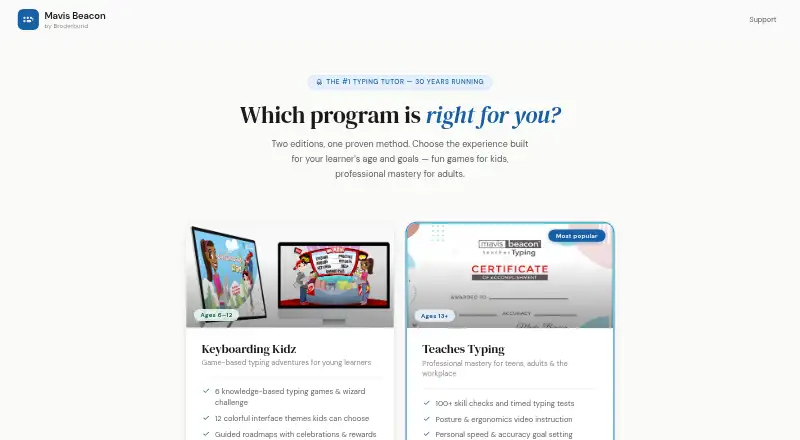
Mavis Beacon Teaches Typing provides browser-based typing instruction for children, teens, adults, and classrooms. Keyboarding Kidz targets ages 6–12 with six typing games, 12 interface themes, guided roadmaps, and a parent and teacher progress dashboard. The Teaches Typing edition is for learners ages 13 and up, offering more than 100 skill checks, timed tests, 16 arcade-style games, and posture and ergonomics instruction. After eight hours of structured practice, it awards a completion certificate downloadable as a PDF and shareable to LinkedIn. Classroom Edition includes class rosters, join codes, reports on speed, accuracy, and lesson level, plus grade-band goals. Students sign in with a class code and PIN without an email address. Editions run in modern browsers on Windows, Mac, and Chromebook without downloads or plugins. Individual, family, and classroom plans are available, including $29.99 per year for one adult learner and $499.99 per year per class of 30 students.
Good
- Separate editions for children, adults, and classrooms
- Six games and guided roadmaps for ages 6–12
- Over 100 adult skill checks and timed tests
- Downloadable completion certificate
- No download or plugin required
Watch out
- No free plan
- Classroom Edition costs $499.99 a year
- Browser-based access only
- Adult edition starts at age 13
Who it suits
It suits children, individual learners, families, teachers, and schools seeking structured typing practice in a browser. Classroom tools are designed for roster management, progress reporting, and class goals.
Verdict
Mavis Beacon covers typing instruction from early learners through classroom programs, with games, assessments, and reporting suited to each audience. Its browser delivery simplifies access, while paid annual plans and age-specific editions shape the choice.
Plans and prices
From Mavis Beacon Teaches Typing's own pricing page, checked 11 Oct 2026.
| Plan | Price | What it gives you |
|---|---|---|
| Keyboarding Kidz — single child | $19.99 a year | 1 child · ages 6–12 · $19.99/yr single child |
| Teaches Typing renewal | $19.99 a year | Existing license · Extend existing license · 12 months |
| Teaches Typing — Single User | $29.99 a year | 1 learner · ages 13+ · 12-month access |
| Keyboarding Kidz — family | $39.99 a year | Family plan · $39.99/yr family |
| Teaches Typing — Family | $49.99 a year | Up to 3 learners · 12-month access |
| Classroom Edition | $499.99 a year | 30 students per class · school and district plans by quote · $499.99/yr per class of 30 students |
The facts
Each one read from Mavis Beacon Teaches Typing's own pages, with the date it was checked.
What it does
- Adult edition
- Teaches Typing is for learners ages 13 and up and includes 100+ skill checks, timed tests, 16 arcade-style games, and posture and ergonomics instruction.checked 11 Oct 2026
- Business and education licensing
- Volume licensing for businesses, government agencies and educational institutions is available with centralized reporting and user management; pricing is by contacting sales.checked 11 Oct 2026
- Certificate
- Teaches Typing awards a completion certificate after eight hours of structured practice, and the certificate can be downloaded as a PDF and shared to LinkedIn.checked 11 Oct 2026
- Children's edition
- Keyboarding Kidz is designed for ages 6–12 and includes six typing games, 12 interface themes, guided roadmaps, and a parent and teacher progress dashboard.checked 11 Oct 2026
- Classroom features
- Classroom Edition provides class rosters, join codes, reports on speed, accuracy and lesson level, and grade-band typing goals.checked 11 Oct 2026
- Integrations
- The Teaches Typing completion certificate can be shared directly to LinkedIn.checked 11 Oct 2026
- Product
- Mavis Beacon offers browser-based typing instruction in editions for children, teens and adults, and classrooms.checked 11 Oct 2026
- Renewal and expiry
- The site states that licenses have a 14-day grace period after expiry and that reminder emails are sent 30 and seven days before expiry.checked 11 Oct 2026
- Security and guarantee
- The Teaches Typing purchase page states that checkout uses 256-bit SSL and offers a 30-day money-back guarantee.checked 11 Oct 2026
- Student access
- Classroom Edition students sign in with a class code and PIN, so they do not need an email address.checked 11 Oct 2026
- Support
- The site links families and students to help and support pages and teachers to a Classroom Edition teacher guide.checked 11 Oct 2026
Where it runs
- Browser and devices
- The editions run in a modern browser on Windows, Mac and Chromebook, with no download or plugin installation required.checked 11 Oct 2026
Alternatives to Mavis Beacon Teaches Typing
- 1
Touch Typer
Free planOpen sourceLinuxmacOSSelf-hostedWindows7.7From $2.39 a month - 2
TypeTastic
Free planAndroidiOSWeb7.4From $680 a year - 3
Avidemux
Free planOpen sourceWebLinuxmacOSWindows7.3Free plan - 4
Typing Instructor
WebmacOSWindows7.3From $29.95 a year - 5
Typesy
AndroidiOSWebmacOS6.9From $72 a year - 6
TypingClub
Free planiOSWeb6.9From $120 a year