manypkg
manypkg is a command-line linter for package.json files in Yarn, npm, pnpm, Bun, and Lerna monorepos.
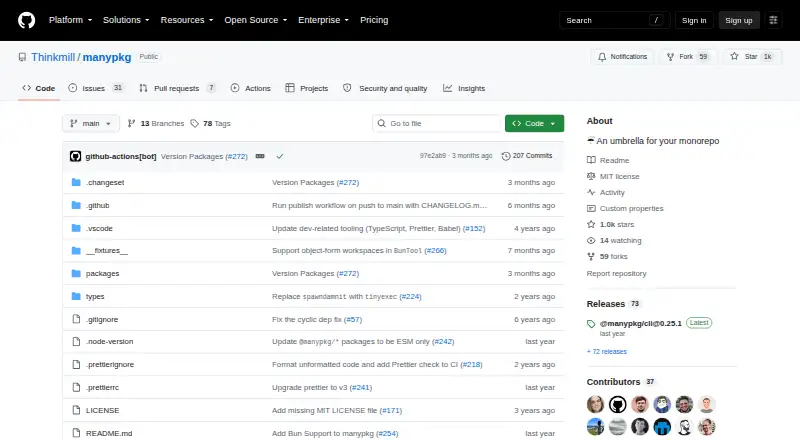
What manypkg is
manypkg is a command-line linter for package.json files in Yarn, npm, pnpm, Bun, and Lerna monorepos. It checks dependency ranges between packages, verifies that internal dependency ranges include the referenced package version, and checks sorting, names, repository fields, and dependency relationships. The `manypkg check` command runs repository checks, logs errors, and exits with a code. When it can correct an issue automatically, `manypkg fix` applies a fix. The CLI can also run scripts for a package selected by partial name or directory, or execute a command across packages. The root package.json supports configuration for ignored rules, the default branch, and workspace protocol behavior; the protocol setting defaults to `allow`. Installation is documented with `yarn add @manypkg/cli`. manypkg is free and MIT-licensed. It supports Linux, macOS, and Windows. Its maker, Thinkmill, is based in Sydney, Australia.
Good
- Checks external dependency ranges across packages.
- Can automatically fix problems it can resolve.
- Supports Yarn, npm, pnpm, Bun, and Lerna monorepos.
- Free under the MIT License.
Watch out
- Does not provide remote caching.
- Does not identify affected builds.
- Does not provide a task graph.
Who it suits
manypkg suits developers maintaining monorepos who want checks for dependency consistency, package metadata, and sorting. It also provides commands for running scripts or other CLI commands across packages.
Verdict
manypkg focuses on package-level checks and commands for monorepos, with configurable rules and automatic fixes for some issues. It is a free CLI option for teams working across supported package managers.
Plans and prices
From manypkg's own pricing page, checked 8 Oct 2026.
| Plan | Price | What it gives you |
|---|---|---|
| Manypkg | Free | MIT-licensed CLI package · Install with yarn or npm |
The facts
Each one read from manypkg's own pages, with the date it was checked.
What it does
- Automatic fixes
- The `manypkg fix` command runs checks and fixes problems that can be fixed automatically.checked 8 Oct 2026
- Check command
- manypkg check runs the repository checks, logs errors and exits with a code.checked 8 Oct 2026
- Checks
- The `manypkg check` command runs the repository checks, logs errors and exits with a code.checked 8 Oct 2026
- Configurable rules
- The root package.json `manypkg` configuration supports ignored rules and a workspace protocol setting, whose default is `allow`.checked 8 Oct 2026
- Configuration
- The root package.json can configure the default branch, ignored rules and whether the workspace: protocol is required or allowed.checked 8 Oct 2026
- Dependency consistency
- Manypkg checks that dependency ranges for external packages match across packages, excluding peerDependencies.checked 8 Oct 2026
- Dependency sorting
- Manypkg checks that dependencies in dependency fields are sorted alphabetically.checked 8 Oct 2026
- Execute across packages
- The `manypkg exec` command executes a CLI command for all packages within a monorepo.checked 8 Oct 2026
- Fix command
- manypkg fix runs the checks and fixes problems that can be fixed.checked 8 Oct 2026
- Install
- The README documents installation with `yarn add @manypkg/cli`.checked 8 Oct 2026
- Internal dependencies
- Manypkg checks that dependency ranges on internal packages include the internal package version.checked 8 Oct 2026
- License
- The project is licensed under the MIT License.checked 8 Oct 2026
- Open source activity
- The Thinkmill organization page lists the manypkg repository as updated Jul 22, 2026.checked 8 Oct 2026
- Other checks
- Checks include peer and dev dependency relationships, root production dependencies, duplicate dependency types, package names, alphabetical sorting and repository fields.checked 8 Oct 2026
- Package manager
- The repository root declares Yarn 1.22.22 as its package manager.checked 8 Oct 2026
- Purpose
- Manypkg is a linter for package.json files in Yarn, npm, pnpm, Bun or Lerna monorepos.checked 8 Oct 2026
- Run packages
- manypkg run executes a script for a package selected by partial package name or directory.checked 8 Oct 2026
- Run package scripts
- The `manypkg run` command executes scripts for packages within a monorepo.checked 8 Oct 2026
- Security
- The opened project pages provided no security or compliance claims.checked 8 Oct 2026
- Support
- The opened project pages provided no dedicated support terms.checked 8 Oct 2026
- Support contact
- The Thinkmill GitHub organization lists [email protected] as its contact email.checked 8 Oct 2026
The company
- Headquarters
- Sydney, Australiachecked 28 Sep 2026
- Maker
- The GitHub organization identifies the maker as Thinkmill and lists Australia as its location.checked 8 Oct 2026
Where it runs
- Supported monorepos
- The README names Yarn, npm, pnpm, Bun and Lerna monorepos as supported.checked 8 Oct 2026
The full review of manypkg
Manypkg is a package.json linter for JavaScript and TypeScript monorepos, with commands for checking, fixing and running work across packages. It suits teams that want package-level consistency checks without adopting a larger build system. Its focused scope is useful, but it does not provide task graphs, affected-build analysis or remote caching.
Overview
Manypkg supports Yarn, npm, pnpm, Bun and Lerna monorepos. Its central job is to catch package configuration problems: inconsistent dependency ranges, incorrect internal dependency versions, unsorted dependencies and other package-level issues. That makes it a practical fit for repositories where package metadata is the pain point, rather than build orchestration.
The command line separates checking from fixing. manypkg check reports repository errors and exits with a code, making it suitable for automated checks. manypkg fix also corrects issues it can handle automatically; problems outside that set still need attention. The project is MIT-licensed, and its README documents installation with Yarn or npm.
Key features
Package consistency checks
Manypkg checks that external dependency ranges match across packages, excluding peer dependencies, and that internal dependency ranges include the version of the referenced package. It also checks alphabetical dependency sorting. These rules help keep package manifests coherent, but do not amount to a general build or dependency-graph system.
Other checks cover peer and development dependency relationships, production dependencies in the root package, duplicate dependency types, package names and repository fields. This breadth makes the linter more useful than a single-purpose version check, while keeping its work centered on package.json files.
Commands and configuration
manypkg run runs a script for a package selected by partial name or directory. manypkg exec executes a CLI command across packages. These commands reduce the need to address each package individually, though they do not offer affected-build selection or remote caching.
Configuration lives in the root package.json. Teams can set a default branch, ignore selected rules and control whether the workspace: protocol is required or allowed; allowing it is the default. This gives maintainers room to adapt checks to repository conventions without making the tool's scope broader.
Pricing
Manypkg is free: its MIT-licensed CLI package costs nothing, with installation through Yarn or npm. There are no paid tiers, trial period or seat and usage caps to weigh against a cheaper plan. The trade-off is scope, not a feature tier: teams needing task graphs, affected builds or remote caching will need another tool alongside it or instead.
Platforms
Manypkg supports Linux, macOS and Windows. Its package-manager coverage includes Yarn, npm, pnpm and Bun; the README also names Lerna monorepos. The repository root declares Yarn 1.22.22 as its package manager.
Who it's for
Choose Manypkg if you maintain a supported monorepo and want automated checks for package names, dependency relationships, versions, sorting and repository metadata, plus commands to run scripts or CLI tools across packages. Its configuration is useful when a team needs to ignore specific rules or enforce a workspace protocol.
Look elsewhere if the main requirement is build orchestration, task graphs, affected-build detection or caching. Manypkg's package-level focus is a strength for teams that want a narrow linter, but it leaves those broader workflows to other software.
Pros and cons
Pros
- Checks a broad set of package.json conventions, including external and internal dependency ranges, package names and dependency relationships.
- Can automatically fix issues it recognizes, while its check command reports errors and exits with a code for use in automated workflows.
- Supports package-level script and CLI execution across monorepos using run and exec commands.
- Free and MIT-licensed, with configurable ignored rules and workspace-protocol behavior.
Cons
- Does not provide task graphs, affected builds or remote caching, limiting its usefulness as a complete monorepo build system.
- Automatic fixes apply only to problems that can be fixed automatically; other reported issues require manual work.
- Dedicated support terms and security or compliance claims are not part of its stated offering.
Alternatives
Browse Monorepo Management Tools for more options in this category. Pick npm instead when public package publishing and registry access are the priority; its free plan covers unlimited public packages, while paid plans are also offered.
Bazel is the better fit for teams seeking an open-source build and test tool rather than package.json linting. For a package manager with no paid plans or stated usage limits, consider Yarn. Nx is an alternative with a free Hobby plan that includes monthly credits, contributor and concurrent CI limits, and community support.
FerrFlow, affected, bento and Bit are also alternatives to compare for monorepo management.
Verdict
Manypkg is a good choice for teams that want a free, focused linter to keep monorepo package manifests consistent and run commands across packages. Its strongest reason to choose it is the combination of targeted checks, some automatic fixes and straightforward configuration. Choose another tool if you need build graphs, affected-build workflows or remote caching.
Getting started
- Open the Manypkg GitHub project.
- Install the CLI with `yarn add @manypkg/cli` or npm.
- Configure ignored rules or workspace protocol behavior in the root `package.json` if needed.
- Run `manypkg check` to check the repository.
- Use `manypkg fix` for automatically fixable problems, or `manypkg run` and `manypkg exec` for package-wide tasks.
Questions
How much does Manypkg cost?
Manypkg is free. The listed plan is free.
Which monorepo tools does it support?
The README names Yarn, npm, pnpm, Bun, and Lerna monorepos.
What does Manypkg check?
It checks dependency consistency, internal dependency ranges, sorting, peer and development dependency relationships, root production dependencies, duplicate dependency types, package names, and repository fields.
Can Manypkg fix issues automatically?
Yes. The `manypkg fix` command runs checks and fixes problems that can be fixed automatically.
Which operating systems does it support?
Linux, macOS, and Windows.
Who makes Manypkg?
Thinkmill, an organization based in Sydney, Australia, makes Manypkg. It is licensed under the MIT License.
Alternatives to manypkg
- 1
npm
Free planLinuxmacOSWindows7.5From $7 a month - 2

Turborepo
Free planOpen sourceAPILinuxmacOSSelf-hosted7.3Free plan - 3

Nx
Free planWebLinuxmacOSSelf-hosted7.2From $29 a month - 4

Bazel
Free planLinuxmacOSWindows6.7Free plan - 5
Bit
Free planAndroidiOSWebAPI6.7Free plan - 6
Lerna
Free planWebSelf-hostedWindows6.7From $29 a month