
Makefun AI
Makefun AI is an AI video generator for creating videos without microphones, cameras, actors, or studios.
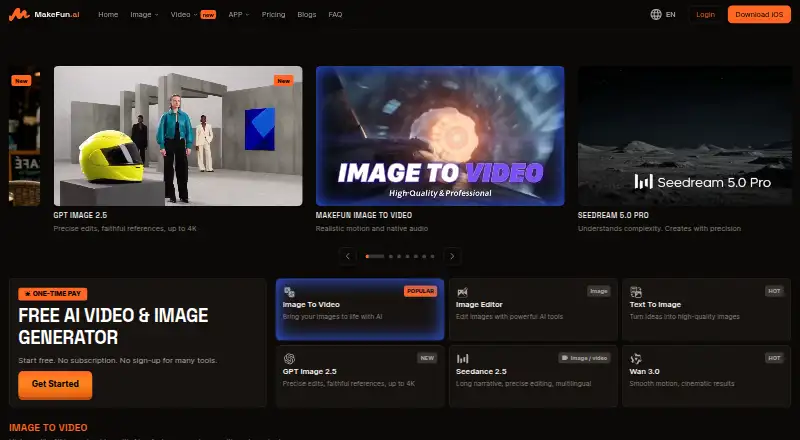
What Makefun AI is
Makefun AI is an AI video generator for creating videos without microphones, cameras, actors, or studios. Its listed workflows include image-to-video, text-to-image, AI avatars, voice cloning, lip sync, face swap, head swap, virtual try-on, and video upscaling. The pricing page lists models and features including Wan, Kling, Veo, Sora, Seedance, GPT Image, Flux, and Nano Banana. Developers can use RESTful APIs, integration guides for avatar, voice, image, and video workflows, and an OpenAPI specification. Documentation includes a generated SKILL.md for Cursor, MCP clients, and other AI agents; an AI Avatar MCP server supports talking-avatar and streaming-avatar functions. Makefun lists web, iOS, API, and self-hosted platforms. The free plan provides 30 bonus credits daily, a watermark, 720P video, and low-priority processing. Pro costs $14.90 USD once and Ultra costs $59.90 USD once. Makefun says it follows GDPR requirements and operates data centers in North America, East Asia, the Middle East, and Europe. Commercial use depends on the plan, workflow, source material, and rights to supplied assets.
Good
- Includes image, video, avatar, and voice workflows.
- RESTful APIs and integration guides are available.
- Offers an AI Avatar MCP server.
- Free plan includes 30 bonus credits daily.
- Pro and Ultra plans support API access.
Watch out
- Free outputs have a watermark.
- Free video is limited to 720P.
- Free processing is low priority.
- Unused subscription credits do not carry over.
Who it suits
It suits creators looking for AI-assisted video, avatar, image, or voice workflows, as well as developers integrating those capabilities through APIs or MCP. Its free tier may help people explore the service, though it carries output and processing limits.
Verdict
Makefun AI spans creative video tools and developer integrations, with a free tier and one-time paid plans. Review its free-plan limits and confirm commercial-use rights for the assets and workflow you plan to use.
Plans and prices
From Makefun AI's own pricing page, checked 7 Oct 2026.
| Plan | Price | What it gives you |
|---|---|---|
| Free | Free | 30 bonus credits/day · watermark · 720P video · low priority AI · 10 custom avatars · 1 voice clone slot · $0 forever |
| Pro | $14.90, paid once | 60 bonus credits/day · 1,800 credits upfront each month · no watermark · up to 2k video · 50 custom avatars · API supported · $14.9 /one-time; also lists $14.9 / 1 month / one-time, $29.9 / 3 month / one-time, and $89.9 / 1 year / one-time |
| Ultra | $59.90, paid once | 90 bonus credits/day · 9,000 credits upfront each month · no watermark · up to 4k video · 200 custom avatars · API supported · highest processing priority · $59.9 /one-time; also lists $59.9 / 1 month / one-time, $119.0 / 3 month / one-time, and $365.0 / 1 year / one-time |
The facts
Each one read from Makefun AI's own pages, with the date it was checked.
What it does
- AI agent support
- The developer documentation offers a machine-readable OpenAPI specification and a generated SKILL.md for Cursor, MCP clients, and other AI agents.checked 7 Oct 2026
- Commercial use
- The FAQ says commercial use depends on the plan, workflow, source material, and rights for supplied assets.checked 7 Oct 2026
- Creative tools
- The site lists image-to-video, text-to-image, AI avatars, voice cloning, lip sync, face swap, head swap, virtual try-on, and video upscaling workflows.checked 7 Oct 2026
- Credit rules
- The pricing page says unused subscription credits do not carry over, while purchased top-up credits do not expire.checked 7 Oct 2026
- Developer integration
- MakeFun provides RESTful APIs and documents integration guides for avatar video, text-to-speech, voice clone, face swap, image generation, video generation, and other workflows.checked 7 Oct 2026
- MCP
- The homepage says developers can use an AI Avatar MCP server to integrate talking-avatar and streaming-avatar functions.checked 7 Oct 2026
- Mobile availability
- The homepage links to an iOS download in the Apple App Store.checked 7 Oct 2026
- Models
- The pricing page lists access to models and features including Wan, Kling, Veo, Sora, Seedance, GPT Image, Flux, and Nano Banana.checked 7 Oct 2026
- Payment security
- The pricing FAQ says payments use SSL/TLS encryption and that MakeFun does not access or store users’ financial information.checked 7 Oct 2026
- Product
- MakeFun describes itself as an AI video generator for creating professional videos without microphones, cameras, actors, or studios.checked 7 Oct 2026
- Security and privacy
- A MakeFun safety article says it operates data centers in North America, East Asia, the Middle East, and Europe and states that it follows GDPR requirements.checked 7 Oct 2026
- Service level
- The pricing FAQ reports a recent API SLA of approximately 99.6% and says its technical team monitors outages 24/7.checked 7 Oct 2026
- Support
- The pricing FAQ says API support is available by email, usually within one business day, and that customers averaging over $500 monthly can get a dedicated WhatsApp line during business hours.checked 7 Oct 2026
- Usage limits
- The free plan includes 30 daily bonus credits, a watermark, 720P video, and low-priority AI processing.checked 7 Oct 2026
The full review of Makefun AI
Makefun AI combines video and image generation with avatar, voice and developer tools. It suits creators working across several AI media workflows and developers who want API access. Its breadth is compelling, but the free tier’s watermark and low-priority processing make it better for exploration than finished work.
Overview
Makefun brings together creative generation, avatar and voice features, and developer integrations in one service. That range is useful when a project moves between images, video and talking avatars; a focused tool may be a better fit when you only need one workflow and want to keep its limits simple.
The free plan gives you 30 bonus credits daily, 10 custom avatars and one voice-clone slot. Its watermark, 720P ceiling and low-priority processing are meaningful constraints for anyone preparing polished or time-sensitive output. Makefun also offers a free trial, alongside one-time paid plans.
Key features
Creative workflows include image-to-video, text-to-image, AI avatars, voice cloning, lip sync, face swap, head swap, virtual try-on and video upscaling. The breadth is a practical advantage for creators who want several kinds of generation in one service, though the credit allowance will shape how much of that menu they can use.
The pricing page names models including Wan, Kling, Veo, Sora, Seedance, GPT Image, Flux and Nano Banana. Multiple model families widen the available creative choices; Pro and Ultra add larger monthly credit allocations, while the free plan’s 30 daily bonus credits are a tighter budget for sustained work.
Developers get RESTful APIs and guides for avatar video, text-to-speech, voice cloning, face swap, image generation and video generation. OpenAPI documentation and a generated SKILL.md are designed to support Cursor, MCP clients and other AI agents. The homepage also offers an AI Avatar MCP server for talking-avatar and streaming-avatar functions, making Makefun more relevant to developers building agent-connected workflows than to creators who only need a standalone editor.
Makefun says it operates data centers in North America, East Asia, the Middle East and Europe and follows GDPR requirements. Its FAQ says payments use SSL/TLS encryption and that Makefun does not access or store users’ financial information. API support is available by email, usually within one business day; customers averaging over $500 monthly can get a dedicated WhatsApp line during business hours. The FAQ reports a recent API SLA of approximately 99.6% and 24/7 outage monitoring.
Pricing
The Free plan costs nothing, billed $0 forever. It includes 30 bonus credits daily, a watermark, 720P video, low-priority AI processing, 10 custom avatars and one voice-clone slot. It is a reasonable way to explore the range of workflows, but the output limits and processing priority make it a poor choice for regular delivery work.
Pro is $14.90, paid once, billed $14.9 /one-time. The other one-time options are $14.9 / 1 month / one-time, $29.9 / 3 month / one-time and $89.9 / 1 year / one-time. Pro includes 60 bonus credits daily, 1,800 credits upfront each month, no watermark, video up to 2K, 50 custom avatars and API support. It suits creators who need cleaner, higher-resolution output and developers who want API access without Ultra’s higher price.
Ultra is $59.90, paid once, billed $59.9 /one-time. Its other one-time options are $59.9 / 1 month / one-time, $119.0 / 3 month / one-time and $365.0 / 1 year / one-time. It raises the allowance to 90 bonus credits daily and 9,000 credits upfront each month, supports video up to 4K and 200 custom avatars, and adds the highest processing priority alongside API support. That makes it the better fit for heavier generation needs where priority and 4K output matter; occasional creators may not need the larger allowance.
Subscription credits do not carry over, so unused monthly credits are lost; purchased top-up credits do not expire. Commercial use depends on the plan, workflow, source material and rights to supplied assets, so confirm those terms for the specific work you intend to publish.
Platforms
Makefun is available on the web and iOS, and offers API access and self-hosted availability. The iOS app is linked from its homepage. API and self-hosted options broaden its appeal to developers and teams with integration needs, while mobile access gives iPhone users a direct route to the service.
Who it's for
Makefun is a strong candidate for creators who need a mix of image, video, avatar and voice workflows, and for developers integrating generation or avatar functions into other products. Pro is the sensible starting point for users who need watermark-free output, 2K video or API access. Ultra is aimed at heavier use, 4K output and higher processing priority. The free tier is most useful for trying workflows before paying.
Look elsewhere if you need a clearly bounded video allowance, a focused avatar-video service, or a specific commercial rights arrangement that Makefun’s plan and workflow terms do not cover.
Pros and cons
- Pros: A wide set of image, video, avatar and voice workflows lets creators handle varied media tasks in one service.
- Pros: REST APIs, integration guides, OpenAPI documentation, agent-oriented files and an AI Avatar MCP server give developers several ways to connect Makefun to their workflows.
- Pros: Pro and Ultra remove the watermark and raise the video ceiling to 2K and 4K, respectively; Ultra also offers the highest processing priority.
- Cons: The free plan’s watermark, 720P output and low priority limit its usefulness for finished or time-sensitive work.
- Cons: Subscription credits expire at the end of their period, which can waste allowance for users whose generation needs vary month to month.
- Cons: Commercial use depends on the plan, workflow and rights to source assets, so users need to check that their intended use is covered.
Alternatives
Browse the AI Avatar Video Software category to compare tools in this area.
Choose HeyGen if its free allowance of up to three videos per month, each no longer than one minute, better matches a small, defined video need. Choose Duix if its AI and human-computer interaction research focus is more relevant to your project.
Vimotion offers a free first video with a 60-second hero video, two social cuts, brand kit onboarding and 1080p MP4 export. AiVATAR offers a free sign-up allocation of 600 credits, one minute of video, 300 MB of storage, five stock avatars, one gesture, standard multilingual voices and unlimited downloads.
Rendora provides a free monthly allowance of 300 credits, approximately four minutes at 540P, with a three-minute video cap and up to three exports. Cuevo AI gives free users 500 points daily and 1080p Full HD video, while its Enterprise plan includes high-volume rendering and API access.
LipSynthesis offers one minute of free video generation; its Pro plan has no credit or minute caps and processes videos one at a time. Synthesia gives Basic users 1,200 credits per month, up to 10 minutes of video monthly and 25 AI-generated video assets.
Verdict
Makefun AI is best for creators who want broad image, video, avatar and voice capabilities, and developers who value API and agent integrations in the same service. Its range and the higher allowances on Pro and Ultra are the main reasons to choose it. The free plan’s watermark, resolution and priority limits, plus credits that expire when subscription periods end, are reasons to look elsewhere if you need predictable finished output or usage that does not fit those terms.
Getting started
- Open Makefun AI on the web or download its iOS app
- Choose the Free, Pro, or Ultra plan
- Create a video from text, images, avatars, or another listed workflow
- Use the API documentation for programmatic integration
- Connect an AI agent through the OpenAPI specification, generated SKILL.md, or Avatar MCP server
Limits worth knowing
The free plan includes 30 daily bonus credits, a watermark, 720P video, low-priority AI processing, 10 custom avatars, and one voice-clone slot. Subscription credits do not carry over; purchased top-up credits do not expire.
Questions
Does Makefun AI have a free plan?
Yes. The Free plan costs nothing and includes 30 bonus credits per day, with a watermark, 720P video, low-priority AI, 10 custom avatars, and one voice-clone slot.
What do Pro and Ultra cost?
Pro costs 14.90 USD once. Ultra costs 59.90 USD once. The pricing page also lists one-time three-month and one-year options for each.
Which platforms are supported?
Makefun lists API, iOS, self-hosted, and web platforms. Its homepage links to an iOS download in the Apple App Store.
Does Makefun provide API access?
Yes. It provides RESTful APIs and guides for avatar, speech, voice-clone, face-swap, image, and video workflows.
Do credits carry over?
Unused subscription credits do not carry over. Purchased top-up credits do not expire.
Can videos be used commercially?
Commercial use depends on the plan, workflow, source material, and rights for supplied assets.
Alternatives to Makefun AI
- 1

Duix
Free planOpen sourceAndroidiOSWebAPI8.5From $29 a month - 2

HeyGen
Free planAndroidiOSWebAPI8.3From $24 a month - 3

Vidnoz AI
Free planAndroidiOSWebAPI8.2From $13.50 a month - 4

JoggAI
Free planAndroidiOSWebAPI8.1From $24 a month - 5
Mango AI
Free planiOSWebWindows7.9From $49.99 a year - 6

AI Studios
Free planWebAPI7.6From $24 a month