live-share.nvim
live-share.nvim is an open-source Neovim plugin for real-time pair programming and collaborative editing.
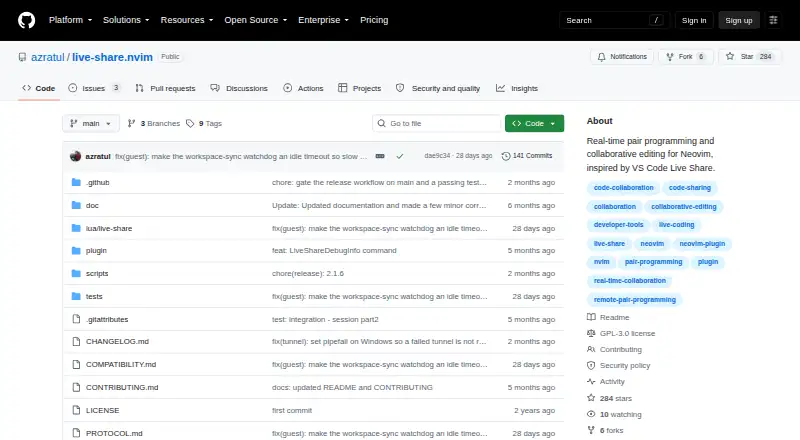
What live-share.nvim is
live-share.nvim is an open-source Neovim plugin for real-time pair programming and collaborative editing. It supports shared editing, remote cursors and selections, and shared terminals. Guests can browse the host's workspace, open files, and follow the active buffer of another participant. Hosts can approve participants with read-write or read-only access. Neovim and VS Code users can collaborate through the compatible open-pair client, in either host or guest roles. The default WebSocket transport uses a tunnel provider; an optional punch transport supports direct UDP connections with relay fallback. Session messages require AES-256-GCM encryption, and OpenSSL is required. Tunnel servers may see connection metadata such as guest IP addresses and timing, but not the encrypted session content or the key from the URL fragment. Users can configure their own SSH or bore server as a tunnel. The plugin requires Neovim 0.9 or later. Its listed tested platforms for WebSocket transport include Linux, OpenBSD, macOS, and Windows with Git Bash; punch transport is tested on Linux. Concurrent edits to one line use host-ordered last-write-wins behavior, and reconnecting guests get a fresh terminal buffer without prior scrollback.
Good
- Shared editing includes remote cursors and selections.
- Hosts can assign read-only or read-write access.
- VS Code can collaborate through open-pair.
- Session messages use mandatory AES-256-GCM encryption.
- Users can configure their own tunnel server.
Watch out
- Requires Neovim 0.9 or later and OpenSSL.
- Concurrent edits on one line can overwrite an edit.
- Reconnecting guests do not receive previous terminal scrollback.
- Punch transport is tested on Linux.
Who it suits
live-share.nvim suits Neovim users who want to pair with collaborators using Neovim or VS Code. It offers host-controlled read-only or read-write access and an option to configure a private tunnel server.
Verdict
live-share.nvim offers collaborative editing and terminal sharing, with access roles and multiple transport options. Note the last-write-wins behavior for same-line edits and the loss of prior terminal scrollback after a guest reconnects.
The facts
Each one read from live-share.nvim's own pages, with the date it was checked.
What it does
- Access roles
- The host can approve guests as read-write or read-only participants.checked 4 Oct 2026
- Audience and license
- The project describes use cases including pair programming, read-only code review, and cross-editor collaboration, and is licensed under GPL-3.0.checked 9 Oct 2026
- Authentication
- There is no authentication beyond possession of the session URL and host approval of a connection.checked 9 Oct 2026
- Collaboration
- It supports shared editing, remote cursors and selections, and shared terminals.checked 4 Oct 2026
- Editing
- Participants can share buffer edits, remote cursors, selections, and workspace files.checked 9 Oct 2026
- Editor integration
- The project documents tested collaboration with the VS Code extension open-pair in both host and guest directions.checked 9 Oct 2026
- Encryption
- Session messages use mandatory AES-256-GCM encryption, and sessions will not start if OpenSSL is unavailable.checked 9 Oct 2026
- Guest roles
- The host approves each guest and assigns read-only or read-write access.checked 9 Oct 2026
- Key sharing
- The session key is placed in the share URL fragment, which the project says is not sent in HTTP requests to the tunnel server.checked 9 Oct 2026
- Known editing limit
- Concurrent edits to the same line are resolved by host arrival order, so one participant's edit may be silently overwritten.checked 9 Oct 2026
- License
- The project is licensed under GPL-3.0.checked 4 Oct 2026
- Privacy
- The maker says tunnel servers can see connection metadata such as guest IP addresses and timing, but cannot read encrypted session content or obtain the key from the URL fragment.checked 4 Oct 2026
- Purpose
- live-share.nvim provides real-time pair programming and collaborative editing for Neovim.checked 9 Oct 2026
- Requirements
- The plugin requires Neovim 0.9 or later and OpenSSL, and its default ws setup has no external plugin dependencies.checked 9 Oct 2026
- Security limits
- The project states that it has no forward secrecy and that tunnel providers can see connection metadata such as guest IP addresses, timing, and traffic volume.checked 9 Oct 2026
- Self-hosting
- The project documents self-hosting a tunnel so session traffic does not pass through a third-party tunnel provider.checked 9 Oct 2026
- Shared terminal
- The host can share a terminal with guests; the feature is marked beta.checked 9 Oct 2026
- Support
- The README directs users to troubleshooting documentation and invites issues and feedback.checked 4 Oct 2026
- Sync limitation
- Concurrent edits to the same line use host-ordered last-write-wins behavior, so one edit can be silently overwritten.checked 4 Oct 2026
- Terminal limitation
- A reconnecting guest starts with a fresh shared terminal buffer and does not receive previous scrollback.checked 4 Oct 2026
- Transport options
- The default WebSocket transport uses a tunnel provider, while optional punch transport supports direct UDP connections and relay fallback.checked 4 Oct 2026
- Tunnel providers
- Built-in tunnel providers include serveo.net, localhost.run, [email protected], and ngrok; custom providers can also be registered.checked 9 Oct 2026
Where it runs
- Platforms
- The default ws transport is described as tested on Linux, OpenBSD, macOS, and Windows using Git Bash; the optional punch P2P transport is tested on Linux.checked 9 Oct 2026
- Platform support
- The README lists Linux, OpenBSD, macOS, and Windows with Git Bash as tested for ws transport; punch transport is tested on Linux.checked 4 Oct 2026
Alternatives to live-share.nvim
- 1

Hopp
Free planOpen sourceWebmacOSSelf-hostedWindows7.9From $15 a month - 2
Drovio
Free planWebLinuxmacOSSelf-hosted7.7From $15 a month - 3

Visual Studio
Free planAPIWindows7.6Free plan - 4

Zed
Free planLinuxmacOSWindows7.6From $10 a month - 5

HackerRank
WebAPImacOSWindows7.4From $165 a month - 6

Coterm
Free planOpen sourceiOSAPImacOSSelf-hosted7.3Free plan