Lithium
Lithium is a free Minecraft mod that optimizes parts of the game to improve performance without changing its mechanics or visuals.
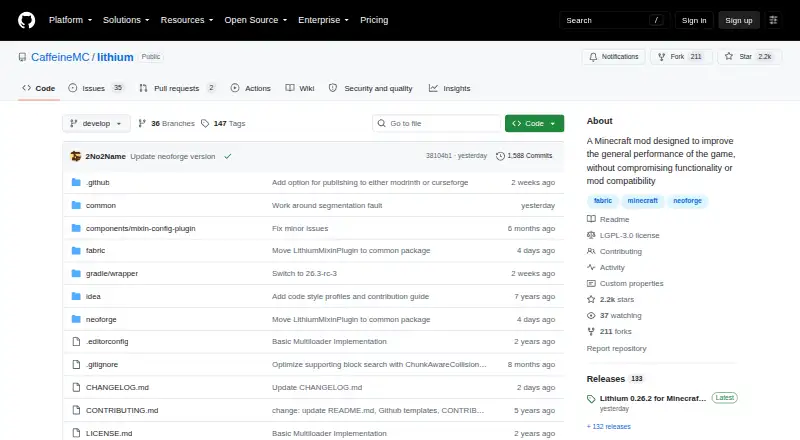
What Lithium is
Lithium is a free Minecraft mod that optimizes parts of the game to improve performance without changing its mechanics or visuals. Its optimizations cover game physics, mob AI, block ticking, world generation, chunk loading, explosions and redstone calculations. It works on both client and server, but does not have to be installed on both sides. Lithium supports Fabric and NeoForge, and stable optimizations are enabled by default after installation without additional configuration. The project says it is compatible with most other mods. Players can turn off individual patches to address bugs or mod conflicts, though changes require restarting the game. Multiplayer server administrators may see improved tick times, while in single-player the mod optimizes Minecraft’s internal server and may free processor capacity for frame rates and responsiveness. Downloads are directed through Modrinth or CurseForge. The project warns that automated bleeding-edge builds can contain unfinished code, bugs or crashes and recommends them only to users comfortable debugging software.
Good
- Optimizes physics, mob AI and world generation
- Works on client and server without both installations
- Stable optimizations are enabled by default
- Supports Fabric and NeoForge
- Individual patches can be disabled for compatibility
Watch out
- Configuration changes require a game restart
- Bleeding-edge builds may contain bugs or crashes
- Bleeding-edge builds are intended for users comfortable debugging
Who it suits
Lithium suits Minecraft players and server administrators seeking performance optimizations without changes to game mechanics or visuals. It also fits users of Fabric or NeoForge who want stable optimizations enabled by default.
Verdict
Lithium adds performance-focused patches across many Minecraft systems while leaving visuals and mechanics unchanged. Stable settings need no extra configuration, while bleeding-edge builds carry the project’s stated risk of unfinished code and crashes.
Plans and prices
From Lithium's own pricing page, checked 29 Sep 2026.
| Plan | Price | What it gives you |
|---|---|---|
| Free | Free | Free and open-source Minecraft mod |
| Lithium | Free | Free and open-source Minecraft mod · Fabric and NeoForge |
The facts
Each one read from Lithium's own pages, with the date it was checked.
What it does
- Client and server
- It works on both client and server, and servers can install it without requiring clients to install it, or vice versa.checked 30 Sep 2026
- Compatibility
- The project describes Lithium as compatible with most other mods and suitable for complex gameplay while preserving vanilla behavior.checked 30 Sep 2026
- Compatibility controls
- A configuration system lets users enable or disable individual patches to address bugs or mod incompatibilities.checked 30 Sep 2026
- Configuration
- No additional configuration is needed after installation, and stable optimizations are enabled by default.checked 29 Sep 2026
- Downloads
- The GitHub page directs users to Modrinth or CurseForge for downloads and also describes manual installation by placing the mod JAR in the game’s mods folder after installing a supported loader.checked 30 Sep 2026
- Game behavior
- The mod aims to improve performance without changing vanilla game mechanics or visuals.checked 30 Sep 2026
- License
- Lithium is licensed under GNU LGPLv3.checked 30 Sep 2026
- Maintainer
- The GitHub README says 2No2Name actively develops Lithium and that JellySquid stepped down from active development in 2020.checked 30 Sep 2026
- Mod loaders
- The project’s GitHub page lists Fabric and NeoForge support; Modrinth also lists Quilt.checked 30 Sep 2026
- Multiplayer use
- The project says multiplayer server administrators can expect improved tick times, allowing hardware to support more loaded entities, chunks, and players.checked 30 Sep 2026
- Optimization areas
- Its optimizations include game physics, mob AI, block ticking, world generation, chunk loading, explosions, and redstone wire calculations.checked 30 Sep 2026
- Purpose
- Lithium is a free, open-source Minecraft mod that optimizes game systems to improve performance.checked 30 Sep 2026
- Related mods
- The CurseForge page says Phosphor and Sodium pair well with Lithium and are fully compatible.checked 30 Sep 2026
- Setup
- The project says no additional configuration is needed after installation, and its Modrinth description says no other mods or Fabric API are required for the described Fabric installation.checked 30 Sep 2026
- Single-player use
- Lithium optimizes Minecraft’s internal game server, which the project says can improve frame rates and responsiveness by freeing processor capacity for other work.checked 30 Sep 2026
- Support
- The project points users to GitHub issues for problems and its Discord community for installation help and technical support.checked 30 Sep 2026
- Tuning
- Users can disable individual optimizations to help resolve mod compatibility issues; configuration changes require a game restart.checked 29 Sep 2026
- Unstable builds
- Automated bleeding-edge builds may contain unfinished code, bugs, or crashes, and the project advises using them only if comfortable debugging software.checked 29 Sep 2026
The full review of Lithium
Overview
Lithium is a free Minecraft mod for players and server operators who want performance improvements without changing how the game looks or behaves. Its broad set of optimizations and support for both Fabric and NeoForge make it a practical first choice for performance tuning; it is not the right pick for anyone seeking visual changes or new mechanics.
It targets work throughout Minecraft, including physics, mob AI, block ticking, world generation, chunk loading, explosions and redstone calculations. The project says it is compatible with most other mods, though individual patches can be disabled to address a conflict. For more options, browse Minecraft Performance Mods.
Key features
- Client and server support: Lithium can run on either side without needing installation on both. In single-player, it optimizes Minecraft’s internal server, which the project says can free processor capacity and improve frame rates and responsiveness. Multiplayer server administrators can expect improved tick times, potentially allowing hardware to handle more loaded entities, chunks and players.
- Broad, focused patches: It reduces work across several systems rather than changing game content. That makes it suited to players who want performance work to stay out of the way, but not to those looking for new visuals or mechanics.
- Mod compatibility controls: The project says Lithium works with most other mods, and users can switch off individual optimizations to help isolate bugs or incompatibilities. Changes take effect after a game restart, so troubleshooting is not immediate.
- Simple setup: Stable optimizations are enabled by default, with no extra configuration required after installation. For the described Fabric installation, the Modrinth description says no other mods or Fabric API are required. Users can get downloads through Modrinth or CurseForge; issues can be reported on GitHub, while installation help and technical support are available through community Discord.
- Optional related mods: The CurseForge page says Phosphor and Sodium pair well with Lithium and are fully compatible. Sodium is not required.
Lithium supports Fabric and NeoForge, is a multi-loader mod, and has dedicated server support. The supported Minecraft versions include 26.x.y, 1.21.11, 1.21.1 and 1.20.1. The project identifies 2No2Name as its active developer; JellySquid stepped down from active development in 2020. Lithium is licensed under GNU LGPLv3.
Pricing
Lithium is free and open source, with no free trial because there is no paid plan to trial. Both listed plans cost nothing: Free is described as a free and open-source Minecraft mod, while Lithium specifies Fabric and NeoForge. Neither plan lists a seat or usage quota. There is no cheaper paid tier that trades away features; the practical choice is simply whether the mod fits your loader and Minecraft version.
Platforms
Lithium is available for Linux, macOS and Windows. Its client-and-server scope means it can serve players as well as multiplayer operators, without requiring both sides to install it.
Who it's for
Choose Lithium if you want to reduce Minecraft’s processing work while preserving its existing mechanics and visuals, especially if you manage a multiplayer server and want better tick times or play single-player and want more processor capacity for other work. Its default stable settings suit users who prefer a straightforward installation; the individual patch controls help when a mod conflict calls for targeted troubleshooting.
Automated bleeding-edge builds are a different proposition: they may include unfinished code, bugs or crashes. The project advises using them only if you are comfortable debugging software. Users who need a dependable setup should stick with stable optimizations rather than treating those builds as the default.
Pros and cons
- Pro: Covers many performance-sensitive game systems, making it useful across more than one narrow bottleneck.
- Pro: Works on client or server independently, giving players and server administrators a choice of where to use it.
- Pro: Stable patches are enabled by default, and individual patches can be disabled when compatibility troubleshooting is needed.
- Con: Configuration changes require a restart, which slows down trial-and-error when narrowing down a conflict.
- Con: Bleeding-edge builds can contain unfinished code, bugs or crashes, so they are unsuitable for users unwilling to debug problems.
- Con: It deliberately leaves visuals and mechanics unchanged, so it will not satisfy players seeking content or presentation changes.
Alternatives
Consider More Culling as another free option if you want a different Minecraft performance mod; the shared facts establish its platforms and free availability, but not its optimization scope.
wWaypoints is also free and supports Linux, macOS and Windows; its creator, wSmoothie, also makes Minecraft mods, videos and tools.
Choose VulkanMod if its Vulkan-based requirement suits your setup: it is free, but requires Fabric and a GPU with Vulkan 1.2 support.
Enhanced Block Entities is another free option, with Linux listed as its platform.
FerriteCore is a free, MIT-licensed Minecraft Java Edition mod; its listed platform is self-hosted.
Krypton is another free Minecraft mod, licensed under LGPL-3.0-only and listed for Linux.
ServerCore is a free alternative listed for self-hosted use.
Alternate Current is a free, MIT-licensed Minecraft mod listed for Linux and self-hosted use.
Verdict
Lithium is the right choice for Minecraft players and server operators who want broad performance-focused changes without altering the game itself. Its default stable patches, client-or-server flexibility and compatibility controls make it a strong fit for routine use. Look elsewhere if you want visual or mechanical changes, or avoid its bleeding-edge builds if you cannot take on debugging risk.
Getting started
- Download Lithium from Modrinth or CurseForge.
- Install it for Fabric or NeoForge on the client or server.
- Keep the default stable optimizations enabled, or adjust individual patches if needed.
- Restart the game after changing configuration settings.
Questions
Does Lithium cost anything?
No. Lithium is free and open source.
Which mod loaders does it support?
Lithium supports Fabric and NeoForge.
Does it need to be installed on both the client and server?
No. It works on the client and server, and does not need installation on both sides.
Does Lithium change Minecraft’s mechanics or visuals?
The project says it does not change game mechanics or visuals.
Where can I download Lithium?
The project directs users to Modrinth or CurseForge.
Are unstable builds suitable for everyone?
The project warns that automated bleeding-edge builds may contain unfinished code, bugs, or crashes, and advises using them only if you are comfortable debugging software.
Alternatives to Lithium
- 1
Krypton
Free planOpen sourceLinuxmacOSSelf-hostedWindows7.2Free plan - 2
VulkanMod
Free planOpen sourceLinuxmacOSWindows7.2Free plan - 3
ImmediatelyFast
Free planOpen sourceAPILinuxmacOSWindows7.1Free plan - 4
FerriteCore
Free planSelf-hosted6.2Free plan - 5
Nvidium
Free planLinux6.1Free plan - 6
Exordium
Free planLinuxmacOSWindows6.0Free plan