Libby
Libby lets library cardholders borrow ebooks, digital audiobooks, and magazines from participating public libraries at no cost.
What Libby is
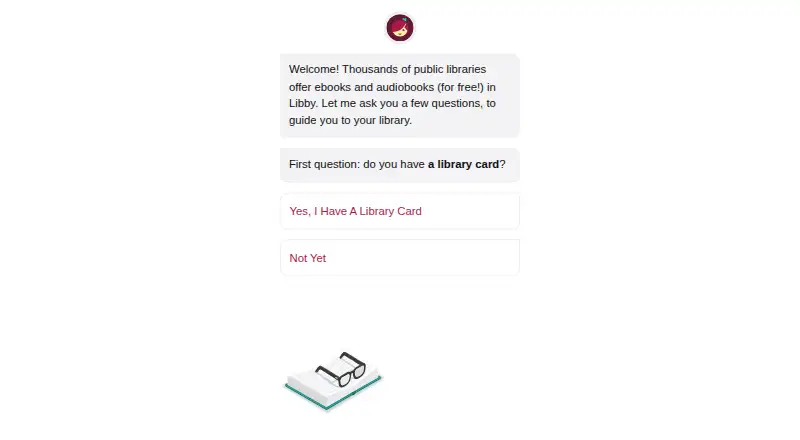
Libby lets library cardholders borrow ebooks, digital audiobooks, and magazines from participating public libraries at no cost. Add a library card to search that library’s collection, browse curated lists and guides, borrow available titles, or place holds. Libby notifies readers when a hold is ready, while each library determines its collection and lending limits. Loans are returned automatically on their due dates, with no late fees. In the mobile app, ebooks and audiobooks can be downloaded over Wi-Fi for offline reading or listening; the website requires an internet connection. Readers can organize titles with tags, and audiobook listening includes a sleep timer with preset or custom durations from 5 to 120 minutes. At U.S. libraries, most ebooks can be read in Libby or sent to Kindle. Libby is free to install, with no subscription costs or in-app purchases. It is available on iOS and Android, plus browsers on Windows, Mac, and Chromebook computers. The service provides digital titles only, not physical library materials.
Good
- No subscription costs, in-app purchases, or late fees.
- Mobile app downloads ebooks and audiobooks for offline use.
- Holds trigger a notification when ready.
- Most U.S. library ebooks can be sent to Kindle.
- Audiobooks include a customizable sleep timer.
Watch out
- A library card is required to borrow titles.
- Each library sets its own collection and lending limits.
- Website use requires an internet connection.
- Does not include physical library materials.
Who it suits
Libby suits library cardholders who want to borrow digital books, audiobooks, and magazines without a subscription. It can work for mobile offline reading or listening, while browser use requires an internet connection.
Verdict
Libby offers free digital borrowing through participating libraries, with mobile downloads, holds, and reading or listening tools. The available titles and borrowing limits depend on the library, and the service covers digital materials only.
Plans and prices
From Libby's own pricing page, checked 30 Sep 2026.
| Plan | Price | What it gives you |
|---|---|---|
| Libby | Free | Free to install · Library digital content is free to borrow with a valid library card · No subscription costs, in-app purchases, or late fees |
The facts
Each one read from Libby's own pages, with the date it was checked.
What it does
- AI recommendations
- Libby’s Inspire Me recommendations use generative AI; when users use a tag, the model receives a random selection of titles from it, without the tag name or description.checked 29 Sep 2026
- Borrowing controls
- Loans are automatically returned on their due dates, and the help page says there are no late fees.checked 30 Sep 2026
- Borrowing limits
- Each library sets its own loan and hold limits; ebooks and audiobooks count toward the loan limit, while magazines and Extras do not.checked 29 Sep 2026
- CarPlay integration
- Libby supports listening to audiobook loans through Apple CarPlay, including playback controls and playback speed from 1x to 2x.checked 30 Sep 2026
- Data practices
- Libby's privacy statement says it does not sell personally identifiable information or use or disclose it for third-party advertising.checked 30 Sep 2026
- Kindle integration
- At U.S. libraries, Libby offers the option to send most ebooks to Kindle or read them in Libby.checked 30 Sep 2026
- Kindle option
- At U.S. libraries, most ebooks can be sent to Kindle or read in Libby.checked 29 Sep 2026
- Library access
- Libby works with public libraries that use OverDrive, and each library chooses which digital titles and lending policies to offer.checked 30 Sep 2026
- Library card required
- To borrow titles, users add a library card; the available collection depends on what each library offers.checked 29 Sep 2026
- Library extras
- Participating libraries may offer Extras that link to additional learning or entertainment resources, including providers such as Kanopy and Craftsy.checked 29 Sep 2026
- Limitations
- Libby provides digital titles only; it does not include physical materials from a library.checked 30 Sep 2026
- Loans and holds
- Users can borrow available titles or place holds, and Libby notifies them when a hold is ready.checked 29 Sep 2026
- Offline reading
- In the mobile app, ebooks and audiobooks are downloaded over Wi-Fi by default for offline use; the website requires an internet connection.checked 29 Sep 2026
- Offline use
- In the mobile app, ebooks and audiobooks can be downloaded for offline use, while libbyapp.com always requires an internet connection.checked 30 Sep 2026
- Organization
- Readers can create tags to organize titles, and smart tags can track borrowed or sampled items and notify readers about certain new library titles.checked 30 Sep 2026
- Privacy
- OverDrive says it does not sell users’ personally identifiable information or use or disclose it for third-party advertising.checked 29 Sep 2026
- Privacy controls
- The privacy statement says Libby does not use third-party cookies and offers an in-app option to delete certain data through Reset Everything.checked 30 Sep 2026
- Reading and listening features
- The app includes a sleep timer with preset or custom durations from 5 to 120 minutes for audiobooks.checked 30 Sep 2026
- Search and browse
- Users can search library collections and browse curated lists, guides, and campaigns.checked 29 Sep 2026
- Security
- Libby's privacy statement says it encrypts data at rest and in transit, has a dedicated security team and server firewall, and commissions independent security audits.checked 30 Sep 2026
- Support
- Users can contact Libby Support through the app's Help & Support menu or use the support form if they cannot reach support in the app.checked 30 Sep 2026
- Supported access
- Libby is available on iOS and Android apps and in a browser on Windows, Mac, and Chromebook computers.checked 29 Sep 2026
The company
- Founded
- 1986checked 28 Sep 2026
- Headquarters
- Cleveland, Ohio, USAchecked 28 Sep 2026
The full review of Libby
Overview
Libby is a digital lending app for readers with a card at a participating public library. It suits people who want free access to that library’s ebooks, audiobooks, and magazines; the trade-off is that each library controls both the catalog and borrowing rules.
Search the collection or browse curated lists, guides, and campaigns, then borrow available titles or place holds on checked-out ones. Libby notifies you when a hold is ready, and loans return automatically on their due dates without late fees. It is a strong way to make a library’s digital collection accessible, but it does not replace borrowing physical books.
Key features
- Library-based catalog: You need to add a library card, and Libby works with public libraries using OverDrive. The collection can vary by library, so this is most useful when your library offers the titles you want.
- Loans and holds: Borrow available items or reserve a title already on loan. The ready notice is useful for keeping track of a queue, though your library determines loan and hold limits.
- Distinct borrowing rules: Ebooks and audiobooks count toward a library’s loan limit; magazines and Extras do not. Participating libraries may also provide Extras linking to learning or entertainment services such as Kanopy and Craftsy.
- Mobile downloads: The iOS and Android apps download ebooks and audiobooks over Wi-Fi by default for offline use. The browser version always needs an internet connection, making it less suitable when reliable connectivity is unavailable.
- Reading and listening tools: Libby supports EPUB and PDF, annotations, and reading sync. Audiobook listeners get a sleep timer with preset or custom durations from 5 to 120 minutes, and Apple CarPlay playback includes controls and speed settings from 1x to 2x.
- Organization: Tags help sort titles; smart tags can track borrowed or sampled items and notify you about certain new library titles.
- Kindle option: At U.S. libraries, most ebooks can be sent to Kindle or read in Libby, giving Kindle owners a choice of reading destination.
- Privacy and security: Libby says it does not sell personally identifiable information or use or disclose it for third-party advertising. It says it does not use third-party cookies and offers Reset Everything to delete certain data. OverDrive says data is encrypted at rest and in transit, supported by a dedicated security team and independent security audits.
- AI recommendations: Inspire Me uses generative AI. When you use a tag, the model receives a random selection of its titles, but not the tag name or description.
Pricing
Libby costs nothing. The free plan is free to install, and borrowing library digital content requires a valid library card. There are no subscription costs, in-app purchases, or late fees; there is no free trial because access is already free. This fits readers who can use a participating library and want to borrow without a subscription. The principal limit is not a paid tier but the library’s own collection and loan and hold caps.
Platforms
Libby is available on iOS 10+ and Android 7.1+ apps, and in a browser on Windows, Mac, and Chromebook computers. Mobile apps can download ebooks and audiobooks for offline reading or listening; libbyapp.com requires an internet connection. At U.S. libraries, most ebooks can also be sent to Kindle.
Who it's for
Choose Libby if you have a card at a participating library and want library-selected digital books, audiobooks, or magazines without borrowing fees. It is especially useful for mobile readers and audiobook listeners who value offline downloads, automatic returns, and CarPlay support. Look elsewhere if you need physical library materials, or if your library’s digital catalog and borrowing limits do not suit your reading habits.
Pros and cons
- Pro: Digital borrowing has no subscription cost, in-app purchases, or late fees, provided you have a valid library card.
- Pro: Mobile downloads make ebooks and audiobooks usable offline, while holds and ready notifications help manage titles that are already checked out.
- Pro: U.S. Kindle delivery, reading sync, annotations, audiobook sleep timers, and CarPlay support serve a range of reading and listening routines.
- Con: Catalogs and loan and hold limits vary by library, so access depends on what your library chooses to provide.
- Con: The web version requires internet access, and Libby covers digital materials only.
Alternatives
Ebook Reader Software is the broader category to explore when you want to compare reading apps.
- Readest is worth considering if open-source software or Linux support matters; it also offers a Plus plan at $4.99 a month with 5 GB cloud sync storage and 100K AI transl.
- Adobe Digital Editions is another free ebook-reading option for Android, iOS, Mac, or Windows.
- Thorium Reader is a free alternative for iOS, Linux, Mac, or Windows.
- eBoox offers a free, ad-free option on Android, iOS, and the web.
- ReadEra has a free, ad-free plan without registration on Android, iOS, and Mac; its one-time 14.99 USD Premium plan adds Google Drive sync, background TTS, and quotes and more.
- PocketBook Reader is a free reader app for Android and iOS, with in-app purchases indicated by app stores.
- DinoReader is a free Android ebook-reading app.
- Google Play Books Auto-narrated Audiobooks is a web option for publishers who need to create, publish, and download audiobooks from an EPUB offered on Google Play; the limited-time creation offer requires the publisher to own the rights.
Verdict
Libby is the right choice for library cardholders who want no-cost digital borrowing, particularly on mobile or through Kindle at U.S. libraries. Its biggest advantage is free access backed by familiar library lending; choose another reader if you need a broader source of books, physical materials, or dependable offline access in a browser.
Getting started
- Install the Libby app on an iOS or Android device, or open libbyapp.com in a browser on Windows, Mac, or Chromebook.
- Add a library card to access the library’s digital collection.
- Search or browse for titles, then borrow available items or place holds.
- Download ebooks or audiobooks in the mobile app for offline use, or read and listen online.
Limits worth knowing
A valid library card is required, and each library sets its own collection, loan limits, and hold limits. Ebooks and audiobooks count toward the loan limit, while magazines and Extras do not.
Questions
How much does Libby cost?
Libby is free to install, and library digital content is free to borrow with a valid library card. There are no subscription costs or in-app purchases.
Do I need a library card?
Yes. Add a library card to borrow titles. Libby works with public libraries that use OverDrive.
Which devices support Libby?
Libby has apps for iOS 10+ and Android 7.1+. Windows, Mac, and Chromebook users can access it in a web browser.
Can I use Libby offline?
Ebooks and audiobooks can be downloaded for offline use in the mobile app. The website always requires an internet connection.
Can I read Libby books on Kindle?
At U.S. libraries, most ebooks can be sent to Kindle or read in Libby.
Does Libby have late fees?
No. Loans are automatically returned on their due dates, and there are no late fees.
Alternatives to Libby
- 1
Librera Reader
Free planOpen sourceAndroidiOSWebExtension8.5$5.99 one-time - 2

Readest
Free planOpen sourceAndroidiOSWebLinux8.4From $4.99 a month - 3
BookFusion
Free planAndroidiOSWebAPI8.0From $2.99 a month - 4

FBReader
Free planAndroidiOSLinuxmacOS7.6$14.99 one-time - 5
KyBook 3
Free planiOSmacOS7.5From $14.99 a year - 6
ReadEra
Free planAndroidiOSmacOS7.2$14.99 one-time