LaneDraws
LaneDraws offers digital brushes for Photoshop and Procreate, reference materials, and instructional content through Patreon.
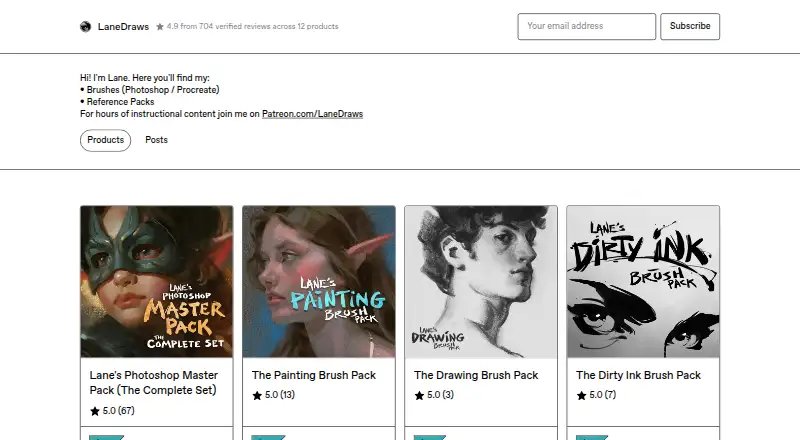
What LaneDraws is
LaneDraws offers digital brushes for Photoshop and Procreate, reference materials, and instructional content through Patreon. Its Photoshop Master Pack combines three packs for painting, illustration, concept art, drawing, and inking. It lists 350+ painting and illustration brushes, 120+ dry media drawing brushes, 120+ inking brushes, and 30+ smudge tools and erasers. The Photoshop packs require Photoshop CC and a stylus with pressure and tilt sensitivity; the Master Pack allows personal and commercial use.
For Procreate, the Charcoal Master Pack contains 44 brushes and tools, while the Pastel Pro Pack includes 48 brushes and tools, 35 natural paper textures, and demonstration videos. The Skulls and Bones reference pack provides 1,850+ images and a 40-minute skull painting demonstration with audio. A free Anatomy of Light Chart is available as a high-resolution JPG. Downloads support ABR and Brushset file formats.
Good
- Photoshop Master Pack lists 600+ brushes and tools.
- Procreate packs include charcoal and pastel brushes.
- Skulls and Bones includes 1,850+ reference images.
- Commercial use is allowed for the Master Pack.
- Free Anatomy of Light Chart download is available.
Watch out
- Photoshop packs require Photoshop CC.
- Photoshop packs require a pressure- and tilt-sensitive stylus.
Who it suits
LaneDraws suits digital artists looking for brushes and reference materials for Photoshop or Procreate. Photoshop pack buyers need Photoshop CC and a pressure- and tilt-sensitive stylus.
Verdict
LaneDraws offers brush collections for both Photoshop and Procreate, plus reference material and instruction. Review the app and stylus requirements before choosing a pack.
Plans and prices
From LaneDraws's own pricing page, checked 2 Oct 2026.
| Plan | Price | What it gives you |
|---|---|---|
| Anatomy of Light Chart | Free | High-resolution JPG image · 4.38 MB |
| Dirty Ink Brush Pack | $18, paid once | 120+ inking brushes · Photoshop CC · pressure- and tilt-sensitive stylus required |
| The Charcoal Master Pack | $22, paid once | 44 brushes and tools · Procreate 5+ |
| The Painting Brush Pack | $22, paid once | 350+ painting and illustration brushes · 40 paper and canvas surfaces · 30 overlay textures · Photoshop CC |
| The Pastel Pro Pack | $24, paid once | 48 brushes and tools · 35 natural paper textures · Procreate 5+ |
| Lane's Photoshop Master Pack | $44, paid once | 600+ brushes and tools · 40+ paper and canvas surfaces · 30 overlay textures · Photoshop CC |
The facts
Each one read from LaneDraws's own pages, with the date it was checked.
What it does
- Coaching format
- A coaching session provides a recorded video of feedback averaging 30–50 minutes, based on submitted artwork and questions.checked 2 Oct 2026
- Commercial use
- The Master Pack page says personal and commercial use is allowed and encouraged.checked 2 Oct 2026
- Photoshop brush contents
- The Master Pack lists 350+ painting and illustration brushes, 120+ dry media drawing brushes, 120+ inking brushes, and 30+ smudge tools and erasers.checked 2 Oct 2026
- Photoshop master pack
- The Photoshop Master Pack combines three Photoshop packs and includes tools for painting, illustration, concept art, drawing, and inking.checked 2 Oct 2026
- Photoshop requirements
- The Photoshop brush packs require Photoshop CC and a stylus with pressure and tilt sensitivity.checked 2 Oct 2026
- Procreate charcoal pack
- The Charcoal Master Pack has 44 brushes and tools, including charcoal pencils, vine, willow, conté, charcoal dust, compressed charcoal sticks, smudge tools, and erasers.checked 2 Oct 2026
- Procreate pastel pack
- The Pastel Pro Pack includes 48 brushes and tools, 35 natural paper textures, a narrated eye demo video, and extra time-lapse videos and high-resolution images.checked 2 Oct 2026
- Reference materials
- The Skulls and Bones reference pack includes 1,850+ reference images and a 40-minute skull painting demonstration video with audio.checked 2 Oct 2026
- Support
- The coaching page says buyers can email the maker after purchase and should expect a response within a few days.checked 2 Oct 2026
- Updates
- The Charcoal Master Pack and Pastel Pro Pack pages state that all future updates are included.checked 2 Oct 2026
- What it offers
- LaneDraws offers brushes for Photoshop and Procreate, reference packs, and instructional content through Patreon.checked 2 Oct 2026
Money
- Free resource
- The Anatomy of Light Chart is a simple diagram labeling and defining essential components of light on a sphere, and its page offers a free download.checked 2 Oct 2026
The full review of LaneDraws
Overview
LaneDraws is a collection of digital brushes, reference packs and art instruction for Photoshop and Procreate. It suits artists who want purpose-built tools for painting, drawing or inking, especially those who also value reference material. Its strongest case is the breadth of its Photoshop Master Pack and focused Procreate sets; the app and stylus requirements make compatibility worth checking before buying.
Key features
Lane’s Photoshop Master Pack combines three packs, with more than 350 painting and illustration brushes, more than 120 dry-media drawing brushes, more than 120 inking brushes, and over 30 smudge tools and erasers. It also includes 40-plus paper and canvas surfaces and 30 overlay textures. That range makes it the broadest single purchase for Photoshop artists in this lineup, but it requires Photoshop CC and a stylus with pressure and tilt sensitivity.
The Procreate options are more specialized. The Charcoal Master Pack has 44 brushes and tools for materials including vine, willow and conté charcoal, plus dust, compressed sticks, smudges and erasers. The Pastel Pro Pack includes 48 brushes and tools, 35 natural paper textures, a narrated eye demonstration and extra time-lapse videos and high-resolution images. Both packs include future updates, a useful advantage for buyers who expect the collections to evolve.
Beyond brushes, the Skulls and Bones pack supplies more than 1,850 reference images and a 40-minute skull-painting demonstration with audio. A free Anatomy of Light Chart is a simpler resource: a diagram labeling and defining the essential components of light on a sphere. Buyers can also email the maker after purchase; responses should be expected within a few days. Coaching consists of recorded feedback averaging 30–50 minutes, based on submitted artwork and questions.
Pricing
LaneDraws sells its paid packs as one-time purchases, rather than subscriptions. The free Anatomy of Light Chart is a low-commitment starting point, but it is a single high-resolution JPG, not a brush collection.
- Dirty Ink Brush Pack — $18, paid once: More than 120 inking brushes for Photoshop CC. It is the lower-cost choice for Photoshop users focused on inking; it still requires a pressure- and tilt-sensitive stylus.
- The Painting Brush Pack — $22, paid once: More than 350 painting and illustration brushes, 40 paper and canvas surfaces and 30 overlay textures for Photoshop CC. Choose it for painting without paying for the Master Pack’s additional drawing, inking and smudge tools.
- The Charcoal Master Pack — $22, paid once: 44 brushes and tools for Procreate 5+. Its focused material range suits charcoal work, but it is not a broad multi-medium set.
- The Pastel Pro Pack — $24, paid once: 48 brushes and tools, 35 natural paper textures and accompanying demonstrations and imagery for Procreate 5+. It costs slightly more than the charcoal pack and adds textures and learning material for pastel-focused artists.
- Lane’s Photoshop Master Pack — $44, paid once: More than 600 brushes and tools, 40-plus paper and canvas surfaces and 30 overlay textures for Photoshop CC. It is the strongest fit for Photoshop artists who want painting, drawing and inking tools together; it is unnecessary if only one discipline matters.
LaneDraws states that commercial use is allowed and encouraged for the Master Pack, and its commercial license scope supports buyers seeking commercial-use brushes. The listed prices are one-time purchases; there is no recurring term to weigh against the upfront cost.
Platforms
LaneDraws is presented across iOS, macOS, web and Windows, but its brush packs target specific apps: Adobe Photoshop and Procreate. Photoshop packs require Photoshop CC, while the Charcoal and Pastel Pro packs require Procreate 5 or later. The Photoshop packs also require a stylus with pressure and tilt sensitivity. Brush files use ABR and Brushset formats and are delivered as downloads. Check the app and device combination before purchasing; a platform listing alone does not make every pack compatible with every setup.
Who it's for
Choose LaneDraws if you already use Photoshop or Procreate and want brushes tailored to a particular medium, or if reference images and instructional material are part of your art workflow. Photoshop artists gain the most from the Master Pack when they need several disciplines in one collection. Procreate artists are better served by the charcoal or pastel set that matches their work. It is a weaker fit for anyone seeking a general-purpose drawing application, or for Photoshop users without the required CC version and pressure- and tilt-sensitive stylus.
Pros and cons
- Pro: The Photoshop Master Pack spans painting, dry-media drawing, inking and finishing tools, reducing the need to buy separate LaneDraws collections.
- Pro: The Procreate packs pair medium-specific tools with textures or demonstrations, and both include future updates.
- Pro: Commercial use is allowed and encouraged for the Photoshop Master Pack, making it suitable for artists creating work commercially.
- Con: Photoshop packs depend on Photoshop CC and a stylus with pressure and tilt sensitivity, so they are a poor fit for incompatible setups.
- Con: The Procreate collections are narrowly focused on charcoal or pastel rather than covering multiple art disciplines.
- Con: The free chart is a single diagram, not a way to try the paid brush collections.
Alternatives
Browse Digital Brush Libraries for a category-wide comparison. Consider Brusher instead if starter brush packs and a free tier matter more than LaneDraws’ medium-focused collections; its premium collections unlock through a $4.99 a month plan billed weekly.
Frankentoon Studio is another Procreate-oriented alternative, with a free 10-brush starter pack and a 12.00 USD one-time Sketch Kit. Choose Krita instead if you want free, open-source software rather than paid brush packs; it has no subscriptions or trials.
Bardot Brush offers another selection of Procreate brush sets. For a broad Procreate collection, RetroSupply Co. sells its Complete Collection for 197.00 USD once; it covers current Procreate products, excludes fonts and does not automatically include future products.
True Grit Texture Supply is worth considering for a specific texture purchase: its 12.00 USD Photoshop and Illustrator set includes 37 textures and stamp brushes as an instant download. For a web-based library with subscription downloads, Brusheezy offers five downloads for $9 a month; unused downloads do not roll over, and the subscription license is for one user.
BrushProcreate is another paid option for Procreate brush sets, with individual sets priced at 2.99 USD each and a 1,460-brush bundle at 9.99 USD.
Verdict
LaneDraws is a strong choice for Photoshop and Procreate artists who want focused brush collections, with the Photoshop Master Pack standing out for its breadth and the Procreate packs for their medium-specific tools and extras. Choose it when those collections match your app and workflow; look elsewhere if you need a general art app, a free brush library or tools that do not depend on Photoshop CC or Procreate 5+.
Getting started
- Open the LaneDraws Gumroad website.
- Choose a brush pack, reference pack, or free Anatomy of Light Chart.
- Download the selected files.
- Open ABR files in Photoshop or Brushset files in Procreate.
- Use Photoshop CC and a pressure- and tilt-sensitive stylus for Photoshop packs.
- Email the maker after purchase if coaching support is needed.
Limits worth knowing
Photoshop packs stop without Photoshop CC and a stylus with pressure and tilt sensitivity. The Charcoal Master Pack and Pastel Pro Pack require Procreate 5 or newer.
Questions
What does LaneDraws sell?
It offers Photoshop and Procreate brushes, reference packs, and instructional content through Patreon.
Are any resources free?
Yes. The Anatomy of Light Chart is offered as a free high-resolution JPG download.
What are the listed prices?
Dirty Ink Brush Pack is 18.00 USD once; Painting Brush Pack and Charcoal Master Pack are 22.00 USD once; Pastel Pro Pack is 24.00 USD once; Lane's Photoshop Master Pack is 44.00 USD once.
Which apps are supported?
The listed supported apps are Adobe Photoshop and Procreate.
Can products be used commercially?
The Photoshop Master Pack page allows and encourages personal and commercial use.
Are updates included?
The Charcoal Master Pack and Pastel Pro Pack pages state that all future updates are included.
Alternatives to LaneDraws
- 1
Frankentoon Studio
Free planiOSmacOSWindows7.6$5 one-time - 2

Clip Studio Assets
Free planAndroidiOSWebmacOS7.5Free plan - 3
Krita
Free planAndroidLinuxmacOSWindows7.1Free plan - 4
Brusher
Free planiOSmacOSWindows6.9From $24.99 a year - 5
DAUB Brushes
Free planiOS6.9€3.99 one-time - 66.5$20 one-time