LabTrainingVR: Biosafety Cabinet Edition
LabTrainingVR: Biosafety Cabinet Edition is a free, headset-only course for practicing safe work in a biological safety cabinet (BSC) in a virtual laboratory.
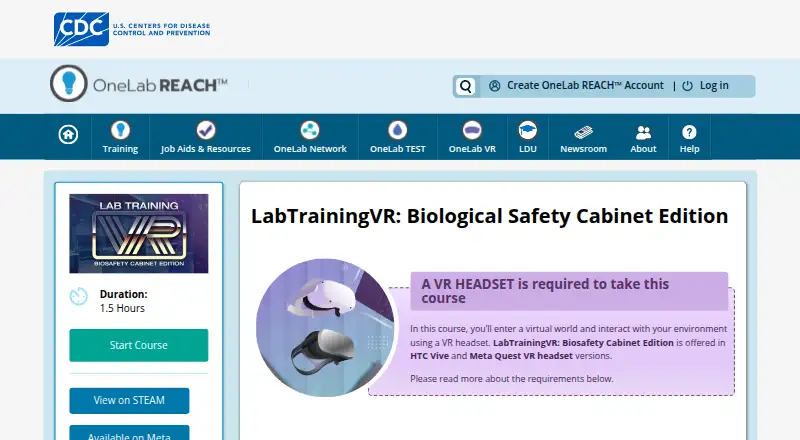
What LabTrainingVR: Biosafety Cabinet Edition is
LabTrainingVR: Biosafety Cabinet Edition is a free, headset-only course for practicing safe work in a biological safety cabinet (BSC) in a virtual laboratory. Its 1.5-hour curriculum covers identifying Class II BSC parts, maintaining positive airflow, preparing for work, following safe practices, decontaminating and shutting down, and handling emergency shutdowns. The simulated setting lets learners practice without exposure to pathogens or the risk of accidental infection or release. The course supplements CDC’s existing eLearning course on safe BSC work and is aimed at laboratory professionals, including public health and clinical laboratory staff, safety professionals, and others interested in safe BSC use. It has versions for HTC Vive and Oculus Quest 2; the equipment guide also identifies Meta Quest 2 and above and OpenXR-compatible headsets. It requires 360° tracking and a play area of at least 3 by 3 feet, with 20 by 20 feet listed as ideal. HTC Vive and tethered-headset setups specify Windows 8.1 or later, 8 GB minimum RAM, and 20 GB of available storage, among other hardware requirements. Quest installation requires Wi-Fi and a mobile device for initial setup.
Good
- Free course lasting 1.5 hours.
- Practices Class II BSC procedures and emergencies.
- Virtual practice avoids pathogen exposure.
- Supports HTC Vive and Oculus Quest 2.
Watch out
- Headset-only; requires 360° tracking.
- Requires at least a 3-by-3-foot play area.
- Quest setup needs Wi-Fi and a mobile device.
- Tethered setups specify Windows 8.1 or later.
Who it suits
This course suits laboratory professionals and others who want to practice BSC procedures in a virtual lab. It requires a compatible headset, 360° tracking, and suitable play space.
Verdict
LabTrainingVR offers structured BSC practice in a virtual setting, including routine and emergency procedures. Check headset, tracking, space, and setup requirements before starting.
Plans and prices
From LabTrainingVR: Biosafety Cabinet Edition's own pricing page, checked 15 Oct 2026.
| Plan | Price | What it gives you |
|---|---|---|
| Free | Free | VR headset and compatible computer required · Steam or Meta distribution |
| LabTrainingVR: Biosafety Cabinet Edition | Free | VR only · HTC Vive or Meta Quest 2 · 1.5 hours · 360° tracking and play area required · Free |
The facts
Each one read from LabTrainingVR: Biosafety Cabinet Edition's own pages, with the date it was checked.
What it does
- Audience
- It is designed for laboratory professionals, including public health and clinical laboratory staff, safety professionals, and others interested in safe BSC use.checked 8 Oct 2026
- Course length
- The course duration is listed as 1.5 hours.checked 8 Oct 2026
- Course level
- CDC describes it as a basic-level course for laboratory professionals.checked 15 Oct 2026
- Distribution
- The official listing links to Steam and Meta distribution.checked 15 Oct 2026
- Duration
- The OneLab REACH listing gives the course a duration of 1.5 hours.checked 15 Oct 2026
- Feature: airflow
- Learners practice maintaining positive airflow inside the cabinet.checked 15 Oct 2026
- Feature: cabinet parts
- Learners identify the major parts of a Class II biological safety cabinet.checked 15 Oct 2026
- Feature: decontamination
- Learners practice decontaminating and shutting down a cabinet.checked 15 Oct 2026
- Feature: emergencies
- The course includes emergency shutdown procedures.checked 15 Oct 2026
- Feature: preparation
- The course teaches preparation steps before working in a cabinet.checked 15 Oct 2026
- Feature: safe work
- The simulation exercises safe-work practices inside a biological safety cabinet.checked 15 Oct 2026
- Government software terms
- CDC states that its VR apps are maintained by the U.S. Government and supplied as-is without warranties.checked 15 Oct 2026
- Headsets and space
- The course page lists HTC Vive and Oculus Quest 2 versions and requires 360° tracking, with a minimum 3-by-3-foot play area and an ideal 20-by-20-foot area.checked 8 Oct 2026
- Integration
- CDC positions the VR course as a supplement to its Fundamentals of Working Safely in a Biological Safety Cabinet eLearning course.checked 15 Oct 2026
- Learning objectives
- Learners practice identifying Class II BSC parts, maintaining positive airflow, preparing for work, applying safe practices, decontaminating and shutting down, and performing emergency shutdown procedures.checked 8 Oct 2026
- Limit: locomotion
- A Steam reviewer reported difficulty with teleport movement, orientation, and adjusting position while working at the cabinet.checked 15 Oct 2026
- Limit: Meta session length
- The same Meta reviewer said the 60-to-90-minute course would be better divided into smaller sessions.checked 15 Oct 2026
- Limit: Meta usability
- A Meta reviewer reported getting stuck after the midpoint, difficulty loading and dispensing pipette liquid, and no in-training help.checked 15 Oct 2026
- Limit: onboarding
- A Steam reviewer said the application needed more introductory instruction on using VR controls.checked 15 Oct 2026
The company
- Company identity
- LinkedIn identifies the maker as the Centers for Disease Control and Prevention, a U.S. government agency headquartered in Atlanta, Georgia.checked 15 Oct 2026
- Company size
- LinkedIn lists CDC at more than 10,001 employees and shows about 20,111 employees on its company page.checked 15 Oct 2026
- Founded
- A CDC overview states that the Centers for Disease Control and Prevention was founded in 1946 and headquartered in Atlanta, Georgia.checked 15 Oct 2026
- Maker history
- CDC’s history page says the Communicable Disease Center opened in Atlanta on July 1, 1946, and that the current CDC headquarters is on Clifton Road in Atlanta.checked 8 Oct 2026
Money
- Limit: hardware cost
- MERLOT noted that VR hardware can be expensive and impractical for individual students doing homework.checked 15 Oct 2026
The full review of LabTrainingVR: Biosafety Cabinet Edition
LabTrainingVR: Biosafety Cabinet Edition is a free CDC virtual-reality course for learning safe work in a biological safety cabinet. It is a focused option for laboratory and safety professionals who need to rehearse BSC procedures; its headset requirement and narrow scope make it unsuitable for screen-based or broader lab training.
Overview
Across 1.5 hours, learners practice identifying Class II cabinet parts, maintaining positive airflow, preparing for work, following safe practices, decontaminating and shutting down, including emergency shutdown procedures. The virtual laboratory removes pathogen exposure and accidental infection or release from the practice itself, which makes it useful for rehearsal of safety-critical steps. It supplements CDC’s existing eLearning course on safe BSC work, so it is best treated as a practical component of that training rather than a standalone laboratory curriculum.
Key features
- Procedure-focused exercises: The course covers a coherent sequence from setup through shutdown. That concentration is valuable for learners specifically responsible for BSC work, but it does not address other laboratory procedures.
- Room-scale VR: The course supports HTC Vive and Oculus Quest 2, with 360° tracking required. The minimum play area is 3 by 3 feet, while 20 by 20 feet is ideal. That can make it workable in a dedicated small space, but room layout and tracking are real prerequisites, not optional refinements.
- PC setup requirements: HTC Vive and tethered-headset use requires Windows 8.1 or later, at least 8 GB of RAM and 20 GB of available storage, among other hardware requirements. Organizations should check their equipment before scheduling training.
- Quest installation: Initial Meta Quest setup requires Wi-Fi and a mobile device, and users must accept an App Lab warning before installation. This adds setup steps that may need support in managed training environments.
- Course support: For technical problems, OneLab REACH directs learners to submit a support ticket or email [email protected].
Pricing
The free plan costs nothing and includes the VR course on HTC Vive or Meta Quest 2, lasting 1.5 hours. There is no cheaper tier that trades away course content, but the free offer is limited to this single BSC course and does not remove its headset, tracking or play-area requirements. It is a strong fit for individuals or teams able to use compatible equipment; anyone needing desktop or mobile access should look elsewhere.
Platforms
The course is available for Android and Windows, but delivery is headset-only. Supported headset versions include HTC Vive and Oculus Quest 2; the equipment guide also identifies Meta Quest 2 and above and OpenXR-compatible headsets. Platform labels do not mean that the course can be completed on a standard phone or Windows PC without compatible VR equipment.
Who it's for
Laboratory professionals, including public health and clinical laboratory staff, safety professionals and others interested in safe BSC use, are the natural audience. It particularly suits learners who need a structured opportunity to rehearse cabinet setup, safe work and emergency shutdown. It is not the right choice for general-purpose VR learning, broader laboratory instruction or anyone without access to a suitable headset and tracked play area.
Pros and cons
Pros
- Free access: The full stated course carries no charge, lowering the cost of adding VR practice to BSC training.
- Safety-focused rehearsal: Learners can practice a defined set of routine and emergency procedures without pathogen exposure or accidental release.
- Useful course length: At 1.5 hours, it is a focused training session rather than an open-ended platform commitment.
Cons
- Requires VR equipment: Headset-only delivery, 360° tracking and a suitable play area exclude learners looking for a conventional desktop or mobile course.
- Limited subject scope: The training centers on BSC procedures and supplements CDC eLearning; it is not a wide-ranging laboratory course.
- Setup overhead: PC specifications or Quest’s Wi-Fi, mobile-device and App Lab steps may require preparation before learners can begin.
Alternatives
For anatomy study across desktop, mobile and web, 3D Organon offers a free entry-level option and paid student access; choose it when anatomy, rather than BSC procedure practice, is the priority. VictoryXR is a freemium platform with a free HoloTutor Basic tier that includes monthly AI usage, an AI creator tool and avatar and environment customization, making it a better fit for broader customizable learning. FundamentalVR is a paid alternative for readers comparing other VR training software.
Openlab provides services free of charge and offers a VR headset trial for a limited time, so it may suit readers who want to explore a different free VR learning option. Pixaera is an enterprise-oriented paid alternative with a demo-request pricing approach. Luminous XR starts its FLOW creator package with demo PORTAL at from £1,450 (priced on request), and may suit buyers looking to create and host XR training content. Bodyswaps offers a 14-day free trial with ready-made lessons and unlimited AI roleplay practice across VR, PC and mobile, making it the more flexible trial option for roleplay-focused training. Immersive Factory sells a SafetyBox VR Day for €890, paid once, including a preinstalled autonomous headset for one day, unlimited employee passes and online support; consider it when a short, managed VR safety session is preferable.
Browse more options in Virtual Reality Learning Platforms.
Verdict
Choose LabTrainingVR: Biosafety Cabinet Edition if you need free, focused VR rehearsal of Class II BSC tasks and can meet its headset, tracking and space requirements. Its strongest reason to choose it is the opportunity to practice routine and emergency procedures in a risk-free simulation. Look elsewhere if you need broader lab instruction, screen-based access or a course that does not depend on room-scale VR.
Alternatives to LabTrainingVR: Biosafety Cabinet Edition
- 1

3D Organon
Free planAndroidiOSWebmacOS8.2From $74.50 a year - 2

VictoryXR
Free planAndroidiOSWebmacOS7.4From $150 a year - 3
Prisms
AndroidiOSWeb7.3From $23.99 a year - 4

Labster
AndroidiOSWebmacOS7.0From $5,000 a year - 5
Immersive Factory
AndroidiOSWebmacOS6.9From €3,600 a year - 6
Interplay Learning
AndroidiOSWeb6.9From $54 a month