KRDC
KRDC is a free Linux application for viewing or controlling another computer’s desktop when that machine runs a compatible server.
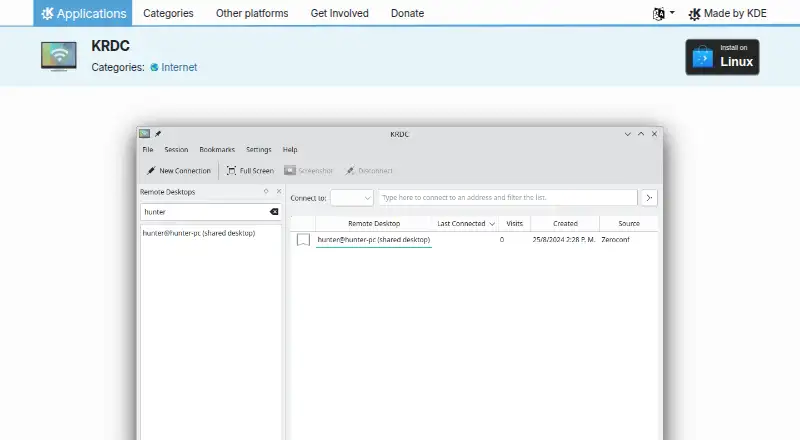
What KRDC is
KRDC is a free Linux application for viewing or controlling another computer’s desktop when that machine runs a compatible server. It connects through VNC, RDP, and SPICE protocol plugins, and the client and server may use different operating systems. KDE documents use with its Desktop Sharing (Krfb) VNC server. Users can save bookmarks, review connection history, and discover locally advertised VNC services through Zeroconf. RDP settings include FreeRDP modes such as NLA, TLS, RDP, and Ext, plus a configurable TLS security level. Proxy and gateway settings, resolution, sound, shared media, and smartcard redirection are available. SPICE dynamic resizing requires spice-vdagent in the guest, while clipboard exchange depends on guest support. The remote server must be enabled and reachable, with its firewall permitting the connection. KRDC reads basic .rdp details but does not import every setting supported by other clients.
Good
- Free Linux application
- Supports VNC, RDP, and SPICE
- Bookmarks and connection history
- Zeroconf VNC service discovery
- Configurable RDP security and access settings
Watch out
- Requires an enabled, reachable remote server
- Firewall must allow the connection
- SPICE features depend on guest support
- Does not import every .rdp setting
Who it suits
It suits Linux users who need VNC, RDP, or SPICE access to a compatible remote desktop server. It can also fit mixed-operating-system client and server environments.
Verdict
KRDC provides protocol-based remote desktop access with useful discovery and RDP configuration options. Its Linux requirement and dependence on server, firewall, and guest support should be planned for.
Plans and prices
From KRDC's own pricing page, checked 11 Oct 2026.
| Plan | Price | What it gives you |
|---|---|---|
| KRDC | Free | Linux app · requires a compatible remote desktop server |
The facts
Each one read from KRDC's own pages, with the date it was checked.
What it does
- Availability and help
- KDE lists Linux installation through AppStream-compatible stores or a distribution package manager and links to the handbook, forum, and bug tracker for help and reports.checked 11 Oct 2026
- Clipboard password limit
- The VNC password-manager option blocks clipboard content marked as a password by supported managers such as KeePassXC, but cannot identify passwords copied by apps that do not provide that marker.checked 11 Oct 2026
- Command line limit
- KRDC can read basic connection details from an .rdp file, but does not import every setting supported by other RDP clients.checked 11 Oct 2026
- Connection discovery
- The connection page lists bookmarks, connection history, and VNC services advertised on the local network through Zeroconf.checked 11 Oct 2026
- Connection requirements
- Before connecting, the remote server must be enabled and reachable, and its firewall must allow the required connection.checked 11 Oct 2026
- Cross operating systems
- The client and server can run different operating systems.checked 11 Oct 2026
- KDE integration
- The handbook describes using KRDC with KDE’s Desktop Sharing (Krfb) VNC server.checked 11 Oct 2026
- Protocols
- The handbook lists VNC, RDP, and SPICE as supported through protocol plugins.checked 11 Oct 2026
- Purpose
- KRDC lets you view or control another machine’s desktop session when it runs a compatible server.checked 11 Oct 2026
- RDP access options
- RDP settings include network proxy and gateway configuration, plus controls for resolution, sound, shared media, and smartcard redirection.checked 11 Oct 2026
- RDP security settings
- For RDP, KRDC offers FreeRDP security modes including NLA, TLS, RDP, and Ext, with a configurable TLS security level.checked 11 Oct 2026
- SPICE requirements
- SPICE dynamic resizing requires spice-vdagent in the guest, and clipboard exchange depends on guest support.checked 11 Oct 2026
Money
- Free plan
- Yeschecked 20 Sep 2026
Where it runs
- Supported platforms
- Linuxchecked 20 Sep 2026
Alternatives to KRDC
- 1

Royal TS
Free planAndroidiOSAPIExtension8.1€49 one-time - 2

Nexterm
Free planOpen sourceAndroidiOSWebAPI7.7Free plan - 3

BURSU Connection Manager
Free planAndroidiOSWebAPI7.4Free plan - 4

MobaXterm
Free planWindows7.4From $69 a year - 5

Conduit
Free planiOSWebLinuxmacOS7.2From $10 a month - 6

Keeper Connection Manager
AndroidiOSWebLinux6.9