KidsNanny
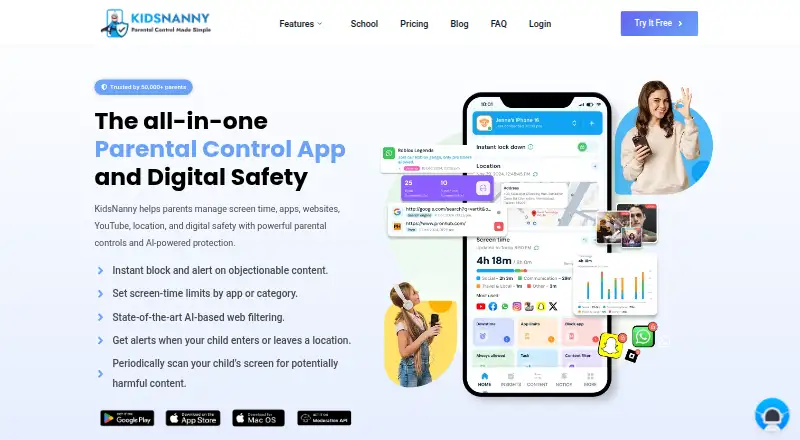
KidsNanny is a parental control app for managing children’s screen time, apps, websites, YouTube access, location, and digital safety.
What KidsNanny is
KidsNanny is a parental control app for managing children’s screen time, apps, websites, YouTube access, location, and digital safety. Parents can set schedules, filter content, block apps, review activity reports, and control websites by domain or category. Supported browsing history can be reviewed, and YouTube access can be managed by allowing or blocking channels.
Screen Scanner periodically checks a child’s screen for potential safety risks and can alert parents when configured concerns are detected. WhatsApp Shield can flag risky messages or media and remove configured harmful content. Camera Shield can detect potentially inappropriate visuals during supported camera or video-call activity and take protective action. Location features include real-time tracking, history, geofences, entry and exit alerts, and child Check-In. Parents can assign tasks and let children redeem earned points for extra screen time.
KidsNanny supports Android, iPhone, iPad, Mac, and a parent web dashboard, though feature availability varies by platform. A Basic free version is available, alongside a 7-day trial and paid plans: $35.00 per year or $5.00 per month.
Good
- Basic free version available
- Screen-time schedules, app blocking, and content filtering
- Location history, geofences, and entry and exit alerts
- Tasks can earn children extra screen time
Watch out
- Feature availability varies by platform
- Paid plans auto-renew monthly or yearly
- Setup requires platform-specific permissions or configuration
Who it suits
KidsNanny suits parents seeking screen-time controls, content filtering, location tools, and activity visibility for children’s devices. It supports families using Android, Apple devices, or a web dashboard, with features varying by platform.
Verdict
KidsNanny combines device controls with location, safety, and task features. Families should check platform-specific feature availability and decide whether the free version or a renewing paid plan meets their needs.
Plans and prices
From KidsNanny's own pricing page, checked 22 Sep 2026.
| Plan | Price | What it gives you |
|---|---|---|
| Free trial | Free | 7 days · 7-day free trial |
| Yearly | $35 a year | 7-day free trial · Screen scanner & web history · WhatsApp, camera & app/web shields · YouTube control & usage reports · Tasks, rewards & custom alerts · Billed $35 once a year; auto-renews yearly |
| Monthly | $5 a month | 7-day free trial · Screen scanner & web history · WhatsApp, camera & app/web shields · YouTube control & usage reports · Tasks, rewards & custom alerts · Billed $5 every month; auto-renews monthly |
The facts
Each one read from KidsNanny's own pages, with the date it was checked.
What it does
- Activity reports
- Yeschecked 22 Sep 2026
- AI processing
- On-device processing may be used as a first layer for supported safety features, but processing varies by feature and device and is not exclusively on-device.checked 8 Oct 2026
- Camera Shield
- Camera Shield detects potentially inappropriate visual content during supported camera and video-call activity and can take protective action.checked 8 Oct 2026
- Content filtering
- Yeschecked 22 Sep 2026
- Integrations
- Parents can create an account or sign in with Google, Apple, or email.checked 8 Oct 2026
- Location
- Location tools include real-time tracking, location history, geofences, entry and exit alerts, and child Check-In.checked 8 Oct 2026
- Location tracking
- Yeschecked 22 Sep 2026
- Paid from
- 2.92checked 22 Sep 2026
- Privacy and data retention
- The privacy policy says screenshots and phone media are encrypted, accessible only by the account owner, and stored on KidsNanny’s server for seven days before deletion.checked 8 Oct 2026
- Purpose
- KidsNanny is a parental control app for managing children’s screen time, apps, websites, YouTube, location, and digital safety.checked 8 Oct 2026
- Screen Scanner
- Screen Scanner periodically analyzes a child’s screen for potentially harmful or inappropriate content and can alert parents when a configured safety risk is detected.checked 8 Oct 2026
- Screen-time schedules
- Yeschecked 22 Sep 2026
- Setup
- Device setup connects a child’s device to the parent account with a QR code or pairing code and requires platform-specific permissions or configuration.checked 8 Oct 2026
- Support
- KidsNanny says support is available by live chat during working hours and by email during off-hours.checked 8 Oct 2026
- Tasks and rewards
- Parents can set tasks, approve completed work, and let children redeem earned points for extra screen time.checked 8 Oct 2026
- Web and YouTube controls
- Parents can block websites by domain or category, review supported browsing history, and manage YouTube access by blocking or allowing channels.checked 8 Oct 2026
Where it runs
- App blocking
- Yeschecked 22 Sep 2026
- Supported devices
- KidsNanny supports Android, iPhone, iPad, and Mac, with feature availability varying by platform; parents can use a web dashboard.checked 8 Oct 2026
- WhatsApp Shield
- WhatsApp Shield can alert parents to risky messages or media and automatically remove configured harmful content.checked 8 Oct 2026
Money
- Free access
- The FAQ describes a Basic (Free) version available without subscribing, alongside Monthly and Yearly subscription options.checked 8 Oct 2026
- Free plan
- Nochecked 22 Sep 2026
Alternatives to KidsNanny
- 1
Kaspersky Safe Kids
Free planAndroidiOSWebmacOS8.8From $14.99 a year - 2
Qustodio
Free planAndroidiOSmacOSWindows8.5From $72.94 a year - 3

MMGuardian
AndroidiOSWebmacOS8.3From $59.90 a year - 4

OurPact
Free planAndroidiOS8.2From $69.99 a year - 5

Mobicip
AndroidiOSmacOSWindows8.0From $2.99 a month - 6
FamilyTime
AndroidiOSmacOSWindows8.0From $2.41 a month