Kamu
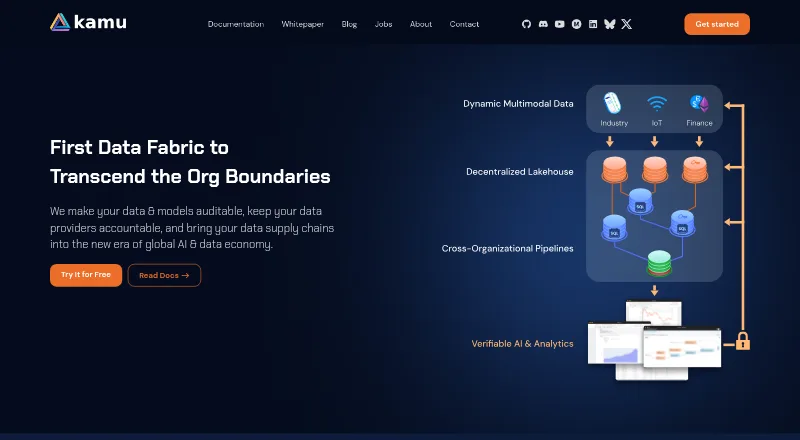
Kamu is a data fabric for auditable data supply chains and collaborative processing across organizational boundaries.
What Kamu is
Kamu is a data fabric for auditable data supply chains and collaborative processing across organizational boundaries. Its free Kamu CLI manages and verifiably processes structured data, and the maker says it can be used without an account, credit card, or cloud subscription. It preserves data history and transformation code so users can trace origins and verify how results were produced. SQL-based ETL pipelines can use processing engines including Flink, Spark, and DataFusion; ingestion options include Debezium, web polling, MQTT brokers, and blockchain logs. Users can explore datasets with an embedded SQL shell, Jupyter notebooks, an embedded web UI, and BI tools such as Apache Superset. Open Data Fabric formats and protocols support data sharing through conventional and decentralized storage. Kamu Node is a server implementation deployable as Kubernetes applications in a distributed environment. The CLI works on Linux, macOS, and Windows with WSL2. The documentation cautions that Kamu is not well suited to high-frequency, high-volume cases.
Good
- Kamu CLI is free to use.
- Records data history and transformation code.
- Supports SQL-based ETL pipelines.
- Offers conventional and decentralized data exchange.
Watch out
- Not well suited to high-frequency, high-volume cases.
- Kamu Platform is labeled as coming soon.
- Docker access without sudo can expose the filesystem with root privileges.
Who it suits
Kamu may suit teams exchanging data between independent parties or handling low-to-moderate-frequency data where traceability and protection from malicious actors matter. It is not described as a good fit for high-frequency, high-volume workloads.
Verdict
Kamu focuses on data provenance, exchange, and verifiable processing, with a free CLI and a Kubernetes-deployable server counterpart. Its documented workload limitation is important for teams considering it for high-volume or high-frequency data.
Plans and prices
From Kamu's own pricing page, checked 30 Sep 2026.
| Plan | Price | What it gives you |
|---|---|---|
| Kamu CLI | Free | Runs on a laptop; can scale to a large on-prem cluster |
The facts
Each one read from Kamu's own pages, with the date it was checked.
What it does
- Analytics tools
- Documented exploration integrations include an embedded SQL shell, Jupyter notebooks, an embedded web UI, and Apache Superset and other BI tools.checked 30 Sep 2026
- Data exchange
- ODF datasets can be shared through conventional storage such as S3, GCS, and Azure, or decentralized storage such as IPFS.checked 30 Sep 2026
- Data lineage
- Kamu preserves data history and lets users trace data origins and see who transformed it and how.checked 29 Sep 2026
- Data processing
- Kamu uses temporal SQL for data manipulations and supports near real-time, autonomous pipelines.checked 29 Sep 2026
- Deployment
- Kamu Node is a scalable server implementation of ODF, deployable as Kubernetes applications in a distributed environment.checked 30 Sep 2026
- Existing tools
- Kamu says it can ingest data from databases and that standard protocols and SQL let notebooks, BI tools, and analytics platforms query its datasets.checked 29 Sep 2026
- History and provenance
- Kamu records data history and transformation code so users can trace sources and verify reproducible results.checked 30 Sep 2026
- Ingestion
- Kamu supports extractors such as Debezium and built-in sources including web polling, MQTT brokers, and blockchain logs.checked 30 Sep 2026
- Integrations
- Kamu says it integrates Spark, Flink, Arroyo, and Datafusion as plugins, allowing different engines in one pipeline.checked 29 Sep 2026
- Node
- Kamu Node is described as a server counterpart to the CLI, with the same features designed for large scale.checked 29 Sep 2026
- Notable limit
- The CLI docs say Kamu is not well suited for IoT or other high-frequency, high-volume cases, though it may suit insights derived from such data.checked 30 Sep 2026
- Open source
- The maker says Kamu technology and tooling are developed in the open and welcomes contributors.checked 30 Sep 2026
- Pipelines
- Users can build SQL-based ETL pipelines using processing engines including Flink, Spark, and DataFusion.checked 30 Sep 2026
- Privacy
- Kamu describes its data sharing as privacy-preserving and says publishers can retain ownership and control without moving data to a central point.checked 29 Sep 2026
- Product
- Kamu is a data fabric for auditable, accountable data supply chains and collaborative processing across organizational boundaries.checked 29 Sep 2026
- Protocol
- Open Data Fabric (ODF) is the set of formats and protocols for data exchange and verifiable processing implemented by Kamu CLI and Node.checked 29 Sep 2026
- Security
- The CLI installation guide warns that sudo-less Docker access can expose the filesystem with root privileges and recommends rootless Podman as an alternative.checked 30 Sep 2026
- Security and accountability
- The maker says data changes by people with admin access leave a trace, and data provenance keeps publishers and processors accountable.checked 29 Sep 2026
- Self-hosting
- Kamu Node is documented as a Kubernetes application set that can be installed in a distributed environment and provides APIs to applications and smart contracts.checked 29 Sep 2026
- Support
- The maker directs users to GitHub issues or Discord for feedback and questions.checked 30 Sep 2026
- Supported systems
- The CLI installation page says it works on Linux, macOS, and Windows with WSL2.checked 29 Sep 2026
The company
- Company
- The site identifies the company as Kamu Data Inc.checked 29 Sep 2026
Money
- Free CLI
- The maker says Kamu CLI includes all features of a modern data lakehouse and can be installed and used for free without a credit card, account, or cloud subscription.checked 29 Sep 2026
Where it runs
- Platforms
- The CLI supports Linux and Intel and M-series macOS; Windows use is documented through WSL2 or Docker Desktop, while the native Windows binary is described as highly experimental.checked 30 Sep 2026
The full review of Kamu
Kamu is a data fabric for teams that need to exchange structured data across organizational boundaries without losing track of its origins or transformations. Its free CLI makes the approach accessible, while the workload ceiling rules out some demanding streaming use cases.
Overview
Kamu centers on verifiable data exchange: its Open Data Fabric (ODF) formats and protocols are implemented in a free command-line tool and Kamu Node, a server counterpart intended for larger-scale deployments. The CLI can run on a laptop and scale to a large on-premises cluster; Node is deployed as Kubernetes applications in a distributed environment. This combination suits organizations that need both local data work and a server path for collaborative processing.
ODF datasets can be shared through conventional storage such as S3, GCS, and Azure, or decentralized storage such as IPFS. Publishers can retain ownership and control rather than moving data to a central point. That is a useful distinction for cross-organization work, though Kamu’s value depends on needing its provenance-centered data-fabric model rather than simply another general analytics platform.
Key features
Lineage and accountable processing
Kamu records data history and transformation code, so teams can trace a dataset’s origins, see who changed it and how, and verify reproducible results. The audit trail is particularly relevant when data is shared among parties that need to establish responsibility. The maker also says changes by people with administrative access leave a trace, an important safeguard when trust extends to privileged users.
SQL pipelines and integrations
Temporal SQL supports data manipulation and near-real-time autonomous pipelines. Teams can build SQL-based ETL workflows with processing engines such as Spark, Flink, and DataFusion; Arroyo is also offered as a plugin. This engine choice helps teams fit processing to a pipeline rather than depend on a single engine, but the documented workload range remains low to moderate frequency.
Ingestion, exchange, and analysis
Kamu can ingest from databases, Debezium extractors, web polling, MQTT brokers, and blockchain logs. An embedded SQL shell, Jupyter notebooks, an embedded web UI, Apache Superset, and other BI tools provide ways to explore datasets. The mix connects ingestion to familiar analysis tools, while ODF exchange spans both cloud storage and decentralized storage.
Pricing
Kamu CLI costs nothing. It includes the CLI’s features and runs on a laptop, with the ability to scale to a large on-premises cluster. The maker says it requires no credit card, account, or cloud subscription, making it suitable for evaluating or operating the core workflow without a paid entry tier.
Kamu Node is the server counterpart, designed for large-scale use and Kubernetes deployment. Its price is custom pricing. The free CLI is the clear starting point for individuals and teams, while organizations needing a distributed server deployment should consider Node’s custom-priced route.
Platforms
The CLI supports Linux, macOS, and Windows with WSL2. Kamu also has API, web, and self-hosted platform availability; Node is the self-hosted Kubernetes option. Kamu Platform is coming soon, so the current web-facing exploration tools include an embedded UI rather than a generally available Kamu Platform.
Who it's for
Kamu is aimed at teams exchanging data between independent parties, particularly where low-to-moderate-frequency, mission-critical information needs to be trustworthy and protected from malicious actors. Its use cases include energy, enterprise and government data, science and research, IoT and smart cities, fintech and insurtech, healthcare, Web3, and DePIN. It can also serve teams deriving insights from high-volume sources, but is not well suited to processing IoT or other high-frequency, high-volume workloads directly.
Pros and cons
- Pros: A free CLI with no account or cloud subscription requirement makes it practical to start locally.
- Pros: Recorded history and transformation code support traceability and reproducibility across organizational boundaries.
- Pros: SQL pipelines, multiple processing engines, and integrations with notebooks and BI tools offer several routes from ingestion to analysis.
- Cons: High-frequency, high-volume processing is outside its recommended workload range.
- Cons: Node’s distributed Kubernetes deployment is a more involved path than using the CLI on a laptop.
- Cons: The sudo-less Docker setup can expose the filesystem with root privileges; the installation guide recommends rootless Podman as an alternative.
Alternatives
Data Fabric Software is the broader category for comparing tools in this area. Choose InterSystems IRIS instead if you want a paid platform with a free Community Edition and free trial. Denodo Platform is an alternative if its Developer plan’s single-server, 4-core, 50-data-product and 2.5 TB/year limits suit your needs, alongside unlimited data sources, consumers, and Data Marketplace users.
Teradata VantageCloud offers a freemium route with a free plan and trial. Consider Informatica Intelligent Data Management Cloud if a free data-integration tier capped at 20M rows or 10 compute hours per month fits your workload. K2View Fabric provides a 30-day free trial that demonstrates its capabilities with a basic Customer 360 scenario.
GE Vernova Proficy Plant Applications is an alternative for process, discrete, and mixed manufacturing. DataOS offers pay-per-use and yearly subscription plans with custom pricing. HPE Morpheus VM Essentials Software is another option for HVM hypervisor and VMware management, with a free trial.
Verdict
Kamu is a strong choice for teams that need auditable, verifiable data exchange between independent organizations and want to start with a free CLI. Its lineage model and flexible processing integrations are the reasons to choose it; teams handling high-frequency, high-volume data should look elsewhere for the primary processing layer.
Getting started
- Visit the Kamu website.
- Install Kamu CLI on Linux, macOS, or Windows with WSL2.
- Use the CLI without an account, credit card, or cloud subscription.
- Build SQL-based pipelines and connect supported processing engines or data sources.
- For a distributed server deployment, install Kamu Node as a Kubernetes application.
Limits worth knowing
Kamu CLI is free and can run on a laptop or scale to a large on-prem cluster. The CLI documentation says Kamu is not well suited to high-frequency, high-volume workloads.
Questions
Does Kamu have a free plan?
Yes. Kamu CLI is free to install and use, without an account, credit card, or cloud subscription.
Which operating systems can run Kamu CLI?
The CLI installation page lists Linux, macOS, and Windows with WSL2.
Is Kamu open source?
The maker says Kamu technology and tooling are developed in the open and welcomes contributors.
What is Kamu Node?
Kamu Node is the server counterpart to the CLI, designed for large scale. It can be deployed as Kubernetes applications in a distributed environment.
Which data tools can Kamu work with?
Kamu says it integrates Spark, Flink, Arroyo, and DataFusion as plugins. Dataset exploration options include Jupyter notebooks, Apache Superset, an embedded SQL shell, and an embedded web UI.
Who makes Kamu?
The site identifies the company as Kamu Data Inc.
Alternatives to Kamu
- 1

Informatica Intelligent Data Management Cloud
Free planWebAPIExtensionLinux8.0From £26,550 a year - 2

GE Vernova Proficy Plant Applications
AndroidiOSWebAPI7.7From $5,800 a month - 37.0From $1.15 a month
- 4
Solix Data Fabric
WebAPISelf-hosted6.8From $7 a month - 5
Denodo Platform
Free planWebAPILinuxSelf-hosted6.7Free plan - 6
Infor Enterprise Performance Management
AndroidiOSWebAPI6.7