ink and Inky
ink and Inky are tools for writing branching narrative games.
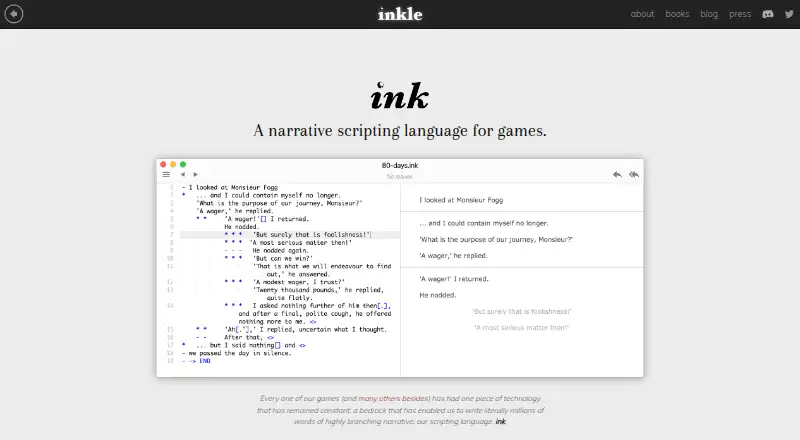
What ink and Inky is
ink and Inky are tools for writing branching narrative games. ink is a narrative scripting language designed primarily for professional game development, while Inky is its companion app for writing, testing, and exporting stories. The language uses text-first markup, letting writers place code and logic within story text. Inky refreshes its play pane as a story changes, highlights errors during typing, and can jump from a divert to its target. Stories export as JSON or as a web page ready for customization. Inky is available for Linux, macOS, and Windows. For Unity projects, the plugin recompiles ink files during editing and includes a previewer for playing stories in the Unity Editor. The maker also points to Inkpot, a container created by The Chinese Room for integrating ink within Unreal Engine. Beyond professional game development, the tools can be used to write and share choice-based interactive fiction. ink, Inky, and the Unity integration plugin are freely available under the MIT license. For questions about ink and its Unity integration, the maker points users to Discord and GitHub Discussions.
Good
- Inky previews changes while a story is edited.
- The editor highlights errors as users type.
- Stories export as JSON or a customizable web page.
- Unity integration includes recompilation and an editor previewer.
- ink, Inky, and the Unity plugin are free under MIT.
Watch out
- The listed Inky downloads are for Linux, macOS, and Windows.
- Unreal integration is pointed to through Inkpot, a separate container.
Who it suits
These tools suit professional game developers creating branching narratives, as well as people writing and sharing choice-based interactive fiction.
Verdict
ink and Inky pair a text-first narrative language with an editor for testing and exporting stories. Unity integration is described directly; Unreal integration is addressed through Inkpot.
Plans and prices
From ink and Inky's own pricing page, checked 5 Oct 2026.
| Plan | Price | What it gives you |
|---|---|---|
| Free | Free | ink, Inky, and the ink-Unity integration plugin are freely available under the MIT license |
The facts
Each one read from ink and Inky's own pages, with the date it was checked.
The company
- Company background
- inkle says it was founded in 2011 by two Cambridge game developers.checked 4 Oct 2026
- Company history
- inkle says it was founded in 2011 by two Cambridge game developers.checked 5 Oct 2026
- Founded
- 2011checked 28 Sep 2026
- Headquarters
- Cambridge, United Kingdomchecked 28 Sep 2026
What it does
- Downloads
- The Inky page links to downloads for Mac, Windows, and Linux.checked 5 Oct 2026
- Editor features
- Inky provides an automatically refreshing play pane, as-you-type error highlighting, jump to definition, and JSON and web export.checked 5 Oct 2026
- Export formats
- Inky exports stories as JSON or as a web page ready to customise.checked 4 Oct 2026
- Help
- The maker directs users to its Discord server and GitHub Discussions for questions and help.checked 5 Oct 2026
- Inky editor
- Inky lets users write, test, and export ink stories in one app.checked 5 Oct 2026
- Intended use
- Ink is primarily designed for professional game development and can also be used to write and share choice-based interactive fiction.checked 5 Oct 2026
- Intended users
- The site describes ink as primarily designed for professional game development, while also noting that it can be used to write and share choice-based interactive fiction.checked 4 Oct 2026
- License
- The maker says ink, Inky, and the ink-Unity integration plugin are available under the MIT license.checked 5 Oct 2026
- Purpose
- Ink is a narrative scripting language for writing branching game stories.checked 5 Oct 2026
- Security
- The product page states the MIT license and does not describe security certifications or compliance.checked 5 Oct 2026
- Support
- The site directs users to Discord and GitHub Discussions for questions about ink and its Unity integration.checked 4 Oct 2026
- Unity integration
- The Unity plugin automatically recompiles ink files as they are edited and includes a previewer for playing stories in the Unity Editor.checked 5 Oct 2026
- Unreal integration
- The page points to Inkpot, a container for integrating ink within Unreal Engine, created by The Chinese Room.checked 5 Oct 2026
- Writing style
- Ink uses markup where text comes first and code and logic are inserted within it.checked 5 Oct 2026
Money
- License and cost
- The site says ink, Inky and the ink-Unity integration plugin are freely available under the MIT license.checked 4 Oct 2026
The full review of ink and Inky
ink and Inky suit game writers who want to author branching stories in text and keep a playable preview close at hand. Their strongest case is a free, MIT-licensed workflow with direct Unity support; writers who need a visual-first story planner may prefer another tool.
Overview
Ink is a narrative scripting language aimed primarily at professional game development, while Inky is its companion app for writing, testing and exporting ink stories. The document-based approach keeps prose central, with markup and logic inserted into the text rather than requiring writers to build every branch in a visual canvas. That can make story-heavy scripts easier to read as documents, though it favors authors comfortable with text-based structure.
Inky’s live play pane, error highlighting and ability to jump from a divert to its target help authors follow and troubleshoot branching stories while they write. The software is focused on narrative authoring and previewing, not broad project planning.
Key features
Text-first branching
Ink supports branching dialogue and choice-based interactive fiction. Its text-first markup suits writers and developers who want narrative and logic together in a readable script; it is less compelling for teams that want to map story structure visually.
Preview, debugging and export
Inky refreshes its play pane as the story changes and highlights errors as they are typed, reducing the need to switch tools just to check a passage. Jumping from a divert to its target also helps navigate a branching document. Stories can be exported as JSON or as a web page ready to customise, useful for moving the work into an integration or sharing a browser-based version.
Engine integration
The Unity plugin recompiles ink files during editing and includes a previewer for playing stories inside the Unity Editor. That makes ink a natural fit for Unity workflows. For Unreal Engine, the site points to Inkpot, a container for integrating ink created by The Chinese Room; it is a separate route rather than the same direct plugin experience described for Unity.
Pricing
Ink, Inky and the ink-Unity integration plugin are available under the MIT license at no charge. The Free plan costs nothing and is suitable for individual writers as well as professional teams that want to use the language and Unity integration without a software fee. The license also permits use and modification under MIT terms.
There are no paid tiers or seat counts stated for ink and Inky. This is a focused, free tool rather than a freemium product with feature gates; support questions are directed to Discord and GitHub Discussions. The product page states the MIT license but does not describe security certifications or compliance.
Platforms
Inky downloads are offered for Linux, macOS and Windows. Unity integration is explicitly described, while Unreal use is addressed through Inkpot. The stated platforms cover desktop authoring, not mobile Inky downloads.
Who it's for
Choose ink and Inky if you write branching dialogue or choice-based fiction and want prose, logic, previewing and export in one workflow, particularly if your game uses Unity. It can also serve writers who want to create and share interactive fiction without a game-engine project. Look elsewhere if your process depends on a visual node editor or a broader narrative production suite.
Pros and cons
- Pro: Free and MIT-licensed, including the Unity integration plugin, so there is no software fee for the core workflow.
- Pro: Inky combines live preview, typed error highlighting and divert navigation, helping authors inspect branching stories without leaving the editor.
- Pro: JSON and customisable web-page exports give authors more than one way to carry stories beyond Inky.
- Con: Text-based authoring is a poor fit for writers who prefer to construct and inspect branches visually.
- Con: Unity has a described recompilation and preview workflow; Unreal integration is directed to Inkpot instead.
Alternatives
For a broader set of options, browse Game Narrative Design Software.
- ChatMapper is worth comparing if its free tier’s one editor, three projects and 300-node-per-project cap fit your needs, with core exports and commercial use permitted.
- Ren'Py is another free option for authors who want a tool available on desktop, web and mobile platforms.
- Narrat may suit writers looking for a free, MIT-licensed open-source option with no restrictions for personal or commercial use.
- Yarn Spinner is a better comparison if you want free Unity, Godot and Unreal integrations plus a VS Code extension.
- Godot Asset Library is a free alternative when the goal is browsing and using assets from Godot’s official library rather than choosing a narrative scripting workflow.
- Narratyr may be a fit if a full visual editor and open document format matter more than ink’s text-first authoring.
- Quest Viva is another free, MIT-licensed option that permits creating and selling games and using modified source in closed-source commercial applications.
- articy:draft X may be a better match if you want a visual planning tool with a free tier limited to 700 objects per project and unlimited projects.
Verdict
Ink and Inky are a strong choice for narrative writers and game developers who want free, text-first branching authoring with a particularly direct Unity workflow. The main reason to choose them is that Inky pairs writing with live preview, error cues and useful exports at no software cost. Look elsewhere if visual story mapping is central to your process or if you need the same explicitly described integration path for Unreal that Unity receives.
Getting started
- Download Inky for Linux, macOS, or Windows
- Write the story using ink’s text-first markup
- Use Inky’s play pane to test the story as you edit
- Export the finished story as JSON or a customizable web page
- Add the ink-Unity integration plugin for Unity projects
- Use Inkpot when integrating ink within Unreal Engine
Questions
Is ink and Inky free?
ink, Inky, and the ink-Unity integration plugin are freely available under the MIT license.
Which operating systems can run Inky?
Downloads are offered for Linux, macOS, and Windows.
Can ink stories be used in Unity?
Yes. The Unity plugin recompiles ink files during editing and includes a previewer in the Unity Editor.
How can stories be exported?
Inky exports stories as JSON or as a web page ready for customization.
Is Unreal Engine supported?
The site points to Inkpot, a container created by The Chinese Room for integrating ink within Unreal Engine.
Where can users get help?
inkle directs questions about ink and its Unity integration to Discord and GitHub Discussions.
Alternatives to ink and Inky
- 1

Yarn Spinner
Free planOpen sourceWebAPIExtensionLinux8.0$75 one-time - 2

Ren'Py
Free planOpen sourceAndroidiOSWebAPI7.9Free plan - 3
ChatMapper
Free planWebLinuxmacOSSelf-hosted7.7From $19 a month - 4

articy:draft X
Free planAPImacOSSelf-hostedWindows7.4From €69.99 a year - 5
Poetix
Free planWebAPI7.2From $15 a month - 6

Arcweave
Free planWebAPI6.7From $15 a month