iClicker
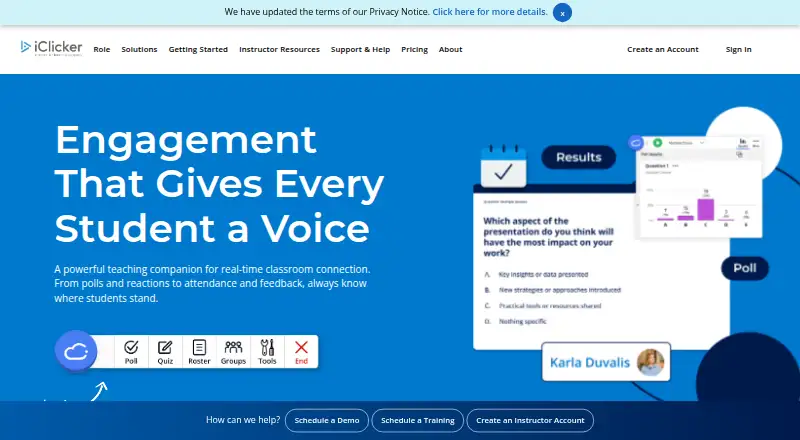
iClicker is a student response system for classroom engagement, bringing polling, quizzes, attendance, reactions, and feedback into in-person and virtual cla…
What iClicker is
iClicker is a student response system for classroom engagement, bringing polling, quizzes, attendance, reactions, and feedback into in-person and virtual classes. Instructors can ask multiple-choice, multiple-answer, short-answer, numeric, target, formula or symbol, and anonymous questions. Its AI Question Creator can generate up to 50 questions using uploaded files as context. Attendance tracking covers in-person and virtual classes, while iClicker Pulse adds auto-run sessions and late-arrival tracking. An instructor gradebook gives real-time reports on student and class performance, attendance, and participation.
Students can respond through iClicker’s mobile app, student web app, or physical remotes. The mobile app supports Apple and Android smartphones. Integrations include Blackboard, Canvas, Brightspace by D2L, and Moodle, as well as roster and grade sync, CSV integration, and single sign-on. iClicker offers a free instructor account; student subscription requirements depend on the enrolled course. Listed U.S. The instructor desktop software is available for Windows and Mac, with Windows 10 or newer and macOS 12 or newer listed as minimum requirements. iClicker was founded in 1997 and describes itself as part of the Macmillan Learning family.
Good
- Supports multiple question formats, including anonymous responses.
- AI Question Creator can generate up to 50 questions from uploaded context.
- Attendance supports in-person and virtual classes.
- Gradebook reports on performance, attendance, and participation in real time.
- Integrates with Blackboard, Canvas, Brightspace by D2L, and Moodle.
Watch out
- Some students may need a paid subscription, depending on their enrolled course.
- Instructor desktop software requires Windows 10 or newer or macOS 12 or newer.
- International and partner pricing requires contacting iClicker.
Who it suits
iClicker suits instructors who want to run classroom polls or quizzes and track attendance and participation. It also suits students whose enrolled course uses iClicker and who want to respond through a phone, web app, or remote.
Verdict
Choose iClicker if your course needs classroom polling, quizzes, attendance tracking, or participation reporting, with several response options for students. Students should first check which subscription their enrolled course requires; international and partner pricing is handled by contacting iClicker.
Plans and prices
From iClicker's own pricing page, checked 5 Oct 2026.
| Plan | Price | What it gives you |
|---|---|---|
| Instructor account | Free | Instructor access · Always free for instructors. |
| iClicker Pulse — 6 months | $4.99, paid once | Attendance tracking (in-person & virtual) · Auto-run class sessions · Late-arrival tracking · Covers eligible iClicker courses during subscription period · 6 months |
| iClicker Pulse — 12 months | $7.99, paid once | Attendance tracking (in-person & virtual) · Auto-run class sessions · Late-arrival tracking · Covers eligible iClicker courses during subscription period · 12 months |
| iClicker Pro — 6 months | $15.99, paid once | Attendance · LMS grade and attendance sync (requires admin setup) · Polling and quizzing · Assignments · Study tools · Focus reports · Group learning and emoji reactions · 6 months |
| iClicker Pro — 12 months | $24.99, paid once | Attendance · LMS grade and attendance sync (requires admin setup) · Polling and quizzing · Assignments · Study tools · Focus reports · Group learning and emoji reactions · 12 months |
| Institutional enterprise plans | Priced on request | Departmental and institutional access · Custom pricing; contact iClicker for details. |
The facts
Each one read from iClicker's own pages, with the date it was checked.
What it does
- Accessibility
- The institutional page says the mobile and web platforms were independently audited to meet WCAG 2.1 AA standards.checked 5 Oct 2026
- Access options
- Students can participate using the mobile app, the student web app, or physical iClicker remotes.checked 5 Oct 2026
- AI question creator
- The AI Question Creator can generate up to 50 questions and accept uploaded files as context.checked 5 Oct 2026
- Analytics
- The instructor gradebook provides real-time reporting on student and class performance, attendance, and participation.checked 5 Oct 2026
- Anonymous responses
- Yeschecked 20 Sep 2026
- Attendance
- Attendance tracking supports in-person and virtual classes, with auto-run sessions and late-arrival tracking listed for Pulse.checked 5 Oct 2026
- Eligibility and pricing limits
- A student's enrolled course determines which subscription, if any, is required; listed prices are for U.S. customers, and international and partner pricing requires contacting iClicker.checked 5 Oct 2026
- Instructor desktop
- The iClicker Cloud instructor desktop software is available for Windows and Mac, and the page lists Windows 10 or newer and macOS 12 or newer as minimum requirements.checked 5 Oct 2026
- Integrations
- iClicker lists Blackboard, Canvas, Brightspace by D2L, and Moodle integrations, roster and grade sync, CSV integration, and single sign-on.checked 5 Oct 2026
- Live polling
- Yeschecked 20 Sep 2026
- Paid from
- 4.99checked 20 Sep 2026
- Polling
- Instructors can ask multiple-choice, multiple-answer, short-answer, numeric, target, formula or symbol, and anonymous questions.checked 5 Oct 2026
- Purpose
- iClicker is a student response system for classroom engagement, including polling, reactions, attendance, and feedback.checked 5 Oct 2026
- Quiz mode
- Yeschecked 20 Sep 2026
- Security and privacy
- The institutional page says iClicker is AWS-hosted, uses firewall protection and segregated Virtual Private Cloud architecture, and undergoes third-party penetration testing; it also states FERPA and FIPPA compliance and 1EdTech Data Privacy Certification.checked 5 Oct 2026
- Slide integrations
- Yeschecked 20 Sep 2026
- Support
- iClicker offers support articles, tutorials, customer support, training, and access to iClicker specialists.checked 5 Oct 2026
The company
- Founded
- 1997checked 23 Sep 2026
- Maker relationship
- iClicker describes itself as part of the Macmillan Learning family.checked 5 Oct 2026
Money
- Free plan
- Yeschecked 20 Sep 2026
Where it runs
- Student app platforms
- The student mobile app supports Apple and Android smartphones.checked 5 Oct 2026
The full review of iClicker
iClicker is a classroom response system for polling, quizzes, attendance and participation reporting. It is best suited to instructors who want those tools in one teaching workflow, particularly when students need more than one way to respond. Its broad classroom toolkit is compelling, but course requirements determine whether students need a paid subscription.
Overview
iClicker brings live questions, reactions, attendance and feedback together with an instructor gradebook that reports on student and class performance in real time. Students can participate through mobile apps, a web app or physical remotes, giving instructors options for classrooms where smartphone participation is not practical. That breadth is useful in structured courses, but students should confirm the subscription their course requires before budgeting for access.
Founded in 1997, iClicker is part of the Macmillan Learning family. Its institutional offering also includes security measures such as AWS hosting, firewall protection, segregated Virtual Private Cloud architecture and third-party penetration testing. The institutional page states FERPA and FIPPA compliance and 1EdTech Data Privacy Certification; it also says the mobile and web platforms were independently audited to meet WCAG 2.1 AA standards.
Key features
Instructors can ask multiple-choice, multiple-answer, short-answer, numeric, target, formula or symbol, and anonymous questions. That range supports quick checks as well as more varied classroom prompts; anonymous responses are useful when instructors want candid feedback. Live polling, quiz mode and slide integrations connect interaction to teaching, while LMS roster and grade sync can reduce manual record-keeping. iClicker lists integrations with Blackboard, Canvas, Brightspace by D2L and Moodle, plus CSV integration and single sign-on.
The AI Question Creator can generate up to 50 questions using uploaded files as context. That can help instructors build question sets from course materials, though it is an authoring aid rather than a replacement for reviewing the questions. Attendance covers in-person and virtual classes. Pulse adds auto-run sessions and late-arrival tracking, while the instructor gradebook provides real-time reporting on attendance, participation and performance.
Students can use Apple or Android phones, the student web app or physical iClicker remotes. Instructors can use iClicker Cloud desktop software on Windows 10 or newer and macOS 12 or newer. Support includes articles, tutorials, customer support, training and access to iClicker specialists, a useful complement for instructors or institutions setting up a classroom workflow.
Pricing
iClicker has a free instructor account and paid student subscriptions. A student's enrolled course determines whether a subscription is required, so students should check course requirements rather than assume the free instructor plan covers participation.
- Instructor account: free, always free for instructors. It provides instructor access, making it the straightforward starting point for teaching with iClicker.
- iClicker Pulse — 6 months: $4.99 a month. It includes attendance tracking, auto-run class sessions and late-arrival tracking; it is the focused option for students whose course uses those attendance features.
- iClicker Pulse — 12 months: $7.99 a month, billed annually. It includes the same attendance features as the six-month Pulse plan, with annual billing to consider when choosing a term.
- iClicker Pro — 6 months: $15.99 a month. It adds LMS grade and attendance sync, live polling and quizzing, assignments, study tools, focus reports, group learning and emoji reactions. This is the fuller student package for courses using the broader set of learning tools, but it costs substantially more than Pulse.
- iClicker Pro — 12 months: $24.99 a month, billed annually. It includes the same Pro features with annual billing; students should weigh the longer commitment against their course needs.
- Institutional enterprise plans: custom pricing for departmental and institutional access; contact iClicker for details.
Prices are for U.S. customers. International and partner pricing requires contacting iClicker, so the displayed student rates do not establish what every institution or region will pay.
Platforms
iClicker supports Android, iOS, macOS, web and Windows. Student mobile participation is available on Apple and Android phones, and the web app and physical remotes provide alternatives to the mobile app. Instructor desktop software supports Windows 10 or newer and macOS 12 or newer. The combination suits courses with mixed devices, though the listed desktop minimums matter for instructors using older computers.
Who it's for
iClicker is a strong fit for instructors who need classroom polling, varied question formats, attendance tracking and participation reporting, especially when LMS sync or multiple response methods matter. Institutions can consider enterprise access, while students should choose a subscription only after checking the requirements of their enrolled course. It is less suitable for a student seeking a predictable stand-alone purchase independent of course adoption.
Pros and cons
- Pro: Question formats span multiple-choice through numeric, target and formula or symbol prompts, giving instructors more than basic quiz options.
- Pro: App, web and physical-remote participation accommodates students who cannot or do not want to use a phone.
- Pro: Attendance, gradebook reporting and LMS sync connect classroom participation to course records.
- Pro: The instructor account is always free, and Pulse offers a lower-cost route focused on attendance.
- Con: Student subscription requirements depend on the enrolled course, which makes the purchase decision less predictable for individuals.
- Con: Pro is priced at $15.99 a month for six months or $24.99 a month billed annually for 12 months, a significant commitment for students who need only basic participation.
- Con: International and partner pricing requires contacting iClicker rather than relying on the U.S. rates.
Alternatives
For a broader comparison, browse Audience Response Systems and Student Response Systems.
- Poll Everywhere is worth considering when a free plan with a 40-person audience limit, or a 700-person limit for 30 days, better suits a presentation; it also lists 10 AI prompts per month.
- Kahoot! fits a quiz-focused session that can work within its free plan's limit of 40 participants and classic live quiz and true-or-false formats.
- Votinova offers a free plan capped at 50 participants per session, six question types and one simultaneous session, a fit for small sessions with those limits.
- AhaSlides suits presentations that fit its free allowance of 50 participants, five quiz questions and three poll questions, with unlimited presentations per month.
- Particify offers a free plan with 200 participants per room, unlimited rooms and question series, and one room creator.
- EngageSlide is an alternative with a free plan for up to 10 live participants and unlimited audiences per month.
- Mentimeter is another freemium alternative, with a free plan allowing 50 participants per month and 23 slide types.
- Vevox is a web-based alternative with a free plan for 100 participants and one user.
Verdict
Choose iClicker when a course needs polling, quizzes, attendance and participation records in a single classroom system, especially if remote, web and physical response options or LMS sync are important. Its breadth and free instructor access are clear advantages. Students should look elsewhere if they need a purchase independent of course requirements or find the Pro subscription more than their course demands.
Getting started
- Visit https://www.iclicker.com/.
- Instructors can create a free instructor account.
- Students can use the mobile app, student web app, or physical iClicker remotes.
- Check the enrolled course to determine whether a student subscription is required.
- For instructor desktop software, use Windows 10 or newer or macOS 12 or newer.
Limits worth knowing
The instructor account is free. Student subscription requirements depend on the enrolled course; listed U.S. student plans start at $4.99/mo, and international and partner pricing requires contacting iClicker.
Questions
Is iClicker free?
iClicker offers a free instructor account. Students may need a subscription depending on their enrolled course.
What does a student subscription cost?
Listed U.S. plans include iClicker Pulse — 6 months at $4.99 a month and iClicker Pro — 6 months at $15.99 a month. The listed 12-month plans are billed annually at $7.99 and $24.99 a month, respectively.
Which devices can students use?
Students can participate through the mobile app, student web app, or physical iClicker remotes. The student mobile app supports Apple and Android smartphones.
Which learning platforms does iClicker integrate with?
Listed integrations include Blackboard, Canvas, Brightspace by D2L, and Moodle. iClicker also lists roster and grade sync, CSV integration, and single sign-on.
What can instructors do with iClicker?
Instructors can run polls and quizzes, track attendance, and view real-time reporting on performance, attendance, and participation.
How do international customers get pricing?
Listed prices are for U.S. customers. International and partner pricing requires contacting iClicker.
Alternatives to iClicker
- 1

Particify
Free planOpen sourceAndroidiOSWebAPI9.2From €12 a month - 2

Poll Everywhere
Free planAndroidiOSWebmacOS9.1From $10 a month - 3

Hypersay
Free planAndroidiOSWebLinux8.9Free plan - 4

Votinova
Free planAndroidiOSWebAPI8.8From €9 a month - 5

AhaSlides
Free planWebmacOSWindows8.4Free plan - 6

EngageSlide
Free planAndroidiOSWebExtension8.4From $57.48 a year