Grafari
Grafari is a spelling program for learners from the first year of school through adulthood.
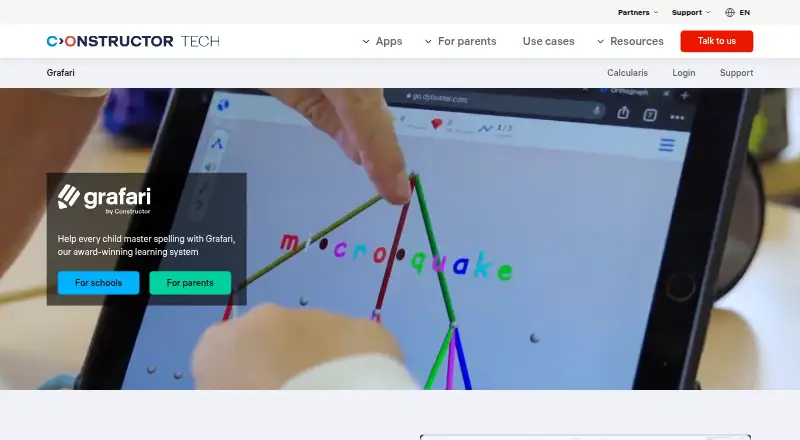
What Grafari is
Grafari is a spelling program for learners from the first year of school through adulthood. It connects spoken and written words with visual, sound, and shape-based activities, then selects the next task based on each learner’s errors without teacher setup. Its Coach feature offers reports, class overviews, and analysis of individual learner errors. The English program includes about 8,000 common words grouped by spelling pattern. Activities include dictation, picture-based spelling, letter color and tone matching, 3D word structures, mouth-shape videos, rewards, and a personal companion. The school program recommends sessions of 20 minutes three times weekly for at least three months. Teachers set up accounts through Institution Management and assign licenses in Coach. It runs in a browser on PCs, laptops, Chromebooks, and tablets without installation. Plans include Annual Premium at $20 a month, billed annually; 6-Month Plan at $25 a month, billed every six months; and Essentials at $33 a month, billed every three months. The school license price varies by country.
Good
- Adapts tasks to each learner’s error pattern.
- Includes about 8,000 English words.
- Offers class and individual learner reports.
- Runs in a browser without installation.
Watch out
- School license prices vary by country.
- School practice schedule calls for at least three months.
- Paid plans have differing billing intervals.
Who it suits
Grafari suits learners of any age who want spelling practice, including children with dyslexia or literacy and spelling difficulties. Its Coach reports and license assignment also make it relevant to schools and teachers.
Verdict
Grafari combines adaptive spelling activities with reports for teachers and a browser-based school setup. Learners and schools should consider the suggested practice schedule and plan billing terms before choosing it.
Plans and prices
From Grafari's own pricing page, checked 15 Oct 2026.
| Plan | Price | What it gives you |
|---|---|---|
| Annual Premium | $20 a month | long-term improvement · save 39% · 3-day trial · 240 USD per year |
| 6-month plan | $25 a month | best seller · save 24% · 3-day trial · 150 USD every 6 months |
| Essentials | $33 a month | maximum flexibility · 3-day trial · 99 USD every 3 months |
| Schools licenses | Priced on request | priced per learner · price varies by country · 30-day trial |
The facts
Each one read from Grafari's own pages, with the date it was checked.
What it does
- 3D word structures
- Words are represented as structures of colors, shapes and sounds to provide multiple memory cues.checked 15 Oct 2026
- Adaptive learning
- The software reads each learner’s error pattern and selects the next task without teacher configuration.checked 15 Oct 2026
- API and SDK
- The reviewed G2 listing describes LMS integration but does not list a Grafari-specific public API or SDK.checked 15 Oct 2026
- Changelog
- The August 2024 Coach release unified separate Grafari, Orthograph, Calcularis and Institution Management tools with learner profiles, licensing and analytics.checked 15 Oct 2026
- Coach administration
- Teachers can manage groups, adjust learning settings and assign a specific module to one learner.checked 15 Oct 2026
- Compliance
- The school page displays GDPR, FERPA, SOPIPA, COPPA and EU AI Act compliance information.checked 15 Oct 2026
- Dictation
- Supported dictation gives learners visual and audio scaffolding plus prompts for self-correction.checked 15 Oct 2026
- Funding
- Crunchbase records one seed funding round and Boğaziçi Ventures as an investor.checked 15 Oct 2026
- Independent profile
- EdTech Impact lists English, German and French, Mac, Windows, Chromebook, Linux and iPad support, plus email, phone, FAQ and knowledge-base support.checked 15 Oct 2026
- Independent user description
- Dyslexic Advantage describes Grafari as a game that practices splitting long German words to support reading and spelling.checked 15 Oct 2026
- Learning activities
- Features include letter color and tone matching, supported dictation, picture-based spelling, 3D word structures, mouth-shape videos, rewards, and a personal companion.checked 30 Sep 2026
- Legal entity
- Moneyhouse lists Constructor Technology AG as an active Swiss AG with CHF 100,000 capital and a Rheinweg 9, Schaffhausen address.checked 15 Oct 2026
- Limit: curriculum sequencing
- The same reviewer said CAR and SIR appeared in an introductory CVC module despite requiring special phonogram rules.checked 15 Oct 2026
- Limit: voice clarity
- A verified reviewer reported that the AI voice makes short E/I and A/E sounds difficult to distinguish.checked 15 Oct 2026
- Multisensory method
- Exercises combine colors, sounds, shapes and structures to connect spoken and written language.checked 15 Oct 2026
- Open-source licence
- The reviewed product, documentation and review pages do not state an open-source licence.checked 15 Oct 2026
- Personal companion
- Learners choose a companion avatar that guides activities and explains new exercises.checked 15 Oct 2026
Where it runs
- Browser requirements
- The school version runs in browsers on PCs, laptops, Chromebooks and tablets without installation.checked 15 Oct 2026
- Device support
- Grafari runs in a browser on PCs, laptops, Chromebooks, and tablets with nothing to install.checked 30 Sep 2026
The company
- Company founded
- LinkedIn identifies Constructor Tech as founded in 2019.checked 15 Oct 2026
- Company headquarters
- LinkedIn lists Schaffhausen, Switzerland as the headquarters.checked 15 Oct 2026
- Company size
- LinkedIn lists Constructor Tech as privately held with 201–500 employees.checked 15 Oct 2026
- Headquarters
- Singaporechecked 28 Sep 2026
Money
- Limit: signup billing
- The reviewer reported that signup was confusing and accidentally caused a duplicate payment, which support later corrected.checked 15 Oct 2026
The full review of Grafari
Overview
Grafari is a spelling program for school-age learners through adults, including children with dyslexia or spelling difficulties. It is strongest for families and schools seeking structured spelling practice rather than a general reading curriculum.
Its adaptive tasks and school reporting make it a considered option, but families should weigh the recommended commitment of three sessions a week and check the billing terms before enrolling.
Key features
- Adaptive spelling practice: Grafari uses each learner’s error patterns to choose the next task without teacher setup. That can reduce the need to manually tailor exercises, while the recommended schedule—20 minutes, three times a week, for at least three months—calls for a sustained commitment.
- Multisensory activities: Learners match letters with colors and tones, complete supported dictation and picture-based spelling, build 3D word structures, and watch videos of mouth shapes. Rewards and a personal companion add variety to practice.
- English vocabulary: The program groups about 8,000 high-frequency words by spelling pattern, giving practice a substantial vocabulary base organized around how words are spelled.
- Teacher reporting: Coach provides one-click learning reports, class overviews and individual error analysis. Teachers create accounts in Institution Management and assign licenses through Coach, giving schools a defined route to set up learner access and review progress.
- School safeguards and support: The school offering includes compliance information for GDPR, FERPA, SOPIPA, COPPA and the EU AI Act. Constructor Technology says customer data is encrypted in transit and at rest, access is restricted on a least-privilege basis, and privileged access uses multi-factor authentication. Schools receive a written product guide and can contact [email protected].
Pricing
Paid family plans begin at $20 a month on the annual option; the school option uses custom pricing per learner, with the price varying by country.
| Plan | Price and terms | Best fit |
|---|---|---|
| ANNUAL PREMIUM | $20 a month, billed $240 annually; long-term improvement · Save 39% | Families ready to commit for a year and seeking the lowest monthly price. |
| 6-MONTH PLAN | $25 a month, billed $150 every 6 months; best for consistent progress · Save 24% | Families who want a shorter commitment while maintaining regular practice. |
| ESSENTIALS | $33 a month, billed $99 every 3 months; maximum flexibility | Families prioritizing a shorter billing interval over the lower monthly cost. |
| Schools licenses | Custom pricing per learner; price differs by country. | Schools assigning licenses to learners through Coach. |
The family plans trade a lower monthly price for a longer billing commitment: the annual plan is billed at $240 annually, while Essentials renews every three months at $99. Check renewal terms before choosing; no cancellation or renewal policy is specified.
Platforms
Grafari is available on the web and runs in a browser on PCs, laptops, Chromebooks and tablets without installation. Mobile support is also indicated. The product runs on Android, iOS, macOS and Windows according to its platform coverage, but the described school setup is browser-based.
Who it's for
Grafari suits learners from the first year of school through adulthood who need spelling practice, particularly children with dyslexia or literacy and spelling difficulties. Its adaptive sequencing can suit learners who benefit from tasks responding to their errors, while the activity mix offers more than dictation alone. Schools may find Coach’s class and individual reports useful; those seeking a brief or occasional practice routine may find the recommended three-month schedule a poor fit.
Pros and cons
Pros
- Practice responds to learner errors: Tasks adapt without requiring a teacher to configure the next activity.
- Broad activity mix: Color and tone matching, dictation, picture spelling, 3D structures and mouth-shape videos give learners several ways to approach spelling.
- School reporting and browser access: Coach supplies class and individual views, and learners can use a browser without installing software.
- Longer-term price is lower: The annual plan costs $20 a month when billed $240 annually, less per month than the six-month and quarterly options.
Cons
- The cheapest option commits families for a year: Annual billing lowers the monthly rate but requires a $240 annual payment.
- Shorter billing costs more per month: Essentials offers quarterly billing at $33 a month, compared with $20 a month for the annual plan.
- Practice takes consistency: The school recommendation is three 20-minute sessions weekly for at least three months, which may not suit learners or families unable to sustain that routine.
- School pricing varies: Licenses are priced per learner and differ by country, so schools need a quote before budgeting.
Alternatives
Dyslexia Learning Apps is a useful category to compare when choosing support for dyslexia. Lexy is a better fit for those seeking a freemium option with up to five students on its free plan, AI tutoring, voice-based learning and adaptive phonics; Grafari instead emphasizes spelling-pattern practice and school reporting.
Reading Mountain offers a free, separate phonemic-awareness app with no login, making it a fit for those seeking a no-login starting point rather than Grafari’s broader spelling program. DytectiveU may suit schools in Spain seeking an option available without cost through Fundación ”la Caixa” and EduCaixa.
EduFlip has a free Level 1 plan for one student profile with self-paced practice, a fit for families wanting to begin with a limited free tier. Cody Reading offers three decodable stories per week on its free forever plan, so it is a better match for readers seeking a free, story-based option rather than spelling-pattern work.
Legasthenie & LRS Trainer is another freemium option for readers comparing web and mobile availability. OgStar Reading is another freemium choice with web and iOS support. Lumira is a free web option for those prioritizing a free product.
Exam Proctoring Software and Online Proctoring Software cover a different need: readers seeking proctoring tools rather than spelling practice should compare those categories.
Verdict
Choose Grafari if a learner needs structured spelling practice that adapts to errors, or a school wants Coach reports alongside browser-based access. Its multisensory activities and reporting are the clearest reasons to choose it; look elsewhere if you need flexible short-term billing, a defined free-plan allowance, or a lower-cost option without a long commitment.
Getting started
- Open the Grafari website
- Start the available free plan or free trial
- Use a supported browser on a PC, laptop, Chromebook, or tablet
- Schools create accounts in Institution Management
- Teachers assign licenses through Coach
Questions
What does Grafari cost?
Annual Premium costs $20 a month billed annually. The 6-Month Plan costs $25 a month billed every six months, and Essentials costs $33 a month billed every three months; school licenses vary by country.
Is there a free option?
Yes. Grafari lists a free plan and a free trial.
Which devices can run Grafari?
It runs in a browser on PCs, laptops, Chromebooks, and tablets, and lists Android, iOS, macOS, and Windows platforms.
Does Grafari provide teacher reports?
Yes. Coach provides one-click learning reports, class overviews, and per-learner error analysis.
How do schools assign access?
Teachers create accounts in Institution Management and assign Grafari licenses through Coach.
Who is Grafari for?
The program covers learners of all ages. Its parent offering is designed for children, including those with dyslexia or literacy and spelling difficulties.
Alternatives to Grafari
- 1

Reading Mountain
Free planAndroidiOSWeb7.9From $239 a year - 2
Reading Horizons
iOSWebmacOSSelf-hosted7.5From $10 a month - 3

DytectiveU
Free planAndroidiOSWeb7.3From €17 a month - 4
EduFlip
Free planWeb7.3From $13 a year - 5

Lexy
Free planiOSWebmacOS7.1Free plan - 6
Wordshark
AndroidiOSWebmacOS7.1From £190 a year