Gionth
Gionth is a browser-based AI homework helper that gives step-by-step assistance across school subjects.
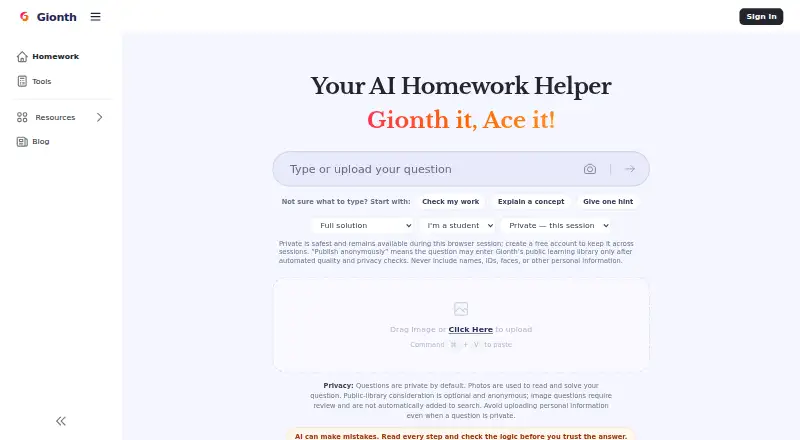
What Gionth is
Gionth is a browser-based AI homework helper that gives step-by-step assistance across school subjects. Users can type a question or upload a homework photo for the AI to read and solve. Coverage includes math, science, English, history, and computer science, though results depend on the topic and how clearly the question is presented. The site also provides free GPA calculator, word counter, and citation generator tools. No account is needed to ask a question or upload a photo; a free account can retain question history across sessions. Questions are private by default, and users may choose to submit them for public-library consideration after automated quality and privacy checks. Gionth says product events exclude question text, OCR text, email, raw IP, and full browser user-agent, while separate visit and security logs may include IP and browser details. It is designed for modern iPhone and Android browsers and does not require an app. The plan is free, but fair-use rate limits may apply to bursts from one IP, and explanations depend on daily free-service capacity. Gionth warns that AI can make mistakes, especially with unclear images or advanced problems, and advises checking its steps and following school or teacher policies.
Good
- Accepts typed questions and homework photos.
- Provides step-by-step explanations and worked solutions.
- No account is required to ask questions.
- Includes free GPA, word-count, and citation tools.
Watch out
- AI may make mistakes, especially on unclear images or advanced problems.
- Explanations depend on daily free-service capacity.
- Fair-use limits may apply to request bursts from one IP.
- No mobile app is provided.
Who it suits
Gionth suits students who want help working through homework questions by text or photo on a browser. Its extra study tools may also help users checking GPA, word counts, or citations.
Verdict
Gionth offers browser-based homework help with photo input and additional study tools. Treat its explanations as something to check, and follow your school or teacher’s policy on AI-generated work.
Plans and prices
From Gionth's own pricing page, checked 15 Oct 2026.
| Plan | Price | What it gives you |
|---|---|---|
| Free | Free | Questions and photo uploads without account · step-by-step explanations · fair-use limits may apply to request bursts · daily free-service capacity |
The facts
Each one read from Gionth's own pages, with the date it was checked.
What it does
- Academic-integrity guidance
- The FAQ says submitting generated work as one’s own may violate school rules and advises checking assignment policies.checked 15 Oct 2026
- Academic use
- Gionth says users should follow their school or teacher’s policy and not submit AI-generated work as their own.checked 8 Oct 2026
- Account
- An account is not required to ask a question or upload a photo; a free account can preserve question history across sessions.checked 8 Oct 2026
- Account requirement
- Typing or uploading a homework problem does not require an account; accounts can preserve history across sessions.checked 15 Oct 2026
- Accuracy
- Gionth warns that AI can make mistakes, particularly with unclear images or advanced problems, and advises users to check its steps.checked 8 Oct 2026
- Accuracy warning
- The maker warns that unclear images, advanced problems and some reasoning can produce errors that users must verify.checked 15 Oct 2026
- Advertising
- Gionth says small unobtrusive advertisements fund the free service.checked 15 Oct 2026
- AI basis
- The FAQ says Gionth uses a language model that generates explanations from training patterns and question context.checked 15 Oct 2026
- API and SDK
- The public pages reviewed describe browser use but do not document a public API, SDK or developer integration.checked 15 Oct 2026
- Availability
- Gionth states that its browser service is available 24/7.checked 15 Oct 2026
- Documentation depth
- Documentation consists mainly of consumer FAQ, workflow and study-guide pages rather than API or administrator manuals.checked 15 Oct 2026
- Image limitation
- Messy handwriting, glare and dense diagrams may be misread during photo processing.checked 15 Oct 2026
- Input methods
- Users can type a question or upload a homework photo for OCR reading and solving.checked 15 Oct 2026
- Licence
- The public pages reviewed do not state an open-source licence or indicate that the software is open source.checked 15 Oct 2026
- Limit: answer reliability
- MobilesTalk repeats the maker’s warning that unclear images and advanced questions can lead to incorrect AI answers.checked 15 Oct 2026
- Limit: burst throttling
- MobilesTalk reports that fair-use limits may affect users who send many requests rapidly from one IP address.checked 15 Oct 2026
- Mobile access
- The product is designed for modern iPhone and Android browsers and requires no app installation.checked 15 Oct 2026
The company
- Company headquarters
- The maker’s public About and FAQ pages do not state a headquarters location.checked 15 Oct 2026
- Founded year
- The maker’s public pages do not state a founding year.checked 15 Oct 2026
- Maker
- Gionth says it was created by teachers, developers, and technology enthusiasts; the page does not state a headquarters or founding date.checked 8 Oct 2026
- Maker description
- Gionth says it was created by teachers, developers and technology enthusiasts focused on making learning more accessible.checked 15 Oct 2026
Money
- Free tools
- The site offers GPA, word-count, citation, study-timer and unit-conversion utilities alongside the AI solver.checked 15 Oct 2026
- Praise: free access
- MobilesTalk highlights the no-cost plan and the ability to ask questions without registering as key advantages.checked 15 Oct 2026
Where it runs
- Limit: browser-only workflow
- MobilesTalk describes Gionth as browser-based and says users should not expect a dedicated app experience.checked 15 Oct 2026
The full review of Gionth
Gionth is a free homework helper for students who want step-by-step explanations in a browser, without installing an app. It suits everyday questions across several school subjects, but its answers are best treated as a starting point to verify.
Overview
Students can type a question or upload a homework photo, and Gionth provides worked solutions with explanations. Coverage includes math, science, English, history and computer science, though results depend on the topic and how clearly the question is presented. That makes it a useful way to work through routine problems; advanced questions and unclear images are less reliable cases, according to Gionth’s own warning about AI mistakes.
No account is needed to ask a question or submit a photo. A free account preserves question history between sessions, which is useful for returning to previous work. The site also provides a GPA calculator, word counter and citation generator at no charge. Students should follow their school or teacher’s AI policy and not submit generated work as their own.
Key features
Typed and photo questions
Typing is straightforward for questions already in digital form, while photo input can save transcription for a problem on paper. Image convenience comes with a qualification: unclear photos can cause errors, so students should check both the question interpretation and the reasoning before using a solution.
Study utilities and history
The GPA calculator, word counter and citation generator broaden Gionth beyond solving individual homework questions. They are useful supporting tools, though the central draw remains the explanations. Question history requires a free account; students who prefer not to create one can still ask questions but will not have that cross-session continuity.
Privacy and usage limits
Questions are private by default. Users may opt to submit a question for possible inclusion in a public library after automated quality and privacy checks. Product event data excludes question text, OCR text, email, raw IP and full browser user-agent, while separate visit and security logs may include IP and browser information. Fair-use rate limits can apply when one IP sends a burst of requests, and the availability of explanations depends on daily free-service capacity, so the free access is not a guarantee of unlimited use.
Pricing
Free — free. Asking questions requires no subscription, and the plan includes free access to Gionth’s question-solving service. Fair-use burst limits and daily service capacity can constrain use, so it is best for occasional or ordinary study needs rather than anyone depending on uninterrupted high-volume access. There are no paid tiers or subscription terms to weigh.
Platforms
Gionth runs on the web and is designed for modern iPhone and Android browsers. It does not require a mobile app, which keeps access simple across devices but means students looking specifically for a dedicated app should consider another option.
Who it's for
Gionth is a sensible choice for students seeking no-cost, browser-based help with routine questions, especially those who value worked steps over a bare answer and sometimes need to submit a photo. It is less suitable as a sole authority for advanced material, unclear image-based questions, or coursework where a teacher restricts AI assistance.
Pros and cons
- Pros: No subscription or account is required to ask a question, reducing friction for occasional help.
- Pros: Typed and photo input plus step-by-step solutions support different homework formats and can show a method, not only a result.
- Pros: A free account preserves question history, and the GPA calculator, word counter and citation generator add useful study utilities.
- Cons: AI errors are a stated risk, particularly for advanced problems and unclear images, so answers need independent checking.
- Cons: Daily capacity and burst-based fair-use limits mean access may not suit sustained, high-volume sessions.
- Cons: Browser access rather than a dedicated mobile app may disappoint students who prefer an installed app.
Alternatives
Consider Gauth if you want a downloadable mobile app alongside web access and a free math-solution option; its Gauth PLUS membership offers more expert interactions at custom pricing.
Course Hero is a better fit for students who want to browse study documents and can use contribution-based unlocks or pay per homework question; its Basic membership is free.
StudyBru may suit students looking for a free service explicitly offered during beta, with no credit card required.
Choose OpenTutor if you want another free-to-download and free-to-use option, with a paid ad-free version mentioned at custom pricing.
Sophia Educate suits someone who wants to try one explanation as a guest or use two daily explanations with a verified account.
AI Homework Help: Scan & Solve is the iOS-only alternative for students who want a free, no-signup start and are willing to consider its $29.99 a year annual plan.
QuestionAI may be preferable for students who need broader device coverage, including desktop platforms, and want a subscription option advertising unlimited problem solving and image uploads.
SnapSolve is worth comparing for Android users who want a stated daily solve allowance and photo, text and voice input; its free tier has no saved history or priority processing.
Browse the Homework Help Software category for more options.
Verdict
Gionth is a good fit for students who want free, browser-based guidance on ordinary homework questions without signing up or installing an app. Its combination of photo input, worked explanations and optional history makes it convenient for day-to-day study. Look elsewhere if you need dependable answers to advanced problems, guaranteed high-volume access, or a dedicated mobile app; in every case, check the steps and follow your school’s rules.
Getting started
- Open Gionth in a web browser
- Type a homework question or upload a homework photo
- Review the generated steps and worked solution
- Create a free account if you want question history across sessions
- Use the GPA calculator, word counter, or citation generator as needed
Limits worth knowing
The free plan may apply fair-use limits to bursts of requests from one IP. AI explanations also depend on daily free-service capacity, and unclear images or advanced problems may produce mistakes.
Questions
Is Gionth free?
Yes. The Free plan costs 0.00 USD and requires no subscription.
Do I need an account to ask questions?
No. You can ask questions or upload photos without an account. A free account preserves question history across sessions.
Which devices can use Gionth?
Gionth works on the web and in modern iPhone and Android browsers. It does not require a mobile app.
What subjects does it cover?
Coverage includes math, science, English, history, and computer science, with performance varying by topic and question clarity.
Can I upload a homework image?
Yes. You can upload a homework photo for the AI to read and solve.
Does Gionth guarantee correct answers?
No. Gionth warns that AI can make mistakes, particularly with unclear images or advanced problems, and advises checking the steps.
Alternatives to Gionth
- 1

QuestionAI
Free planAndroidiOSWebExtension8.1From $4.90 a month - 2
Sophia Educate
Free planWeb7.3$5 one-time - 3
StudyBru
Free planAndroidiOSWeb7.3Free plan - 4

Course Hero
Free planAndroidiOSWebExtension7.2From $9.95 a month - 5
Gauth
Free planAndroidiOSWeb7.2Free plan - 6
Solvely
AndroidiOSWebExtension7.2