GetSound.ai
GetSound.ai creates ambient soundscapes in real time, tailoring them to conditions such as location, weather, and time of day.
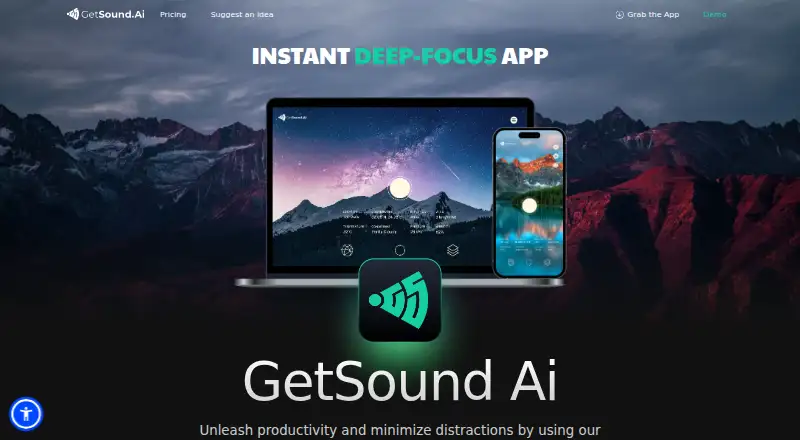
What GetSound.ai is
GetSound.ai creates ambient soundscapes in real time, tailoring them to conditions such as location, weather, and time of day. The maker says each soundscape is generated for the user at that particular moment, and that sound can respond to weather, light exposure, and wind. Nature is the listed sound layer. Session controls include a timer and adjustments for ambient volume, weather synchronization, and environmental layers. Offline playback is available, though some functions need an active internet connection; offline tracks may continue during a network interruption until the connection resumes.
The service is available on Android, iOS, Linux, macOS, web, and Windows. GetSound.ai describes use in coworking spaces, offices, libraries, and educational institutions, with separate ambient controls for multiple business rooms or zones. Its Free plan costs nothing and limits simultaneous use to one device, daily usage, environments, locations, and refreshes. Personal is for non-commercial use on one device at a time. Small Business covers one location and up to 100 clients per day, while Large Business is for businesses serving more than 100 clients daily. A seven-day trial provides access to certain product features and does not require payment to start.
Good
- Soundscapes adapt to weather, location, and time of day.
- Sound can respond to light exposure and wind.
- Session timer and controls cover volume, weather sync, and layers.
- Offline playback is available.
- Supports Android, iOS, Linux, macOS, web, and Windows.
Watch out
- The Free plan limits devices, usage, environments, locations, and refreshes.
- Personal use is non-commercial only.
- Commercial licensing is limited.
- Personal and business plan prices are available on request.
Who it suits
GetSound.ai suits people who want ambient sound that adapts to conditions around them, as well as users who need nature soundscapes across mobile, desktop, or web platforms. Its business plans and room-or-zone controls are intended for coworking spaces, offices, libraries, and educational institutions.
Verdict
Choose GetSound.ai if you want generated ambient soundscapes that respond to environmental conditions, or need controls for multiple business rooms or zones. Look elsewhere if you need unrestricted free use, commercial rights beyond the stated limited license, or a listed price for a paid plan.
Plans and prices
From GetSound.ai's own pricing page, checked 15 Oct 2026.
| Plan | Price | What it gives you |
|---|---|---|
| Free | Free | personal non-commercial · 1 device · 60 minutes daily · limited environments and locations · limited refreshes · audio watermark |
| Personal Monthly | $12 a month | personal non-commercial · 1 device simultaneously · Personal Monthly $12.00 |
| Small Business Monthly | $39.99 a month | small business · one location · up to 100 clients daily · 1 device simultaneously · Small Business Monthly $39.99 |
| Personal Yearly | $107.99 a year | personal non-commercial · 1 device simultaneously · Personal Yearly $107.99 |
| Small Business Yearly | $349 a year | small business · one location · up to 100 clients daily · 1 device simultaneously · Small Business Yearly $349.00 |
| Personal | Priced on request | 1 device at a time · personal, non-commercial use |
| Small Business | Priced on request | 1 device at a time · one business location · no more than 100 clients per day |
| Large Business | Priced on request | One or multiple devices at a time · businesses servicing more than 100 clients daily |
The facts
Each one read from GetSound.ai's own pages, with the date it was checked.
What it does
- Adaptive generation
- Its algorithm uses signals such as weather, location and time of day to shape each soundscape.checked 15 Oct 2026
- API direction
- LinkedIn describes the company goal of providing an API for real-time soundscapes aimed at VR developers.checked 15 Oct 2026
- Business use
- The help center permits personal use and small or enterprise business use, with public playback requiring a Small or Enterprise license.checked 15 Oct 2026
- Business zones
- Business accounts can create separate soundscape zones for areas such as hotel lobbies, elevators, pools and spas.checked 15 Oct 2026
- Commercial license
- limitedchecked 26 Sep 2026
- Data deletion
- Users may request access, correction or deletion of collected personal information by contacting the company.checked 15 Oct 2026
- Desktop availability
- The site provides downloads for macOS, Windows and Linux.checked 15 Oct 2026
- Documentation
- The help center contains FAQs, a detailed tutorial, a desktop app guide and keyboard-shortcut links, but no visible public API or SDK reference.checked 15 Oct 2026
- Download restriction
- The help center says GetSound soundscapes cannot be downloaded.checked 15 Oct 2026
- Environmental layers
- Users can layer effects including forests, lakes, wind chimes, oceans and rivers.checked 15 Oct 2026
- Founders and roles
- The about page names Lior Nitzan as CTO and Adi Goldstein as Sound Architect, with backgrounds in music and sound production.checked 15 Oct 2026
- Google Play privacy
- Google Play says the developer declares no data shared with third parties, no data collected, encryption in transit and user-requested deletion.checked 15 Oct 2026
- Integrations
- The maker pages reviewed do not name third-party product integrations.checked 7 Oct 2026
- Internet access
- The terms say some functions require an active internet connection and that offline tracks may play during a network issue until the connection resumes.checked 7 Oct 2026
- License model
- Terms grant a limited, revocable, non-transferable usage license and prohibit copying, reverse engineering, redistribution and public broadcasting without authorization.checked 15 Oct 2026
- Limit: G2 reviewer
- The same G2 reviewer says generated results sometimes do not match requirements.checked 15 Oct 2026
Where it runs
- Available apps
- The maker’s site links to desktop apps for macOS, Windows, and Linux; Apple and Google app listings identify iOS and Android versions.checked 7 Oct 2026
- Latest listed Android update
- Google Play lists the app as updated December 7, 2023 with background-mode improvements.checked 15 Oct 2026
- Latest listed iOS release
- The App Store page lists version 1.8 dated November 16, 2023 and mentions AirPlay/Bluetooth access and performance improvements.checked 15 Oct 2026
- Limit: Apple AirPlay
- One reviewer reported that an October 2023 update stopped environmental sounds from reaching AirPlay output.checked 15 Oct 2026
The company
- Company headquarters
- LinkedIn lists headquarters in Wilmington, Delaware and company size of 2–10 employees.checked 15 Oct 2026
- Company identity
- LinkedIn identifies the maker as GetSound, LLC, a privately held software-development company founded in 2021.checked 15 Oct 2026
- Headquarters
- Wilmington, Delaware, United Stateschecked 19 Oct 2026
Money
- Free plan
- Yeschecked 26 Sep 2026
The full review of GetSound.ai
Overview
GetSound.ai generates nature-based ambient soundscapes that respond to the listener’s surroundings. It is best suited to people who want changing environmental audio or businesses that need separate sound controls for multiple rooms. Its adaptive approach is distinctive, but the free plan’s daily limit and single-device cap make it a restricted way to listen.
Key features
GetSound says it generates a soundscape for each user in the moment, adapting it to conditions such as weather, light exposure, and wind. That makes it a better fit for listeners who want ambience to shift with the environment than for those seeking a library of fixed tracks. The sound layer is nature, which keeps the experience focused but may not suit people looking for broader kinds of audio.
A session timer, ambient-volume control, weather sync, and environmental-layer controls let listeners shape how a session runs. Offline tracks may continue through a network interruption, although some functions require an active internet connection. The company requests location access only with user approval for specific features and says it does not sell or share location data except to provide the service.
For offices, coworking spaces, libraries, and educational institutions, separate ambient controls for multiple rooms or zones address a need that a single-listener setup does not. The business plans still impose operational boundaries: Small Business covers one device at a time, one location, and up to 100 clients per day; Large Business is for businesses serving more than 100 clients daily and supports one or multiple devices at a time.
Pricing
GetSound is freemium, with a free plan, a seven-day trial, and custom pricing for paid plans. The trial provides full access to certain product features and requires no payment to start. The terms do not say what happens at trial end, so check the terms before relying on it as a continuing arrangement.
| Plan | Price | What it includes |
|---|---|---|
| Free | free | One device simultaneously, a daily usage limit, limited environments and locations, and refresh limits. |
| Personal | Custom pricing | One device simultaneously; personal, non-commercial use. |
| Small Business | Custom pricing | One device at a time, one business location, and no more than 100 clients per day. |
| Large Business | Custom pricing | One or multiple devices at a time for businesses servicing more than 100 clients daily. |
The free tier is useful for trying the core idea, but daily use, environments, locations, refreshes, and simultaneous devices are all constrained. Personal is the relevant paid tier for non-commercial listening on one device; the business plans fit operators according to their client volume and device needs. GetSound’s commercial license is limited, so businesses should confirm that their intended use is covered before committing.
Platforms
GetSound is available on Android, iOS, Linux, macOS, the web, and Windows. That range makes it workable across phones, computers, and browsers. Offline playback is supported, but it does not remove the need for an internet connection for some functions.
Who it's for
Choose GetSound for nature-based ambience that responds to local conditions, especially if you value weather-linked sound or need coordinated controls for multiple business spaces. It is a weaker fit for people who need unrestricted free listening, a broader set of sound layers, or commercial rights beyond the limited license. Support is available through its knowledge base, chat, and [email protected]; the company says it uses commercially acceptable measures to protect personal information but cannot guarantee absolute security.
Pros and cons
- Pros: Soundscapes adapt to weather and other environmental conditions, rather than remaining fixed.
- Pros: Controls for multiple rooms or zones make the product relevant to shared business spaces.
- Pros: Apps span mobile, desktop, and web, with offline tracks able to continue during network issues.
- Cons: The free plan has a daily usage limit and restricts devices, environments, locations, and refreshes.
- Cons: Personal use is limited to one device, while business tiers have device, location, or client-volume constraints.
- Cons: The sound layer is nature and the commercial license is limited, narrowing its fit for other audio needs or broader business use.
Alternatives
For another sound-focused option with a free tier, Easy-Peasy.AI Meditation Music Generator runs on iOS and the web; its free plan includes 1,000 words, one image credit, one audio transcription, and 1,000 characters of text-to-speech. Pick Musigation if you want to compose music in a browser: its free plan gives one monthly credit, MP3 output, composition planning, and lyric and style editing, while its Starter plan is $10 a month billed monthly for 15 credits and MP3 and WAV output.
Somaphi is an iOS and macOS alternative whose free plan offers five modes without an account or subscription. immerse.zone may suit web users who want a free allowance of 10 AI-generated tracks per day. Cleome is a paid web option with a free trial; its Solo plan costs $7.50 a month, billed at $90/yr, and is aimed at independent therapists needing unlimited audio on one device at a time. Nirvael offers a free browser-based generative ambient sound environment with activity and emotional-state selection and continuous listening.
For a broader ambient-sound alternative across Android, iOS, macOS, web, and Windows, Endel has free access and Premium plans for one, three, or 12 months at custom pricing. Mubert is a freemium option on web, iOS, and Android; its free Ambassador plan allows 25 tracks and five downloads per month with fixed duration, while Creator costs $14 a month.
Browse more options in Meditation apps.
Verdict
GetSound.ai is a strong choice for listeners who want nature soundscapes to respond to environmental conditions and for businesses that need controls across rooms or zones. Its wide platform coverage and adaptive generation are the clearest reasons to choose it. Look elsewhere if you need unrestricted free use, a broader sound palette, commercial rights beyond the limited license, or a paid-plan price before contacting the provider.
Getting started
- Visit https://www.getsound.ai/ or choose an app for your platform.
- Choose among the website, desktop apps for macOS, Windows, and Linux, or the iOS and Android apps.
- Start the seven-day free trial without payment, or use the Free plan.
- Allow location access if you want to use features that request it.
- Set a session timer and adjust ambient volume, weather sync, and environmental layers.
Limits worth knowing
The Free plan allows one device simultaneously and has daily usage, environment, location, and refresh limits. The seven-day trial provides full access to certain product features; the Personal plan is limited to non-commercial use on one device at a time.
Questions
Is GetSound.ai free?
Yes. Its Free plan costs nothing and has limits on devices, daily usage, environments, locations, and refreshes.
Is there a free trial?
Yes. A seven-day trial provides access to certain product features, and no payment is required to start it.
Which platforms does GetSound.ai support?
It supports Android, iOS, Linux, macOS, web, and Windows.
Can GetSound.ai work offline?
Offline playback is available, and offline tracks may continue during a network issue. Some functions require an active internet connection.
What do the business plans cover?
Small Business covers one business location and no more than 100 clients per day. Large Business is for businesses serving more than 100 clients daily.
What does GetSound.ai cost beyond the Free plan?
Prices for Personal, Small Business, and Large Business are available on request. Personal is for non-commercial use; the business plans are described by location and client volume.
Alternatives to GetSound.ai
- 1

Loudly
Free planAndroidiOSWebAPI8.9From $96 a year - 2

Soundverse AI Beat Maker
Free planAndroidiOSWebAPI8.7Free plan - 3
Easy-Peasy.AI Meditation Music Generator
Free planiOSWebAPIExtension8.5From $8 a month - 4

AIVA
Free planWebLinuxmacOSWindows8.3From €11 a month - 5

Brain.fm
AndroidiOSWebmacOS8.1From $99.99 a year - 6

Mubert
Free planAndroidiOSWeb8.1From $14 a month