
Game Ping Booster
Game Ping Booster routes traffic for supported games through relay infrastructure on a route intended to be shorter than the player's default route.
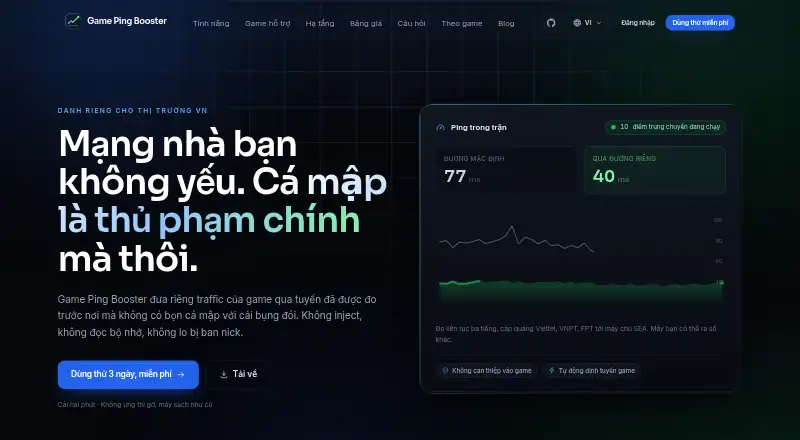
What Game Ping Booster is
Game Ping Booster routes traffic for supported games through relay infrastructure on a route intended to be shorter than the player's default route. Only supported game IP ranges are redirected while a game is running; other internet traffic stays on the usual connection. The listed games include PUBG: Battlegrounds, Counter-Strike 2, Dota 2, Valorant, Teamfight Tactics, League of Legends, Delta Force, World of Tanks, and Naraka: Bladepoint. Active relay locations are Hong Kong, Singapore, and Vietnam. Pressing Connect starts a handshake with relay servers, which then select a route. The Windows client changes routing tables and installs the WinTun network driver, requiring administrator permission. The maker says the app does not inject into games, read game memory, or add DLLs, but does not guarantee game publishers will allow its use. The maker reports one three-hour test with ping to a SEA server moving from 80 ms to 43 ms on Viettel, VNPT, and FPT fiber; results may vary or show no improvement. The service is built primarily for players in Vietnam. Its listed trial lasts one day and covers one device; paid plans are prepaid by bank transfer and do not renew automatically.
Good
- Reroutes supported game traffic only.
- Selects a route automatically after connecting.
- Lists relays in Hong Kong, Singapore, and Vietnam.
- Trial includes one device and premium servers.
Watch out
- Windows client requires administrator permission.
- Supports one simultaneous device.
- Results may show no ping improvement.
- Game publishers may not allow its use.
Who it suits
It may suit Windows players in Vietnam whose games are supported and who want only game traffic rerouted. Users should be comfortable granting administrator permission and using a one-device setup.
Verdict
Game Ping Booster is a focused routing service for supported games, with automatic route selection and traffic kept separate from ordinary internet use. Its one-device limit, administrator requirement, and variable results matter when deciding whether it fits.
Plans and prices
From Game Ping Booster's own pricing page, checked 14 Oct 2026.
| Plan | Price | What it gives you |
|---|---|---|
| Dùng thử | Free | Premium servers · automatic game switching · automatic reconnect · free profile updates · Miễn phí / 1 ngày · 1 thiết bị |
| Tiêu chuẩn | 49,000 VND a month | Premium servers · automatic game switching · automatic reconnect · free profile updates · 49.000 ₫ / 30 ngày · 1 thiết bị |
| Dual | 79,000 VND a month | Premium servers · automatic game switching · automatic reconnect · free profile updates · 79.000 ₫ / 30 ngày · 2 thiết bị |
The facts
Each one read from Game Ping Booster's own pages, with the date it was checked.
What it does
- Account and login
- Accounts can be created with email and password or Google sign-in, and the account dashboard manages devices, subscriptions, and downloads.checked 8 Oct 2026
- API and SDKs
- The privacy policy mentions internal API calls made by the desktop client, but no public API documentation, SDK or developer keys are provided.checked 14 Oct 2026
- Architecture
- The public codebase uses a Go relay on Linux VPS hosts and a C# .NET 9 Avalonia client with a Windows service, JSON profiles and PowerShell tools.checked 14 Oct 2026
- Automatic control
- The client can turn routing on when a game starts, turn it off afterward, and reconnect through fallback routes.checked 14 Oct 2026
- Build requirements
- Relay development requires Go 1.22 or newer; the client requires the .NET 9 SDK, and Native AOT publishing needs Visual Studio C++ build tools.checked 14 Oct 2026
- Commercial backend
- The licence server at gamepingbooster.com is closed source, while the public client and relay components are open source.checked 14 Oct 2026
- Compliance
- The maker states it has not claimed compliance with a specific data-protection framework such as GDPR or CCPA/CPRA.checked 8 Oct 2026
- Compliance statement
- The operator explicitly makes no GDPR or CCPA compliance claim.checked 14 Oct 2026
- Coverage limit
- The README says roughly eight of ten matches reach a covered server because the game profile is not yet saturated.checked 14 Oct 2026
- Data collection
- Connection quality summaries may be sent between matches, and the client setting to disable this also stops discovery of unsupported game servers.checked 8 Oct 2026
- Documentation depth
- The repository publishes architecture and wire-protocol documents plus relay deployment and WinTun operating instructions.checked 14 Oct 2026
- Encryption limit
- The documented tunnel authenticates packets but does not encrypt the payload, so the ISP or path may inspect game traffic.checked 14 Oct 2026
- Game interference
- The maker says the app does not inject into games, read game memory, or insert DLLs, and does not guarantee that a game publisher will allow its use.checked 8 Oct 2026
- Game-only routing
- Only destination ranges associated with the running game are routed through the booster; other traffic keeps the normal ISP path.checked 14 Oct 2026
- Game traffic
- Only supported game IP ranges are rerouted while the game is running; other internet traffic continues over the user's normal connection.checked 8 Oct 2026
- Installer limit
- The README warns that the installer is not code signed and may trigger Windows SmartScreen.checked 14 Oct 2026
- Intended market
- The service is operated from Vietnam and is built primarily for players in Vietnam.checked 8 Oct 2026
- Licence
- The public client and relay repository is released under the MIT licence.checked 14 Oct 2026
- Licence revocation limit
- Offline licence verification can allow a cancelled subscription to continue until the token expires, normally within 24 hours.checked 14 Oct 2026
- Measured result
- The maker reports one three-hour test in which ping to a SEA game server changed from 80 ms to 43 ms on Viettel, VNPT, and FPT fiber, while warning results vary and may show no improvement.checked 8 Oct 2026
- No auto-renewal
- Paid access is prepaid for a fixed term and does not renew automatically.checked 14 Oct 2026
The company
- Founded
- No founded year is stated in the maker's pages or public repository.checked 14 Oct 2026
- Headquarters
- Vietnamchecked 28 Sep 2026
- Maker status
- The service is operated by Việt Nguyễn, an independent programmer in Vietnam, rather than a registered legal entity.checked 14 Oct 2026
The full review of Game Ping Booster
Game Ping Booster routes supported game traffic through relays, with automatic route selection for players seeking a different path to game servers. It is best suited to Windows players in Vietnam; elsewhere, the reported improvement is no guarantee, and the client’s administrator requirement is a meaningful trade-off.
Overview
The service aims to shorten the route between a player and a supported game server by sending game traffic through relays in Hong Kong, Singapore, and Vietnam. It reroutes only supported game IP ranges while the game is running, leaving browsing and other internet traffic on the normal connection. That game-only approach suits players who want to alter a game’s route without routing their entire connection through a service.
Supported titles include PUBG: Battlegrounds, Counter-Strike 2, Dota 2, Valorant, Teamfight Tactics, League of Legends, Delta Force, World of Tanks, and Naraka: Bladepoint. The maker reports one three-hour test in which ping to a SEA game server fell from 80 ms to 43 ms on Viettel, VNPT, and FPT fiber. That result is relevant to the intended Vietnamese market, but it is a single reported test, not a dependable forecast: the maker warns that results vary and may show no improvement.
Key features
Pressing Connect makes the app handshake with relay servers and select a route automatically. This keeps route selection simple, but players who want to choose a relay or compare routes themselves do not get that control among the stated features.
The Windows client changes routing tables and installs the WinTun network driver, requiring administrator permission. The maker says it does not inject into games, read game memory, or insert DLLs, but also does not guarantee that game publishers will permit its use. That distinction may reassure players concerned about how the client interacts with a game, while leaving publisher acceptance unresolved.
Connection quality summaries may be sent between matches. Disabling this setting also stops discovery of unsupported game servers, so privacy-conscious users give up that discovery behavior when they opt out.
Pricing
The Dùng thử plan costs nothing for one day and one device. It includes Premium servers, auto-connect, and auto-reconnect, making it a short trial of the paid service rather than an ongoing free tier.
Tiêu chuẩn costs 49 VND a month, billed every 30 days, for one device with Premium servers, auto-connect, and auto-reconnect. It is the fit for a single-device player who wants continued access after the free day. Dual costs 79 VND a month, also billed every 30 days, and raises the device allowance to two while keeping the same listed features. That is the more suitable option for someone needing two devices; the cheaper plan gives up the second seat.
Paid plans are paid in advance by bank transfer, with SePay matching and confirming payments. Plans do not renew automatically, so continued access requires another payment rather than an automatic renewal. Refund requests are reviewed manually by email; there is no fixed refund window or published response-time commitment.
Platforms
The client is for Windows. Although the service has a web presence and an account dashboard for device management, subscriptions, and downloads, the supported platform is Windows; players seeking a listed mobile or macOS client should look elsewhere.
Who it's for
Game Ping Booster makes the most sense for Windows players in Vietnam whose supported games are reaching servers over a route they want to improve, particularly if they prefer automatic selection and game-only routing. It is a weaker fit for users who need multiple devices on the cheaper paid tier, want manual route control, need a different platform, or require predictable latency gains.
Pros and cons
- Pros: Game-only routing keeps ordinary internet use on the normal connection, and automatic route selection avoids requiring players to pick a path themselves.
- Pros: The one-day free plan includes Premium servers and both auto-connect and auto-reconnect, letting a player try those features before paying.
- Cons: The free plan lasts only one day and allows one device; the one-device limit also applies to the cheaper 30-day paid plan.
- Cons: Windows routing changes and a WinTun driver installation require administrator permission, which may be unsuitable on a managed or restricted PC.
- Cons: Results can vary or show no improvement, and manual refunds have no fixed window or response-time commitment.
Alternatives
For a wider category comparison, see the Game Latency Reducers list. AK Accelerator is worth considering for Android or iOS as well as Windows; its listed free access is another option for someone seeking a free plan.
Hastega offers Android and Windows support and a free tier, though that tier disconnects GPN every 15 minutes and is limited to GPN with VPN Gate servers. Its one-time Premium plan is listed at $5, paid once, billed ~50 Days, for readers comparing a different pricing structure. LightSpeed is the alternative to consider for Linux or macOS, or for a self-hosted setup; it is free forever and includes community-hosted relays and 21 built-in game profiles.
GIAMPING has Android support alongside Windows, but its free plan is limited to VPN-only use, one concurrent session, and VPN bandwidth of 1~2.5Mbps. GTNet offers free Windows early access, with paid subscription required after full release and future availability and pricing subject to change.
RushFrame is for iOS and macOS users; its Daily Rewards plan provides 100 MB per day, cumulative rewards, game library access, and basic optimization. GamesTC is another Windows option, with four hours of daily free usage on Free servers and a daily reset at 06:00 BRT. Qiyou Game Accelerator supports Android, iOS, macOS, and Windows, with listed monthly, quarterly, and half-yearly paid plans.
Verdict
Choose Game Ping Booster if you play supported games on Windows in Vietnam and want an automatic, game-only route change with a one-day chance to try Premium servers. Its narrow traffic scope is the main reason to pick it; variable results, administrator access, and the one-device Standard plan are reasons to look elsewhere if you need predictable gains, broader platform support, or more seats.
Getting started
- Visit the Game Ping Booster website.
- Create an account with email and password or Google sign-in.
- Download and run the Windows client; installation requires administrator permission.
- Choose the one-day free plan or a paid plan.
- Start a supported game and press Connect for automatic route selection.
Limits worth knowing
The free Dùng thử plan lasts one day and covers one device, with Premium servers, auto-connect and auto-reconnect. The listed Tiêu chuẩn plan covers one device; Dual covers two devices. Results can vary and may show no improvement.
Questions
Is there a free plan or trial?
The Dùng thử plan is free for one day and includes one device, Premium servers, auto-connect and auto-reconnect. The service also describes a 3-day trial.
How much do the paid plans cost?
Tiêu chuẩn is 49 VND a month, billed every 30 days, for one device. Dual is 79 VND a month, billed every 30 days, for two devices.
Which platforms does it support?
The supported platform is Windows.
Which games are supported?
The site lists PUBG: Battlegrounds, Counter-Strike 2, Dota 2, Valorant, Teamfight Tactics, League of Legends, Delta Force, World of Tanks and Naraka: Bladepoint.
How does payment work?
Paid plans are prepaid by bank transfer, with SePay matching and confirming payments. The maker says plans do not renew automatically.
Does the service guarantee lower ping?
No guarantee is stated. The maker reports one three-hour test with a change from 80 ms to 43 ms on specified Vietnamese fiber connections, and says results vary and may show no improvement.
Alternatives to Game Ping Booster
- 1
GearUP Booster
Free planAndroidiOSWindows7.9From $6.99 a month - 2

GIAMPING
Free planAndroidWebWindows7.8Free plan - 3

Biubiu Game Booster
AndroidiOSmacOSWindows7.6 - 4

Hastega
Free planAndroidWindows7.6$5 one-time - 5
Qiyou Game Accelerator
AndroidiOSmacOSWindows7.6From CN¥278 a year - 6
AK Accelerator
Free planAndroidiOSWindows7.1Free plan