File Shredder
File Shredder is a free Windows desktop application for permanently removing files by overwriting them with random binary data multiple times.
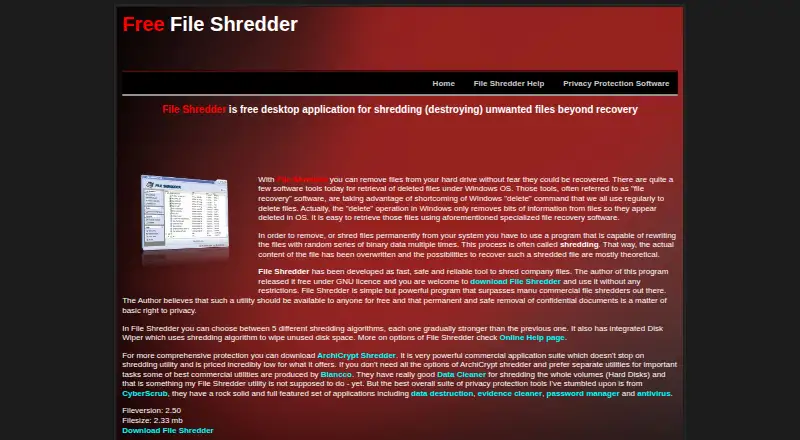
What File Shredder is
File Shredder is a free Windows desktop application for permanently removing files by overwriting them with random binary data multiple times. Users can choose from five shredding algorithms, with different levels of strength, and add files or folders—including their contents and subfolders—to a queue. Its Disk Wiper targets unused disk space. An optional setting adds secure deletion, queueing, and launch commands to Windows Explorer’s right-click menu. The program is licensed under GNU/GPL and is free for personal and commercial use. The help page lists Windows NT, 2000, XP, 2003 Server, Vista, 7, 8, and 10 as supported systems. The maker says the software is not intended for wiping entire disk volumes and that it cannot provide support. The listed version is 2.50. File shredding is permanent and cannot be undone, so users should confirm their selection before starting.
Good
- Free for personal and commercial use
- Offers five shredding algorithms
- Can wipe unused disk space
- Optional Windows Explorer context-menu commands
Watch out
- Cannot shred entire disk volumes
- The maker says support is unavailable
- Shredding is permanent and cannot be undone
Who it suits
File Shredder suits Windows users who need to permanently delete selected files or folders, or wipe unused disk space. It is not intended for whole-volume wiping.
Verdict
File Shredder provides file, folder, and free-space wiping at no cost. Its whole-volume limitation and irreversible deletion are important to consider before use.
Plans and prices
From File Shredder's own pricing page, checked 20 Sep 2026.
| Plan | Price | What it gives you |
|---|---|---|
| Free | Free | Five shredding algorithms · File and folder shredding · Free-space wiping · GNU/GPL licensed |
| File Shredder | Free | Free for personal and commercial use · Windows desktop application |
The facts
Each one read from File Shredder's own pages, with the date it was checked.
What it does
- Algorithms
- Users can choose among five shredding algorithms of increasing strength.checked 3 Oct 2026
- Destructive operation
- The help page warns that shredding files is permanent and cannot be undone.checked 3 Oct 2026
- File and folder queue
- Users can add files and folders, including folder contents and subfolders, to a shredding queue.checked 3 Oct 2026
- License
- The program is released under the GNU/GPL General Public License and is free for personal and commercial use.checked 3 Oct 2026
- Overwrite method
- The site says shredding rewrites files with random binary data multiple times.checked 3 Oct 2026
- Purpose
- File Shredder is a free desktop application for shredding unwanted files beyond recovery.checked 3 Oct 2026
- Support
- The maker says it cannot provide support for File Shredder.checked 3 Oct 2026
- Supported systems
- The help page lists Windows NT, 2000, XP, 2003 Server, Vista, 7, 8, and 10.checked 3 Oct 2026
- Version
- The home page lists Fileversion 2.50 and a filesize of 2.33 mb.checked 3 Oct 2026
- Whole-drive limit
- The maker says File Shredder is not intended to shred entire disk volumes.checked 3 Oct 2026
Money
- Free space wiping
- The integrated Disk Wiper shreds unused disk space.checked 3 Oct 2026
Where it runs
- Windows integration
- An optional setting adds secure deletion, queueing, and launch commands to Windows Explorer’s right-click menu.checked 3 Oct 2026
The full review of File Shredder
Overview
File Shredder is a free Windows desktop application for permanently deleting files and folders by overwriting them with random binary data multiple times. It suits people who need a no-cost way to clear selected files or unused disk space, rather than erase an entire drive. Its choice of five overwrite algorithms adds flexibility, but permanent deletion and the lack of maker support call for care.
Key features
You can queue individual files, folders, and their contents, including subfolders, for shredding. That makes the program useful for targeted cleanup without having to process items one at a time. An optional Windows Explorer integration puts secure deletion and queueing commands in the right-click menu, shortening the path from browsing to removal.
File Shredder offers five algorithms of increasing strength, so users can choose an overwrite method suited to their needs. Its Disk Wiper also shreds unused disk space, a separate capability from deleting selected files. These options make it more versatile than a single-purpose file deletion tool, but they do not make it a whole-drive eraser: the maker says the program is not intended to shred entire disk volumes.
Shredding is permanent and cannot be undone. Check the queue carefully before starting; this is not a tool for files that might later need recovery. The maker also says it cannot provide support, which makes the program a less reassuring choice for users who want help if something goes wrong.
Pricing
Both listed plans cost nothing. The Free plan includes five shredding algorithms, file and folder shredding, free-space wiping, and a GNU/GPL license. The File Shredder plan is described as free for personal and commercial use and as a Windows desktop application. The license terms make it suitable for either personal or commercial use without a purchase, but there is no paid support option described.
Platforms
File Shredder runs on Windows. Supported systems are Windows NT, 2000, XP, 2003 Server, Vista, 7, 8, and 10. The home page lists version 2.50 at 2.33 MB. It is not a choice for Linux or macOS users.
Who it's for
Choose File Shredder if you use a supported Windows system and want free, focused control over file, folder, and free-space wiping. The right-click integration is useful for frequent selective cleanup, while the five algorithms give users a choice of overwrite strength. Look elsewhere if you need whole-volume erasure, scheduled shredding, or maker support.
Pros and cons
- Pros: Free for personal and commercial use under GNU/GPL, with no paid tier required for the listed file, folder, and free-space wiping features.
- Pros: Five overwrite algorithms let users select among different levels of shredding strength.
- Pros: Optional Explorer commands and queueing support make it practical to collect files and folders for deletion.
- Cons: It is not intended to shred entire disk volumes, ruling it out for whole-drive erasure.
- Cons: Shredding cannot be undone, so mistakes in the queue can mean permanent loss.
- Cons: The maker cannot provide support, leaving users without that route for assistance.
Alternatives
For whole-drive erasure, consider Active@ KillDisk, which supports Linux, macOS, and Windows and offers paid personal licenses at $64.95, paid once and $79.95, paid once. If you want another free option across Linux, macOS, and Windows, DriveWipe is free for personal, hobby, and commercial use; its terms expect government, intelligence, forensics, and security organizations to support it.
BCWipe Total WipeOut is a paid alternative with a free trial. CBL Data Shredder may suit Windows users seeking free low-level hard-drive formatting, customizable wipe methods, and drive-sector wiping. For a free, open-source option that runs offline on Windows and Linux, consider Strix Disk Cleaner. Blancco Drive Eraser is a paid alternative with a free trial.
For a Linux-only option, see nwipe. ASCOMP Secure Eraser is another Windows option with a free Standard Edition for personal use and a Professional private license at $29.90, paid once, limited to two systems.
Compare more tools in Data Erasure Software, Secure File Shredding Software, and File Shredder Software.
Verdict
File Shredder is a sensible pick for Windows users who want free, configurable deletion of selected files, folders, or unused disk space. Its Explorer integration and five algorithms make it more useful than a bare delete command, but choose another tool for whole-drive wiping, and avoid it if you need support or a way to recover mistakes.
Alternatives to File Shredder
- 1

BitRaser File Eraser
Free planAPILinuxmacOSWindows7.4From $39.99 a year - 2

D-Secure File Eraser
WebAPILinuxmacOS7.2From $40 a year - 3
SecureDel
Free planOpen sourceWindows6.9Free plan - 4
ShredIt
AndroidiOSmacOSWindows6.9$24.95 one-time - 5

DeleteOnClick
Free planWindows6.7Free plan - 6
Easy File Shredder
Windows6.6From $29.95 a year