DockFlow
DockFlow is browser-based dock scheduling software for operations involving schedulers, drivers, and carriers.
What DockFlow is
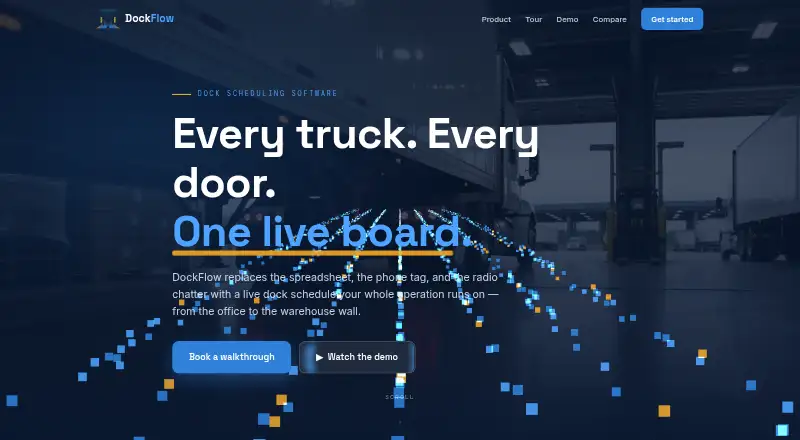
DockFlow is browser-based dock scheduling software for operations involving schedulers, drivers, and carriers. Its live board arranges doors as columns and time slots as rows, displays appointments by status, and flags overlaps that could double-book a door. Drivers and carriers can log in to request appointment slots, while schedulers can approve or decline pending requests with one click. Schedules are available in day, week, month, and list views. Appointments move through pending, scheduled, checked-in, in-progress, completed, and cancelled statuses; drivers see only their own carrier’s appointments. Reports cover carrier performance, dock utilization, completion and cancellation rates, peak arrival hours, and daily volume, with date filters and CSV export. TV mode shows on-site trucks and upcoming appointments on a live wall board that refreshes every 15 seconds. The product also has a dark theme that remembers its setting between sessions. DockFlow requires no installation, according to the maker, DelCom LLC. It is paid, with pricing available on request. The maker offers a 20-minute walkthrough and lists an email for contact.
Good
- Flags overlapping appointments on the live dock grid.
- Carriers and drivers can request slots directly.
- Reports can be filtered by date and exported as CSV.
- TV mode refreshes every 15 seconds.
Watch out
- Pricing is available only on request.
- Runs in a browser; no other platform is listed.
Who it suits
DockFlow suits dock operations where schedulers coordinate appointment requests from drivers and carriers. It may also fit teams that want dock activity, appointment status, and reporting available through a browser.
Verdict
DockFlow brings appointment requests, scheduling, status tracking, and dock reports into a browser-based workflow. Its paid pricing is available on request.
The facts
Each one read from DockFlow's own pages, with the date it was checked.
Where it runs
- Appointment statuses
- The six listed statuses are pending, scheduled, checked in, in progress, completed, and cancelled.checked 8 Oct 2026
- Approval workflow
- Schedulers can approve or decline pending carrier requests with one click.checked 8 Oct 2026
- Browser access
- DockFlow runs in a browser and requires no installation, according to the site.checked 8 Oct 2026
What it does
- Booking
- Carriers and drivers can request appointment slots, which schedulers can approve or decline with one click.checked 9 Oct 2026
- Carrier booking
- Drivers and carriers can log in to request appointment slots directly.checked 8 Oct 2026
- Conflict prevention
- The dock grid flags overlapping appointments before a door is double-booked.checked 9 Oct 2026
- Dark mode
- The product offers a dark theme across its screens and remembers the setting between sessions.checked 9 Oct 2026
- Deployment
- DockFlow runs in a browser and the maker says no installation is needed.checked 9 Oct 2026
- Dock grid
- The live dock grid shows doors as columns and time slots as rows, and flags overlapping appointments.checked 8 Oct 2026
- Product
- DockFlow provides a live dock schedule organized by door, time, and appointment status.checked 9 Oct 2026
- Reporting
- Reports cover carrier performance, dock utilization, completion and cancellation rates, peak arrival hours, and daily volume, with date filtering and CSV export.checked 9 Oct 2026
- Reports
- Reports cover carrier performance, dock utilization, completion and cancellation rates, peak arrival hours, and daily volume, with date filtering and CSV export.checked 8 Oct 2026
- Roles
- DockFlow lists admin, scheduler, and driver roles; drivers see only their carrier’s appointments.checked 9 Oct 2026
- Sales and support
- The maker offers a 20-minute walkthrough and lists [email protected] for direct contact.checked 9 Oct 2026
- Schedule views
- The site lists day, week, month, and list schedule views.checked 8 Oct 2026
- Status tracking
- Appointments can be tracked through pending, scheduled, checked in, in progress, completed, and cancelled statuses.checked 9 Oct 2026
- Support
- The site offers a 20-minute walkthrough and lists [email protected] for contact.checked 8 Oct 2026
- TV mode
- TV mode displays a live dock board with on-site trucks and upcoming appointments and refreshes every 15 seconds.checked 9 Oct 2026
- Views
- The schedule offers day, week, month, and list views.checked 9 Oct 2026
- Who it serves
- The site presents DockFlow for dock operations involving schedulers, drivers, and carriers.checked 8 Oct 2026
The company
- Company
- The site footer identifies DelCom LLC as the company behind DockFlow.checked 8 Oct 2026
- Maker
- The site footer identifies DelCom LLC as the maker.checked 9 Oct 2026
Alternatives to DockFlow
- 1

ProDocks
Free planAndroidiOSWebAPI7.2From $25 a month - 2

DockSync
AndroidiOSWeb6.8From £756 a year - 3

Goramp Dock Scheduling
WebAPI6.8From $249 a month - 4
LoadMetrics Dock Scheduling
Free planWebAPI6.5From $500 a year - 5

SimpleDock
Free planWebAPI6.5From $49 a month - 6

Mobiledock
AndroidiOSWebAPI6.4