Datapack Editor
Datapack Editor is a free creator and editor for Minecraft datapacks, with tools for editing and validating project files.
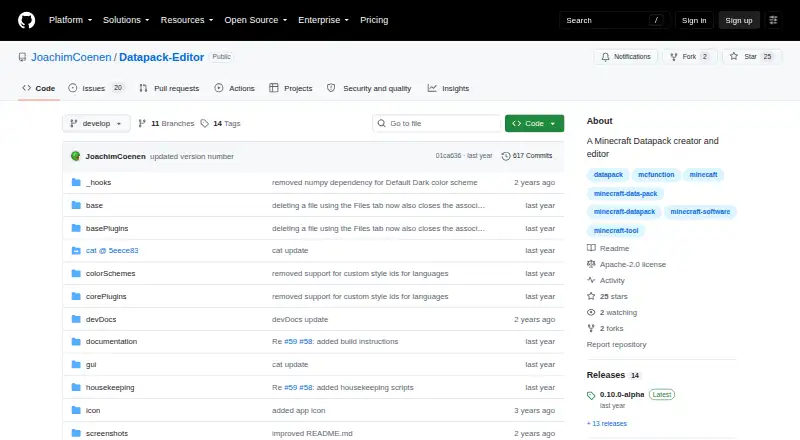
What Datapack Editor is
Datapack Editor is a free creator and editor for Minecraft datapacks, with tools for editing and validating project files. It supports Minecraft 1.20.2–1.20.6, corresponding to datapack versions 18–41. Its editor provides syntax highlighting, error checking, and suggestions and completion for mcFunction and JSON, including nested constructs. Users can create or open projects, validate files, and work across multiple project roots. Projects can declare dependencies on other datapacks through dependencies.json. Navigation tools include Ctrl-click symbol navigation, multiple tabs and views, quick file opening, and search across files. Users can customize the editor with themes and plugins. Windows instructions call for extracting a ZIP and running start.cmd; Linux instructions say to extract the ZIP and run the Datapack Editor file. macOS support is experimental, and the README says users must build the app themselves. The repository lists an Apache-2.0 license. The README also notes that Avast, AVG, and Zillya may flag the Windows executable as malware, describing the alert as a false positive.
Good
- Validates mcFunction and JSON project files.
- Provides syntax highlighting and code suggestions.
- Supports project dependencies through dependencies.json.
- Includes custom themes and plugins.
- Apache-2.0 licensed.
Watch out
- Supports Minecraft 1.20.2–1.20.6 only, as listed.
- macOS support is experimental and requires building the app.
- Some antivirus products may flag the Windows executable.
Who it suits
Datapack Editor suits Minecraft datapack creators working with mcFunction and JSON files on Windows or Debian Linux. macOS users should be prepared to build the app themselves.
Verdict
Datapack Editor offers project validation and code-assistance features for the listed Minecraft versions. Windows and Debian Linux have download instructions, while macOS support requires more setup.
Plans and prices
From Datapack Editor's own pricing page, checked 4 Oct 2026.
| Plan | Price | What it gives you |
|---|---|---|
| Free | Free | Minecraft 1.20.2–1.20.6 · Windows and Debian Linux; macOS experimental and requires building the app |
The facts
Each one read from Datapack Editor's own pages, with the date it was checked.
What it does
- Code editing
- The editor provides syntax highlighting, detailed error checking, and code suggestions and completion for mcFunction and JSON files, including nested constructs.checked 4 Oct 2026
- Customization
- The editor supports custom themes and plugins.checked 4 Oct 2026
- Dependencies
- Projects can declare dependencies between datapacks using dependencies.json.checked 4 Oct 2026
- License
- The GitHub repository lists an Apache-2.0 license.checked 4 Oct 2026
- Navigation
- Features include Ctrl-click symbol navigation, multi-tab and multi-view editing, quick file opening, and search across files.checked 4 Oct 2026
- Project management
- Users can open or create datapack projects, validate project mcFunction and JSON files, and work with multi-root projects.checked 4 Oct 2026
- Purpose
- Datapack Editor is a creator and editor for Minecraft datapacks.checked 4 Oct 2026
- Security note
- The README warns that Avast, AVG, and Zillya may flag the Windows executable as malware and describes this as a false positive.checked 4 Oct 2026
- Support
- The README directs users with questions, problems, or suggestions to create an issue.checked 4 Oct 2026
- Supported Minecraft versions
- The README lists Minecraft 1.20.2–1.20.6, corresponding to datapack versions 18–41.checked 4 Oct 2026
Where it runs
- Linux download
- The Linux instructions say to download and extract the ZIP, then run the Datapack Editor file.checked 4 Oct 2026
- macOS support
- macOS support is experimental, and the README says users must build the app themselves.checked 4 Oct 2026
- Windows download
- The Windows instructions say to download and extract the ZIP, then run start.cmd.checked 4 Oct 2026
The company
- Maker
- The maker’s GitHub profile identifies Joachim Coenen and lists Munich.checked 4 Oct 2026
The full review of Datapack Editor
Overview
Datapack Editor is a dedicated creator and editor for Minecraft datapacks, best suited to authors who want code assistance alongside project-level validation. Its focused toolset makes it a strong no-cost option for compatible projects, but the narrow Minecraft version range and extra setup on macOS limit its reach.
Key features
Syntax highlighting, error checking, and suggestions and completion for mcFunction and JSON—including nested constructs—can help users work through datapack code with fewer context switches. Project validation covers those file types too, but support is limited to Minecraft 1.20.2–1.20.6, corresponding to datapack versions 18–41. Authors targeting other versions should look elsewhere.
Users can create or open datapack projects, organize work across multiple roots, and declare datapack dependencies in dependencies.json. Custom themes and plugins offer some flexibility, while Ctrl-click symbol navigation, multiple tabs and views, quick file opening, and cross-file search help when a project grows beyond a handful of files.
Questions, problems, and suggestions can be raised by creating an issue. The repository uses the Apache-2.0 license. Windows users should also know that Avast, AVG, and Zillya may flag the executable; the project describes these detections as false positives.
Pricing
The Free plan costs nothing. It includes the editor for Minecraft 1.20.2–1.20.6 on Windows and Debian Linux, with no paid tier or trial to weigh against the core features. There are no seat or usage quotas stated for this plan. The trade-off is compatibility: macOS is experimental and requires building the app yourself, while the supported Minecraft versions remain limited.
Platforms
Windows instructions are to download and extract the ZIP, then run start.cmd; on Linux, users extract the ZIP and run the Datapack Editor file. The free plan specifies Debian Linux. macOS is experimental, and users must build the application themselves, making it a less convenient choice for anyone expecting a ready-to-run download on that platform.
Who it's for
Datapack Editor is a good fit for Minecraft datapack authors working within versions 1.20.2–1.20.6 who want editing help, validation, and project organization without a software cost. It is a weaker fit for authors targeting other versions or macOS users who do not want to build the application.
Pros and cons
- Pros: Code suggestions, completion, error checking, and project validation cover both mcFunction and JSON, including nested constructs.
- Pros: Multi-root projects, dependency declarations, plugins, and cross-file navigation support more involved datapack work.
- Pros: The Free plan costs nothing, with no paid tier required for the listed editor features.
- Cons: Minecraft support is confined to versions 1.20.2–1.20.6, or datapack versions 18–41.
- Cons: macOS support is experimental and requires a self-build.
- Cons: Antivirus warnings from Avast, AVG, and Zillya may create friction for Windows users, even though the project describes them as false positives.
Alternatives
Minecraft Datapack Generators is a useful starting point for comparing tools in the category. Choose Orca Minecraft Datapack Generator if you want a generator with Linux, macOS, web, and Windows support and a free plan that includes 200 starter credits. Codexe Datapack Generator is a web-based alternative whose free plan includes 50K tokens. For a free, open-source Minecraft pack development kit across Linux, macOS, and Windows, consider Beet. MCDatapacker is another free option for Linux and Windows, with no paid tier required for its core job. Minecraft Datapack Compiler is free and supports extension, Linux, macOS, and Windows. Minecraft Datapack Language is a free, open-source MIT-licensed option spanning API, extension, Linux, macOS, and Windows. If a web generator with a capped free tier suits you, PackForge allows two generations per month on its Free plan, with basic complexity and prompts up to 2,000 characters. Kore is another free option for Linux, macOS, web, and Windows.
Verdict
Choose Datapack Editor if you build datapacks for Minecraft 1.20.2–1.20.6 and want integrated code assistance, validation, and project tools at no cost. Its narrow version support is the main reason to look elsewhere, and macOS users should be prepared to build it themselves.
Getting started
- Open the Datapack Editor GitHub website
- On Windows, download and extract the ZIP archive
- Run start.cmd on Windows
- On Linux, download and extract the archive
- Launch the Datapack Editor file on Linux
- On macOS, build the application yourself
Limits worth knowing
The free plan covers Minecraft 1.20.2–1.20.6, with Windows and Debian Linux support. macOS remains experimental and requires users to build the application.
Questions
Is Datapack Editor free?
Yes. The Free plan costs nothing and there is no trial period.
Which Minecraft versions are supported?
The listed range is Minecraft 1.20.2 through 1.20.6, corresponding to datapack versions 18 through 41.
Which operating systems can run it?
It supports Windows and Linux. macOS support is experimental and requires building the app yourself.
What files can it edit?
The editor provides code assistance for mcFunction and JSON files, including nested constructs.
Is the project open source?
Its GitHub repository is licensed under Apache-2.0.
Who makes Datapack Editor?
The maker is Joachim Coenen, whose GitHub profile lists Munich.
Alternatives to Datapack Editor
- 1

Orca Minecraft Datapack Generator
Free planWebAPILinuxmacOS7.7From $6.99 a month - 2
Minecraft Datapack Language
Free planOpen sourceAPIExtensionLinuxmacOS7.3Free plan - 3

Codexe Datapack Generator
Free planWeb6.7From $25 a month - 4

PackForge
Free planWeb6.6From $7.99 a month - 5

Beet
Free planLinuxmacOSWindows6.1Free plan - 6

Kore
WebLinuxmacOSWindows6.0