
Custody X Change
Custody X Change helps users create custody schedules and parenting plans, calculate parenting time, and organize co-parenting records.
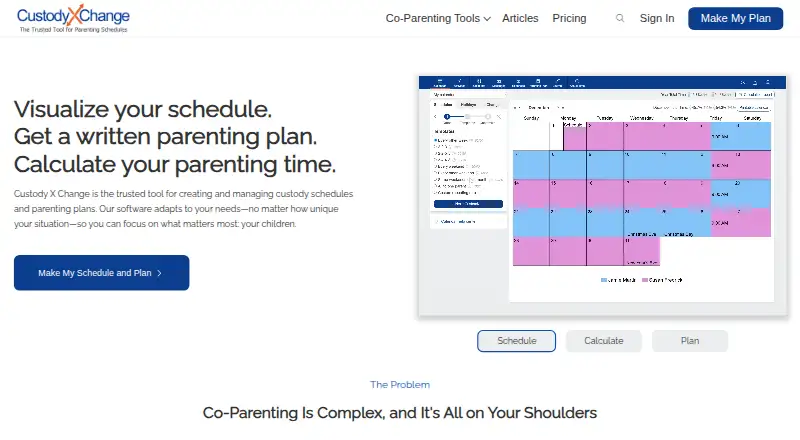
What Custody X Change is
Custody X Change helps users create custody schedules and parenting plans, calculate parenting time, and organize co-parenting records. Its calendar supports regular, seasonal, holiday, and one-time changes, with calculations by hours or overnights. The parenting plan template contains 144 provisions, and users can write custom ones. Other tools include a private journal, an actual parenting time tracker, expense tracking, child information, activities, and co-parent messaging. Messages can be printed with read receipts, and the messaging system detects hostile language. The service can sync custody calendars with services such as Google Calendar or Outlook, and it can send children's names, birth dates, and parenting time totals to the cloud version of Family Law Software for child support calculations. A limited free version is available; it restricts scheduling to five holidays and does not allow printing. The company says user data is encrypted in its database and in transit, but its terms do not guarantee that a schedule or plan made with the app will be accepted by a court.
Good
- Calendars support regular, seasonal, holiday, and one-time changes.
- The parenting plan template includes 144 provisions.
- Includes journals, expense tracking, and co-parent messaging.
- Calendar sync is available with services such as Google Calendar or Outlook.
- Offers a 30-day full refund.
Watch out
- The free version limits scheduling to five holidays.
- The free version does not allow printing.
- The company cannot guarantee court acceptance of a created plan.
Who it suits
Custody X Change suits parents organizing parenting time, schedules, plans, expenses, and communication. Its professional product is described as designed for attorneys, mediators, and judges who need shared client records and collaboration.
Verdict
Custody X Change brings scheduling, planning, time tracking, and co-parenting records into one service. Consider the free version's holiday and printing limits, and remember that the company does not guarantee court acceptance of plans created with the app.
Plans and prices
From Custody X Change's own pricing page, checked 14 Oct 2026.
| Plan | Price | What it gives you |
|---|---|---|
| Free version | Free | limited feature set |
| Parent plan | $6 a month | starting price; plan limits not publicly listed · billed annually |
The facts
Each one read from Custody X Change's own pages, with the date it was checked.
What it does
- Account linking
- Accounts can link with co-parents, lawyers, children and guests, with different sharing permissions for each relationship.checked 14 Oct 2026
- Calendar integrations
- Account settings allow calendar synchronization with another calendar application, and the product page specifically mentions Google Calendar.checked 14 Oct 2026
- Calendar sync
- The maker says users can sync their custody calendar with services such as Google Calendar or Outlook.checked 29 Sep 2026
- Child information
- The child-info tool stores searchable records such as school, medical and clothing information and starts with 11 forms per child.checked 14 Oct 2026
- Developer extensibility
- The public integration documentation describes an account-code connection to Family Law Software; the reviewed official pages do not describe a public API, SDK, source repository or self-hosted deployment.checked 14 Oct 2026
- Documentation
- The product includes a private journal, actual parenting time tracker, expense tracking, child information, activities, and co-parent messaging.checked 29 Sep 2026
- Expense tracking
- Gold-level subscribers can record child-related expenses, upload receipts, dispute entries and print or email expense reports.checked 14 Oct 2026
- Family Law Software integration
- The integration transfers children’s names, birth dates and parenting-time totals to the cloud version of Family Law Software through an account code.checked 14 Oct 2026
- Independent expert criticism
- A family-law attorney’s review rated the product 7/10, citing slow setup for complex plans, imperfect calendar detail, weak vacation provisions and documents that were not suitable for a Texas court without further work.checked 14 Oct 2026
- Installation
- The product is installed as a browser-based app on Windows, Mac and Android, or added to the iPhone home screen through Safari.checked 14 Oct 2026
- Integration
- Custody X Change can send children's names, birth dates, and parenting time totals to the cloud version of Family Law Software for child support calculations.checked 29 Sep 2026
- Journal
- The product includes a private journal for recording events and developments.checked 14 Oct 2026
- Legal limitation
- The terms say the company cannot guarantee that a schedule or plan created with the app will be accepted by a court.checked 29 Sep 2026
- Limit: offline collaboration
- Offline work cannot receive linked-user updates or send notifications until the device reconnects.checked 14 Oct 2026
- Limit: schedule responsibility
- A schedule cannot leave a time block unassigned; responsibility must be assigned to a parent or third party.checked 14 Oct 2026
- Limit: subscription access
- The BBB reviewer complained that viewing prior parenting plans required resubscribing and that no lifetime purchase option exists; the company confirmed those conditions.checked 14 Oct 2026
- Messaging
- Subscribers can message a linked co-parent with read receipts, message reports and a hostility monitor; messages cannot be edited or deleted.checked 14 Oct 2026
- Offline mode
- The app and browser version can work offline for activities, expenses, message searches and journal entries, synchronizing after reconnection.checked 14 Oct 2026
Where it runs
- App-store distribution
- The company says its Windows, iOS and Android apps are not distributed through app stores and are installed directly from the browser.checked 14 Oct 2026
The company
- Company history
- The company says Custody X Change began in 2005 when a family lawyer and software developer collaborated on parenting-time calculations.checked 14 Oct 2026
- Founded
- 2005checked 28 Sep 2026
- Maker headquarters
- Crunchbase lists the company headquarters in Riverton, Utah, United States.checked 14 Oct 2026
- Maker size
- LinkedIn lists Custody X Change as a privately held individual-and-family-services company with 2–10 employees.checked 14 Oct 2026
Money
- Limit: price
- A SoftwareConnect reviewer called the price the product’s biggest disadvantage and said competing services offer discounts or lower costs.checked 14 Oct 2026
The full review of Custody X Change
Overview
Custody X Change is a custody-scheduling and co-parenting record service for parents managing shared care. It is best suited to families that need a detailed plan alongside a record of what actually happens. Its broad planning and documentation toolkit is a strength, but the free version’s holiday and printing caps make it more of a preview than a complete long-term option.
Key features
Schedules and parenting plans
Calendars handle regular routines, seasonal changes, holidays, and one-time adjustments, with parenting time calculated in hours or overnights. That range is useful when a family’s routine changes across the year or parents need to tally time in different ways. Calendar sync with services such as Google Calendar and Outlook can keep custody arrangements visible alongside other commitments.
The parenting-plan template offers 144 provisions, and parents can add custom ones. This gives users a substantial starting point while leaving room for arrangements that do not fit a standard template. Still, a plan made in the service is not a legal guarantee: the company says it cannot ensure that a court will accept a schedule or plan.
Records and communication
A private journal, actual parenting-time tracker, expense tracking, child information, activities, and document storage bring routine records together. This is valuable when parents want to track actual care and expenses, rather than rely on the planned calendar alone. Messaging adds a channel for co-parent communication; messages can be printed with read receipts, and the system detects hostile language. Those features support documentation, but they do not replace legal advice or guarantee how records will be treated in a dispute.
Users can send children’s names, birth dates, and parenting-time totals to the cloud version of Family Law Software for child-support calculations. That connection is specifically useful to people working with that software. The maker describes a professional version for attorneys, mediators, and judges, with professional groups able to share client records and collaborate.
Security and support
The FAQ says data is encrypted in the database and in transit, with requests validated to restrict access to the account holder. The privacy policy also says personal information may be stored on company or third-party cloud servers and names US-based subprocessors Stripe and PostHog. Parents considering sensitive family records should weigh those stated storage and processing arrangements against their own privacy requirements.
The help center has tutorials, and users can contact the company if they cannot find an answer there. A 30-day full refund offers a defined window to reconsider a purchase. Cancellation is handled in account settings, and paid features remain available until the license expires.
Pricing
Custody X Change is freemium, with no free trial. The Free version costs nothing. It limits scheduling to five holidays and does not allow printing, so it may suit someone evaluating the workflow or with simple scheduling needs, but not parents who depend on printed messages or a full holiday calendar.
The Parent plan starts at $6 a month, billed annually. It is the paid option for parents who need to move beyond the free version’s stated limits. The page does not give plan limits, so buyers should confirm the precise inclusions before committing. The FAQ’s 30-day full refund and cancellation policy provide some flexibility, though annual billing is the listed term.
Platforms
Custody X Change is available on Android, iOS, macOS, web, and Windows. That breadth can suit households using a mix of phones and computers.
Who it's for
This is a strong fit for co-parents who want schedules, detailed parenting plans, actual-time records, expenses, and messaging in one service. It also has a clear professional audience among attorneys, mediators, and judges who need shared client records and collaboration. Parents seeking a court-approved outcome, a free tool without the five-holiday cap, or a stated promise of how records will be accepted should look elsewhere or get legal guidance.
Pros and cons
- Pro: Calendars cover recurring routines as well as seasonal, holiday, and one-time changes, with time totals by hours or overnights.
- Pro: A 144-provision plan template, custom provisions, and several record-keeping tools support more than basic calendar sharing.
- Pro: Printable messages with read receipts and hostile-language detection add useful communication records.
- Con: The free version stops at five holidays and bars printing, limiting its usefulness for complex schedules or paper records.
- Con: The paid starting price is billed annually, and the stated price does not explain plan limits.
- Con: The company does not guarantee court acceptance of plans created in the app.
Alternatives
For other options, browse our Co-Parenting Apps directory. Choose AppClose if a free hardship or domestic-violence-survivor account or a monthly web plan at $7.99 a month better fits your circumstances. BestInterest is worth considering for its no-expiration free plan, which includes secure messaging, Solo Mode, coaching sessions, inbound calls, a shared calendar, tasks, and expenses.
CoreParent may suit parents who want a free plan with capped expenses and court-document features, or professionals looking for referral-based exports. Family Focus is an alternative for Android and iOS users considering its 7.99 USD monthly Premium plan, though its site and FAQ describe the free offering differently. Consider CustodyTrac, Kidtime, or dip if you want to compare other web and mobile custody or co-parenting options. Peaceful CoParenting Messenger is another option for iOS and macOS.
Verdict
Choose Custody X Change if you need a detailed custody plan and want schedules, time tracking, expenses, and co-parenting records gathered in one service. Its strongest case is the combination of flexible calendars and substantial documentation, including printable messages. Look elsewhere if the free version’s holiday and printing limits are deal-breakers, or if you need assurance that a plan will be accepted by a court.
Getting started
- Visit custodyxchange.com.
- Choose the limited free version or review the Parent plan, starting at $6 a month billed annually.
- Use the web version or choose Android, iOS, macOS, or Windows.
- Create a custody calendar and enter the applicable schedule changes.
- Add parenting plan provisions and organize co-parenting information.
Limits worth knowing
The free version limits scheduling to five holidays and does not allow printing. The Parent plan starts at $6 a month, billed annually; the plan page does not list its limits.
Questions
Is Custody X Change free?
A limited free version is available. It restricts scheduling to five holidays and does not allow printing.
Which devices and platforms are supported?
Custody X Change is available on Android, iOS, macOS, web, and Windows.
Can I sync its calendar with another calendar service?
The maker says users can sync the custody calendar with services such as Google Calendar or Outlook.
Does it connect to Family Law Software?
It can send children's names, birth dates, and parenting time totals to the cloud version of Family Law Software for child support calculations.
Does Custody X Change provide legal advice or guarantee court acceptance?
Its terms say the company cannot guarantee that a schedule or plan created with the app will be accepted by a court.
Alternatives to Custody X Change
- 1

AppClose
Free planAndroidiOSWeb8.0Free plan - 2

Beacon Co-Parenting App
Free planAndroidiOSWebAPI7.9€19 one-time - 3
Kidtime
Free planAndroidiOSWeb7.8From $99.99 a year - 4

BestInterest
Free planAndroidiOSWebmacOS7.5Free plan - 5
Peaceful CoParenting Messenger
Free planAndroidiOSmacOS7.2From $84.99 a year - 6

CoreParent
Free planiOSWebmacOS7.1From $129 a year