Crypto Shredder
Crypto Shredder is Windows software that overwrites accessible file and directory data before deleting it.
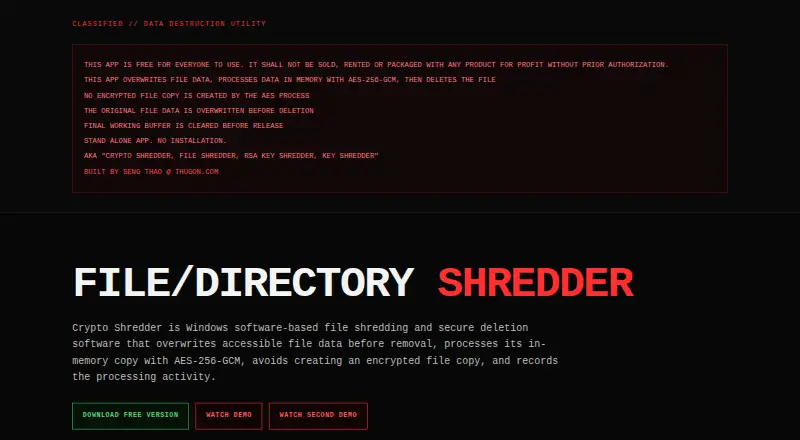
What Crypto Shredder is
Crypto Shredder is Windows software that overwrites accessible file and directory data before deleting it. It replaces file contents with cryptographically generated random data, then flushes and synchronizes the write. Its AES-256-GCM process runs three times on an in-memory copy, with a new 256-bit key and nonce for each pass; the encrypted output is not saved as a file. Before releasing its final working buffer, the application writes zeros over it, though Python and the operating system may manage other temporary memory. It asks users to confirm before processing and can export an optional text report recording the date and time, computer, Windows user, IP address, selected item, and processing sequence. The maker describes it as a standalone app requiring no installation. Crypto Shredder is free, and its listed Windows edition is free. It handles files and folders, not drive wiping. The maker cautions that overwriting cannot guarantee sanitization of every physical NAND cell on SSD or NVMe storage, or remove copies outside the app’s control.
Good
- Overwrites accessible file and directory data before deletion.
- Uses three AES-256-GCM passes with new keys and nonces.
- Optional text reports record processing details.
- Standalone app requires no installation.
- Free Windows edition costs nothing.
Watch out
- Does not wipe drives.
- Cannot guarantee sanitization of every SSD or NVMe NAND cell.
- Copies in backups and other locations remain outside its control.
- Deletion is permanent and cannot be undone by the application.
Who it suits
It may suit Windows users, including IT, security, and compliance teams, businesses, and everyday users who need to delete files or folders. It is not for users seeking whole-drive wiping.
Verdict
Crypto Shredder provides a free way to overwrite accessible file and folder data before deletion, with optional activity reports. Its limits matter: it does not wipe drives, cannot guarantee physical SSD or NVMe sanitization, and cannot address copies beyond its control.
Plans and prices
From Crypto Shredder's own pricing page, checked 7 Oct 2026.
| Plan | Price | What it gives you |
|---|---|---|
| Free Windows Edition | Free | Windows · Version 2.0.1 · free for everyone |
The facts
Each one read from Crypto Shredder's own pages, with the date it was checked.
What it does
- Activity reports
- It can export a text session report recording the date and time, computer, Windows user, IP address, selected file or directory, and processing sequence.checked 7 Oct 2026
- AES processing
- It processes the in-memory copy three times with AES-256-GCM, using a new 256-bit key and nonce for each pass; the encrypted output is not saved as a file.checked 7 Oct 2026
- Compliance caveat
- The maker says activity reports document the application's reported processing and are not independent certification of physical media sanitization or regulatory compliance.checked 7 Oct 2026
- Confirmation
- The application asks for confirmation before processing files or directories and offers an optional activity report.checked 7 Oct 2026
- Copies outside its control
- The app does not control copies that may exist in backups, snapshots, cloud synchronization, temporary files, pagefiles, hibernation data, virtual machines, or application recovery systems.checked 7 Oct 2026
- Destructive deletion
- The maker says deletion is permanent and cannot be undone by the application, and users are responsible for confirming they are authorized to delete selected items.checked 7 Oct 2026
- Intended users
- The maker describes it for Windows users including IT administrators, security teams, compliance teams, businesses, and everyday users.checked 7 Oct 2026
- Memory cleanup
- The application explicitly overwrites its final working buffer with zeros before releasing it, while noting that Python and the operating system may manage other temporary memory.checked 7 Oct 2026
- Overwrite process
- It replaces accessible file contents with cryptographically generated random data, then flushes and synchronizes the write.checked 7 Oct 2026
- Purpose
- Crypto Shredder is Windows software that overwrites accessible file data before deleting files or directories.checked 7 Oct 2026
- Storage limits
- The maker says software overwriting cannot guarantee sanitization of every physical NAND cell on SSD or NVMe storage.checked 7 Oct 2026
The company
- Headquarters
- ThugOn's homepage lists Fresno, California, USA.checked 7 Oct 2026
- Maker
- The product page credits Seng Thao at ThugOn.com as its maker.checked 7 Oct 2026
Where it runs
- Standalone app
- The maker describes Crypto Shredder as a standalone app that requires no installation.checked 7 Oct 2026
Alternatives to Crypto Shredder
- 1

BitRaser File Eraser
Free planAPILinuxmacOSWindows7.4From $39.99 a year - 2

D-Secure File Eraser
WebAPILinuxmacOS7.2From $40 a year - 3
SecureDel
Free planOpen sourceWindows6.9Free plan - 4
ShredIt
AndroidiOSmacOSWindows6.9$24.95 one-time - 5

DeleteOnClick
Free planWindows6.7Free plan - 6
Easy File Shredder
Windows6.6From $29.95 a year