
Continua CI
Continua CI is a self-hosted continuous integration system for detecting source changes, applying user-defined business logic, and running builds automatical…
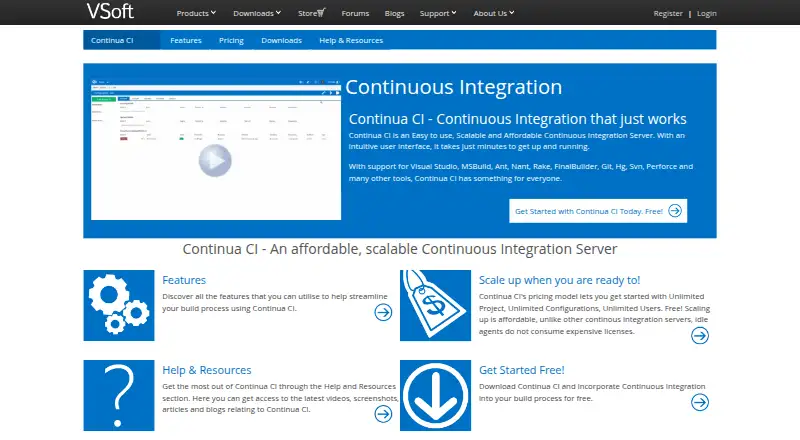
What Continua CI is
Continua CI is a self-hosted continuous integration system for detecting source changes, applying user-defined business logic, and running builds automatically. Its workflow editor supports try/catch blocks, loops, and conditional statements. Builds can start on schedules, commits or check-ins, or completion of another build, while deployments can run manually or automatically. The feature list includes Subversion, Team Foundation Server, and Git repository support, plus integrations with FinalBuilder and MSBuild runners. Builds can be distributed across agents, and paid plans list unlimited agents. Users, roles, and groups can connect with Active Directory authentication. Notifications include email, instant messaging, and XMPP. Continua CI supports pull request checks, pipeline configuration, and artifact or dependency caching. It runs on Windows and the web, with 64-bit server and agent installers and a 32-bit agent installer.
Good
- Supports Git, Subversion, and Team Foundation Server
- Workflow editor includes loops and conditional statements
- Builds can run across multiple agents
- Active Directory authentication is supported
- Pull request checks and caching are available
Watch out
- Free edition allows only one concurrent build
- Free edition runs builds only on the Continua server
- No hosted option is listed
Who it suits
It suits teams that want self-hosted build automation with repository integrations, configurable workflows, and distributed agents. It is also relevant to organizations using Windows-based servers or agents.
Verdict
Continua CI combines configurable workflows, multiple triggers, repository support, and self-hosted build distribution. The free edition is limited to one server build at a time, while paid plans add concurrent builds and unlimited agents.
Plans and prices
From Continua CI's own pricing page, checked 8 Oct 2026.
| Plan | Price | What it gives you |
|---|---|---|
| Solo | Free | 1 Concurrent Build · 1 Local Agent · Unlimited Projects · Unlimited Users |
| Add a Build | $199, paid once | +1 Concurrent Build · Unlimited Agents · Unlimited Projects · Unlimited Users |
| Start-up | $900, paid once | +5 Concurrent Builds · Unlimited Agents · Unlimited Projects · Unlimited Users · 12 months of support and updates included; renewal for another 12 months costs 40% of initial purchase |
| Team | $1,750, paid once | +10 Concurrent Builds · Unlimited Agents · Unlimited Projects · Unlimited Users · 12 months of support and updates included; renewal for another 12 months costs 40% of initial purchase |
| Professional | $2,550, paid once | +15 Concurrent Builds · Unlimited Agents · Unlimited Projects · Unlimited Users · 12 months of support and updates included; renewal for another 12 months costs 40% of initial purchase |
| Corporate | $3,300, paid once | +20 Concurrent Builds · Unlimited Agents · Unlimited Projects · Unlimited Users · 12 months of support and updates included; renewal for another 12 months costs 40% of initial purchase |
The facts
Each one read from Continua CI's own pages, with the date it was checked.
What it does
- Access control
- The product supports users, roles, and groups that can be linked to Active Directory authentication.checked 8 Oct 2026
- Build tools
- The feature page says Continua CI integrates with FinalBuilder and MSBuild build runners.checked 8 Oct 2026
- Deployment
- Deployments can be set to run manually or automatically.checked 8 Oct 2026
- Distributed builds
- Builds can be distributed across multiple agents, and the pricing page lists unlimited agents on paid plans.checked 8 Oct 2026
- Notifications
- The feature page lists email, instant messaging, and XMPP notifications.checked 8 Oct 2026
- Purpose
- Continua CI detects source changes, checks them against user-defined business logic, and runs builds automatically.checked 8 Oct 2026
- Refund
- The pricing page offers a 100% refund within 60 days of purchase.checked 8 Oct 2026
- Repositories
- The feature page lists support for Subversion, Team Foundation Server, and Git repositories.checked 8 Oct 2026
- Support
- VSoft offers product support through its forums and support email.checked 8 Oct 2026
- Triggers
- Builds can start on timed, commit/check-in, or build-completed triggers.checked 8 Oct 2026
- Workflow
- Its workflow editor supports try/catch statements, loops, and conditional statements.checked 8 Oct 2026
Money
- Free edition limit
- Without a license key, builds can run only on the Continua CI server and only one build may run at a time.checked 8 Oct 2026
Where it runs
- Windows requirements
- The download page offers 64-bit server and agent installers and a 32-bit agent installer.checked 8 Oct 2026
Alternatives to Continua CI
- 1

Codemagic
Free planAndroidiOSWebAPI8.2From $99 a month - 2

TeamCity
Free planAndroidWebAPILinux8.2From $15 a month - 3

Azure Test Plans
Free planWebAPIExtensionLinux8.1From $6 a month - 4
Bitbucket Pipelines
Free planWebAPILinuxmacOS8.0From $3.65 a month - 5

AppVeyor
Free planWebAPILinuxmacOS7.9From $29 a month - 6

AWS CodeBuild
Free planWebAPILinuxmacOS7.9From $0.01 a month