
Cleanmock
Cleanmock is a browser-based tool for creating mobile and web app device mockups.
What Cleanmock is
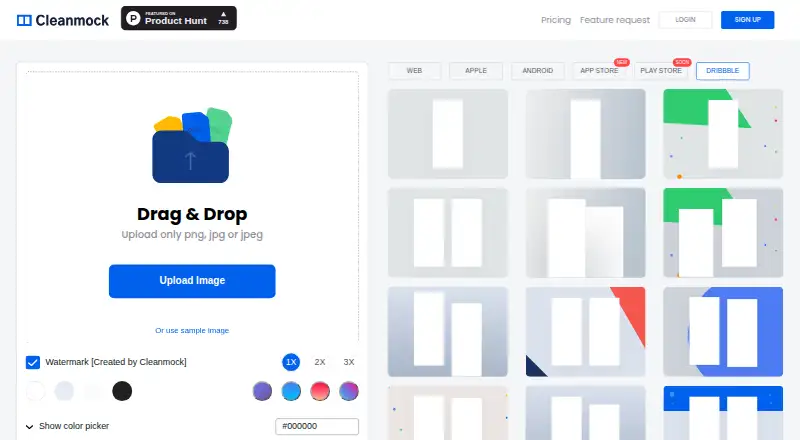
Cleanmock is a browser-based tool for creating mobile and web app device mockups. The editor accepts PNG, JPG, or JPEG uploads and also offers a sample image. Its mockup categories include Web, Apple, Android, App Store, Play Store, and Dribbble; backgrounds can be color, transparent, popular-color, or gradient. The product page describes device frames for the latest devices and website mockups that support all devices. It lists 1600 × 1200 output and image generation in 30 seconds or less. Suggested uses include portfolios, app landing pages, social posts, presentations, customer support, and product documentation. Cleanmock has a free plan with limited downloads, a watermark, and standard 1x resolution. Premium is $4 per month, billed as $48 yearly, and includes no watermark, 3x Ultra HD, unlimited downloads, exclusive mockups, custom background colors, and priority support. Custom background images and App Store assets are marked as upcoming. The site offers sign-in with Twitter, Dribbble, Facebook, Google, or email.
Good
- Accepts PNG, JPG, and JPEG uploads.
- Includes transparent and gradient backgrounds.
- Lists multiple app-store and social mockup categories.
- Premium includes unlimited downloads and 3x Ultra HD.
Watch out
- Free downloads are limited.
- The free plan adds a watermark.
- Custom background images are marked upcoming.
- App Store assets are marked upcoming.
Who it suits
Cleanmock suits people who need browser-based mockups for app or website images, portfolios, presentations, or product materials. The free plan may fit occasional use where limited downloads and a watermark are acceptable.
Verdict
Cleanmock offers a browser editor with several mockup categories and background choices. Its free tier has limits; Premium is $4 per month billed as $48 yearly.
Plans and prices
From Cleanmock's own pricing page, checked 15 Oct 2026.
| Plan | Price | What it gives you |
|---|---|---|
| Free | Free | watermark · 1x standard resolution · limited downloads · no exclusive mockups · no custom background colors · no priority support |
| Premium | $4 a month | no watermark · 3x Ultra HD · unlimited downloads · exclusive mockups · custom background colors · priority support · $48 yearly |
The facts
Each one read from Cleanmock's own pages, with the date it was checked.
What it does
- Analytics integration
- The privacy policy identifies Google Analytics as a service used to monitor site usage.checked 15 Oct 2026
- Authentication
- Account login options shown on the site include Twitter, Dribbble, Facebook, Google and email.checked 15 Oct 2026
- Background colors
- Users can apply transparent backgrounds, popular colors and custom background colors on Premium.checked 15 Oct 2026
- Backgrounds
- The product page lists color, transparent, popular-color, and gradient backgrounds.checked 30 Sep 2026
- Data location
- The privacy policy states personal information is stored and processed in the United States or locations used by its providers.checked 15 Oct 2026
- Developer extensibility
- The opened official pages describe a browser editor but provide no public API, SDK or self-hosting instructions.checked 15 Oct 2026
- Email integration
- The privacy policy says MailChimp may be used for opted-in user emails.checked 15 Oct 2026
- Generation speed
- The site claims image generation can complete in 30 seconds or less.checked 15 Oct 2026
- Gradient backgrounds
- The feature list includes preset gradient backgrounds.checked 15 Oct 2026
- Image generation
- The product page describes high-resolution 1600 × 1200 output and image generation in 30 seconds or less.checked 30 Sep 2026
- Image input
- The editor accepts PNG, JPG, or JPEG uploads and also offers a sample image.checked 30 Sep 2026
- Image uploads
- The editor accepts PNG, JPG and JPEG files through drag-and-drop upload.checked 15 Oct 2026
- Independent description
- Toolbase says the product combines drag-and-drop uploading with ready-made templates for web, iPhone, Android, App Store, Play Store and Dribbble.checked 15 Oct 2026
- Independent how-to result
- Lifehacker Japan reported that users can upload up to two images, choose a phone mockup including iPhone X, adjust background color and download the result.checked 15 Oct 2026
- Integrations
- The site offers sign-in with Twitter, Dribbble, Facebook, Google, or email.checked 30 Sep 2026
- License terms
- The terms grant only a temporary personal, non-commercial viewing license and prohibit copying, modification, commercial use and reverse engineering.checked 15 Oct 2026
- Limit: asset pricing oversight
- A Product Hunt commenter objected that a black-hand mockup required payment while a white-hand version was free; the maker said this was an oversight and fixed it.checked 15 Oct 2026
- Limit: branding concern
- A Product Hunt commenter said Cleanmock's logo looked too similar to Trello's, and the makers acknowledged the concern.checked 15 Oct 2026
- Limit: missing hand variant
- At launch, a commenter reported that a hand-held mockup variant was unavailable; the maker replied that it would be added later.checked 15 Oct 2026
Where it runs
- Device frames
- The product offers device frames described as covering the latest devices.checked 15 Oct 2026
- Devices
- The product page says it provides device frames for the latest devices and website mockups that support all devices.checked 30 Sep 2026
The company
- Founded
- Product Hunt lists Cleanmock as launched in 2019.checked 15 Oct 2026
- Maker
- The official footer credits Tekeste Kidanu and Johny Vino as the makers.checked 15 Oct 2026
Money
- Limit: free tier
- A Product Hunt commenter considered the free model too limited for a new product and viewed the upgrade path as aggressive.checked 15 Oct 2026
The full review of Cleanmock
Cleanmock is a browser-based editor for building device, website and app-store mockups from an image. It suits people who need polished product or promotional visuals without leaving the browser, though its free exports are constrained. For frequent finished work, Premium removes the watermark and download cap; users needing custom background images should look elsewhere for now.
Overview
Cleanmock accepts PNG, JPG and JPEG uploads, and also provides a sample image to start from. Its categories span Web, Apple, Android, App Store, Play Store and Dribbble, giving designers a way to frame an image for several common product and promotional contexts. Device frames cover the latest devices, while website mockups support all devices.
Background options include solid color, transparent, popular colors and gradients. Transparent export is especially useful when a mockup needs to sit over a slide or page design rather than a preset scene. The product describes output at 1600 × 1200 and image generation in 30 seconds or less, but the free plan is limited to standard 1x resolution, so that headline output capability is most relevant to Premium users.
Cleanmock’s suggested uses range from portfolios and app landing pages to social posts, Medium covers, presentations, customer support and product documentation. That breadth makes it useful for routine visual communication, although the current range of background choices may not satisfy work built around a specific photographic setting.
Key features
- Multiple mockup categories: Web, Apple, Android, App Store, Play Store and Dribbble cover varied destinations in one editor, reducing the need to switch tools for basic product presentation.
- Flexible image and background setup: Upload an image or use the sample, then choose color, transparent, popular-color or gradient backgrounds. Premium adds custom background colors; custom background images are marked as upcoming.
- High-resolution output: The stated 1600 × 1200 output and generation time of 30 seconds or less make the editor appealing when turnaround matters, but Free exports are only 1x standard resolution.
- Promotion and templates: Premium includes design promotion and exclusive templates, which add value for users producing work regularly rather than occasional drafts.
Pricing
Cleanmock has a free plan and one paid plan. Free costs nothing and includes standard 1x resolution, limited downloads, and a watermark. It excludes exclusive mockups, custom background colors and priority support. That is enough to explore the editor or prepare occasional drafts, but the watermark and download limit make it a poor fit for repeated client-facing or public use.
Premium costs $4 a month, billed as $48 yearly. It removes the watermark, raises output to 3x Ultra HD, allows unlimited downloads, and adds exclusive mockups, custom background colors and priority support. It is the sensible tier for recurring production where clean exports and higher resolution matter. The annual billing term is important: the monthly figure is not a month-to-month price. Custom background images and App Store assets are marked as upcoming rather than current Premium benefits.
Platforms
Cleanmock is available on the web, so it fits browser-based workflows rather than a stated desktop or mobile app installation. Sign-in options include Twitter, Dribbble, Facebook, Google and email. Cleanmock says Stripe processes payments directly and securely. Its privacy policy says personal information may be stored and processed in the United States or wherever Cleanmock and its service partners maintain facilities; it also says commercially acceptable safeguards cannot guarantee absolute security. Support is offered through Drift chat, with [email protected] as a contact. The terms say website materials are provided as-is and Ohio law governs.
Who it's for
Cleanmock fits app makers, designers and teams that need device or website visuals for portfolios, landing pages, presentations, social posts, support material or documentation. It is particularly suitable when a browser editor, common image uploads and transparent output cover the job. It is less suitable for users who need custom photographic scenes or finished App Store assets now, or who require high-resolution, watermark-free exports without an annual paid commitment.
Pros and cons
- Pros: Six categories cover device, web and store-oriented mockups; transparent and gradient backgrounds support varied layouts; Premium combines unlimited downloads, no watermark and 3x resolution.
- Cons: Free downloads are limited and watermarked at standard resolution; Premium is billed yearly at $48; custom background images and App Store assets are not yet available as current features.
Alternatives
Compare mockup generator software if you want to weigh several tools before settling on a workflow.
- Mockuuups Studio is worth considering if you want a free collection with attribution or a professional plan that includes 5,300+ mockups, and need Linux, macOS, Windows or web support.
- Mediamodifier Mockup Generator may suit users looking for free mockup and design templates, 1,300+ fonts, and Unsplash and GIPHY integration across web and mobile platforms.
- The Mock House is an option if its free allowance of three mockups per month, five saves and 2K downloads fits a personal-use workflow.
- Mockup Wish offers a free allowance of five design mockups per month, three alpha and clipart mockups, and one brand kit, making it a possible fit for occasional, capped use.
- Mockupgenerator.ai is a strong alternative to compare if unlimited free mockup downloads and high-resolution exports are priorities.
- MockupKit may be a better fit for users who need an API, 25 monthly mockups, 1,000+ templates and 1 GB of storage in its free plan.
- Presenta is another freemium option for users who want a whole studio and PNG, JPG or WebP export on its free plan.
- Shots is another web-based freemium alternative to compare.
Verdict
Choose Cleanmock if you want a browser-based way to turn uploaded images into device, website and promotional mockups, with transparent backgrounds and a straightforward upgrade to unlimited, watermark-free 3x exports. Its free tier is best treated as a draft tool, while the $48 yearly Premium commitment is a meaningful drawback for occasional users. If custom background images or App Store assets are essential, choose another tool until those capabilities are available.
Getting started
- Open the Cleanmock website
- Sign in with Twitter, Dribbble, Facebook, Google, or email
- Upload a PNG, JPG, or JPEG, or use the sample image
- Choose a mockup category
- Select a background style
- Generate the mockup image
- Upgrade to Premium if you need its listed features
Limits worth knowing
The Free plan costs nothing and limits downloads, adds a watermark, and provides standard 1x resolution. Premium costs $4 a month billed as $48 yearly and adds unlimited downloads, 3x Ultra HD output, no watermark, exclusive mockups, custom background colors, and priority support.
Questions
Does Cleanmock have a free plan?
Yes. The Free plan costs nothing and includes limited downloads, a watermark, and standard 1x resolution.
How much is Premium?
Premium costs $4 a month, billed as $48 yearly.
What files can I upload?
The editor accepts PNG, JPG, and JPEG files, and also provides a sample image.
Which mockup categories are available?
Categories include Web, Apple, Android, App Store, Play Store, and Dribbble.
Does it support transparent backgrounds?
Yes. Transparent backgrounds are one of the listed background options.
What is marked upcoming?
Custom background images and App Store assets are marked upcoming.
Alternatives to Cleanmock
- 1
Mediamodifier Mockup Generator
Free planAndroidiOSWebAPI8.1From $15.83 a month - 2
The Mock House
Free planAndroidiOSWeb8.0From $29 a month - 3

Mockuuups Studio
Free planWebAPILinuxmacOS7.9Free plan - 4

Dynamic Mockups
Free planWebAPI7.3$15 usage-based - 5
Rotato
WebAPImacOSWindows7.3$79 one-time - 6

Mockupgenerator.ai
Free planWeb6.8From $19.99 a year