
Class Charts
Class Charts is classroom management software for schools, bringing behaviour records, attendance, homework, communication, and student support into one prod…
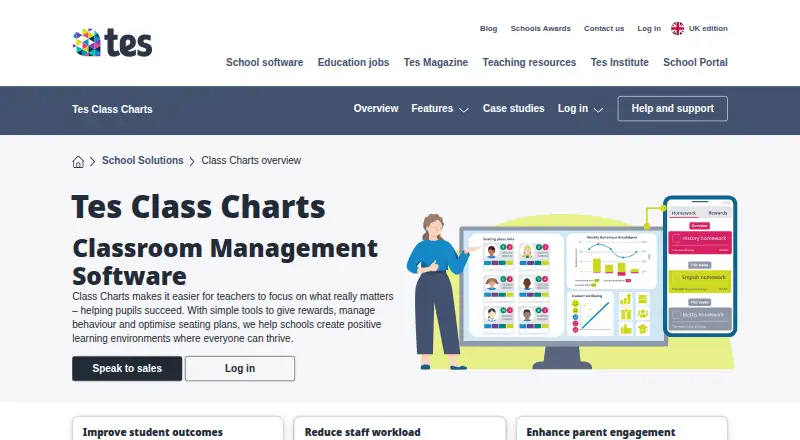
What Class Charts is
Class Charts is classroom management software for schools, bringing behaviour records, attendance, homework, communication, and student support into one product. Teachers can award performance points, define behaviours and achievements to match school policy, and produce whole-school reports. Recorded data and student interactions help teachers create and adjust seating plans. Attendance tools cover morning and afternoon registers, reporting, and identifying patterns. Teachers can assign and track homework, while students and parents can see requirements and deadlines. Schools can share updates and student performance information with staff and families, and a wellbeing module highlights concerns and provides resources. Other listed modules include detentions. Class Charts can interface with key MIS systems using writeback, or schools can ask about integration through Wonde. Tes also describes links with MyConcern and Provision Map to bring safeguarding, behaviour, attendance, SEND, and learning-plan information into a single view. The parent and pupil apps are available on iOS and Android, alongside web access. Tes describes the homework and reward store modules as free for schools. The product is paid, but schools must request pricing; the demo page offers a free introductory demonstration without stating a trial period. Class Charts was founded in 2010.
Good
- Teachers can tailor behaviours and achievements to school policy.
- Attendance covers morning and afternoon registers and pattern identification.
- Homework requirements and deadlines are visible to students and parents.
- MIS writeback and Wonde integration options are available.
- Homework and reward store modules are free for schools.
Watch out
- Subscription pricing is available only on request.
- The free introductory demonstration has no stated trial period.
- The listed deployment is web-based.
Who it suits
Class Charts is suited to schools and teachers looking to coordinate behaviour, attendance, homework, and student support. Parent and student login options, along with iOS and Android apps, support family and pupil access to assigned work and school communications.
Verdict
Choose Class Charts if your school wants behaviour management alongside attendance, homework, wellbeing, and family communication. Look elsewhere if you need a stated subscription price or a product trial period before contacting sales.
Plans and prices
From Class Charts's own pricing page, checked 8 Oct 2026.
| Plan | Price | What it gives you |
|---|---|---|
| Class Charts | Priced on request | Pricing not stated; request a demo |
The facts
Each one read from Class Charts's own pages, with the date it was checked.
What it does
- Attendance
- Attendance features include digital registers, real-time tracking, reports and automatic flags for missing or incomplete registers.checked 8 Oct 2026
- Audience
- Tes describes Class Charts as classroom management software designed for schools and teachers.checked 7 Oct 2026
- Behaviour
- Teachers can award performance points, customise behaviours to match school policy and generate whole-school reports.checked 7 Oct 2026
- Behaviour tools
- Teachers can award performance points, create school-specific behaviours and achievements, and generate whole-school reports.checked 8 Oct 2026
- Communications
- The communication module lets schools share updates and student performance data with staff and parents.checked 7 Oct 2026
- Connected products
- Tes describes integration with MyConcern and Provision Map as a way to bring behaviour, attendance, SEND and safeguarding information into a single view.checked 7 Oct 2026
- Homework
- Teachers can assign homework with instructions, due dates and optional attachments, while students and parents can view tasks and deadlines in the apps.checked 8 Oct 2026
- Integrations
- Class Charts can connect with school MIS systems using writeback or through Wonde; the page displays SIMS, Bromcom, Arbor, iSAMS, Juniper, Engage and Integris logos.checked 8 Oct 2026
- Intended users
- The product is presented for schools, with teacher, parent and student login options.checked 8 Oct 2026
- Other modules
- The listed modules include homework, detentions, communications, attendance and wellbeing.checked 8 Oct 2026
- Pricing
- The product page invites schools to speak to sales and does not state a Class Charts subscription price.checked 7 Oct 2026
- Pricing and demo
- The demo page offers a free introductory demonstration; it does not state a product price or trial period.checked 8 Oct 2026
- Privacy and compliance
- Tes states that its services are subject to data protection laws including the UK GDPR, EU GDPR, Data Protection Act 2018 and Australian Privacy Act 1988.checked 8 Oct 2026
- Purpose
- Class Charts is classroom management software for managing behaviour, rewards and seating plans in schools.checked 8 Oct 2026
- Support
- Tes directs product support requests to the Class Charts help and support portal.checked 8 Oct 2026
- Tes product links
- Tes describes links with Provision Map for learning-plan information and MyConcern for safeguarding concerns.checked 8 Oct 2026
- Wellbeing
- The wellbeing module highlights concerns and provides resources to support students.checked 7 Oct 2026
The company
- Founded
- 2010checked 28 Sep 2026
- Headquarters
- Sheffield, England, United Kingdomchecked 28 Sep 2026
Money
- Free modules
- Tes describes the homework and reward store modules as free for schools.checked 7 Oct 2026
- Seating plans
- The software uses recorded data about pupil interactions to help create seating plans and can be used on whiteboards, laptops, iPads and phones.checked 8 Oct 2026
Where it runs
- Mobile apps
- Tes says the parent and pupil apps are available for iOS and Android.checked 8 Oct 2026
The full review of Class Charts
Overview
Class Charts is school-focused classroom management software that brings behaviour tracking together with attendance, homework, wellbeing and communication tools. It is best suited to schools that want teachers, pupils and families to work from shared student information. Its broad module set is the main draw; schools must request custom pricing before they can judge the cost.
Key features
Teachers can award performance points, define behaviours and achievements to match school policy, and produce whole-school reports. This supports consistent recognition and gives school leaders a way to review behaviour across classrooms. Its usefulness depends on staff applying the school’s chosen categories consistently.
Seating plans draw on recorded data and student interactions, helping teachers create and adjust classroom arrangements. Attendance supports morning and afternoon registers, reporting and pattern identification, so it can serve routine tracking as well as review of attendance patterns.
Teachers can set and track homework, with requirements and deadlines visible to pupils and parents. Tes describes the homework and reward store modules as free for schools, making those functions a potential entry point for schools not ready to adopt the wider paid product.
Other modules cover detentions, communication and wellbeing. Staff can share updates and student performance data with colleagues and parents, while the wellbeing module highlights concerns and provides support resources. Class Charts can connect with key MIS systems through writeback, or schools can ask about integration through Wonde. Tes also describes links with MyConcern and Provision Map to bring safeguarding, learning-plan and related student information into a single view.
Pricing
Class Charts is a paid product with custom pricing: schools are invited to contact sales, and no subscription amount is stated. The product page offers a free introductory demonstration, but no trial period is stated. The homework and reward store modules are described as free for schools; that does not establish that the rest of Class Charts is free.
Because there is no published subscription price or stated trial length, schools should request a quote and clarify what modules it covers before comparing budgets. There are no published seat limits, quotas or renewal terms to weigh.
Platforms
Class Charts is available on the web, with parent and pupil apps for iOS and Android. This gives families mobile access alongside the school-facing web product.
Who it's for
Class Charts is designed for schools and teachers, with login options for teachers, parents and students. It is a stronger fit for schools seeking a combination of behaviour, attendance, homework and family communication than for buyers looking for a narrowly focused tool with a published per-user price.
Its wellbeing, IEP support, goal progress monitoring, incident tracking and compliance reporting capabilities may also suit schools coordinating student support alongside everyday classroom management. Class Charts is subject to data protection laws including the UK GDPR, EU GDPR, Data Protection Act 2018 and Australian Privacy Act 1988.
Pros and cons
- Pros: Behaviour points, school-specific categories and whole-school reports support both classroom reinforcement and broader oversight.
- Pros: Attendance, homework, communications and wellbeing sit alongside behaviour tools, reducing the need to treat each area as a separate workflow.
- Pros: Free homework and reward store modules offer a way to use some functions without adopting the wider paid product.
- Cons: Custom pricing and no stated trial period make it harder to assess cost and test the wider product before contacting sales.
- Cons: The value of behaviour reports and data-led seating plans depends on schools recording useful information and applying their policies consistently.
Alternatives
For schools comparing specialist options, browse Special Education Software and Behavior Management Software.
- PowerSchool Behavior Support is another paid option for Android, iOS and web; its price is not published and buyers are directed to contact PowerSchool for a demo.
- FrenalyticsEDU may suit schools seeking a web-based freemium option: its free plan allows 10 student profiles, one staff account and one daily Learning Session per student.
- IEP Evolve is a web-based paid alternative for buyers considering another specialist product; pricing is not published.
- IEP Progress may suit schools that want a stated annual teacher price: either app costs $59 a year, billed annually in advance, with unlimited students, goals and data and a five-teacher minimum.
- Adaptive XI Intelligence offers a Solo plan at $588 a year for one student, including an AI lesson planner, student login, AI assessments with auto-grading, a reading tracker and digital library.
- Progress Desk is an option for buyers seeking a one-time purchase on Apple desktop or iPad platforms: its iPad plan costs $59, paid once and its Mac plan $99, paid once.
- SameGoal Special Education is another paid option with a Standard plan at $12.98 a year per student for the 2026-27 school year, including unlimited users.
Verdict
Class Charts is a sensible choice for schools that want behaviour management supported by attendance, homework, wellbeing and family communication in one system. Its breadth and free homework and reward store modules are the clearest reasons to consider it. Look elsewhere if a stated subscription price or a product trial period is essential before engaging with sales.
Getting started
- Visit https://www.tes.com/en-gb/for-schools/class-charts.
- Request a free introductory demonstration.
- Ask Tes for pricing.
- Use the web product, with parent and pupil apps available on iOS and Android.
- Ask about MIS writeback or integration through Wonde if needed.
Limits worth knowing
The homework and reward store modules are free for schools. The product page does not state a subscription price, and the free introductory demonstration does not specify a trial period.
Questions
Is Class Charts free?
Class Charts is a paid product. Tes describes the homework and reward store modules as free for schools.
How much does Class Charts cost?
Pricing is available on request; the product page invites schools to speak with sales.
Which platforms are available?
Class Charts is available on the web. Parent and pupil apps are available for iOS and Android.
Can Class Charts connect with school systems?
It can interface with key MIS systems using writeback, and schools can ask about integration through Wonde. Tes also describes links with MyConcern and Provision Map.
Can families and students use it?
Yes. The product is presented with teacher, parent, and student login options. Students and parents can view homework requirements and deadlines.
Who makes Class Charts, and when was it founded?
Tes presents Class Charts as its school product. It was founded in 2010.
Alternatives to Class Charts
- 1

LiveSchool
Free planAndroidiOSWebmacOS7.4From $1,960 a year - 2

Scholva Behavior & Discipline
Free planAndroidiOSWebAPI7.2Free plan - 3
Navigate360 Behavior Intervention
AndroidiOSWeb6.6 - 4
Reward System
Free planWeb6.6From £480 a year - 5

DeansList
AndroidiOSWeb6.4 - 6

SWIS
AndroidiOSWeb6.4From $500 a year