
Cifra Club Tuner
Cifra Club Tuner listens to an instrument through a device microphone and displays the played frequency and approximate musical note.
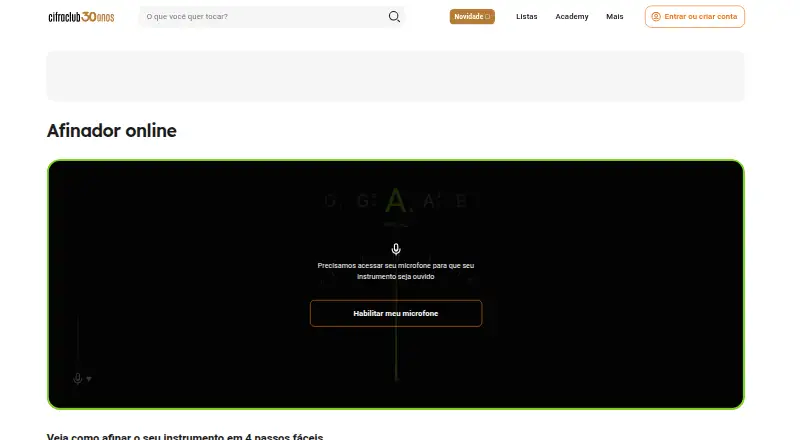
What Cifra Club Tuner is
Cifra Club Tuner listens to an instrument through a device microphone and displays the played frequency and approximate musical note. Its online tuner works in a desktop or mobile browser after microphone access is allowed, and the app is available for Android and iOS. The online tool supports guitar, acoustic guitar, and ukulele; the app's free Chromatic mode can tune any string instrument. The app also lists standard, Eb, Drop C, Drop D, and Open G tunings. Standard guitar tuning is E-A-D-G-B-E. In String-by-String mode, the app guides tuning of the selected string step by step, while a colored pointer indicates whether the note is in tune. Training mode uses interactive games to practice distinguishing notes, identifying intervals, and exercising the ear. Full String-by-String mode, other tuning types, and extra features require a Cifra Club subscription. For more precise tuning, Cifra Club advises placing the device microphone close to the instrument. Chromatic mode is listed as free, and the online tuner can be used on a computer or mobile device.
Good
- Free Chromatic mode tunes any string instrument.
- Works in a desktop or mobile browser.
- Lists five tunings, including Drop D.
- Training mode includes note and interval games.
- Available on Android and iOS.
Watch out
- Browser use requires microphone access.
- Full String-by-String mode requires a subscription.
- Other tuning types and extra features require a subscription.
Who it suits
Cifra Club Tuner suits guitar, acoustic guitar, and ukulele players who want a browser-based tuner, as well as string-instrument players using the app's free Chromatic mode. Its training mode may suit learners practicing note and interval recognition.
Verdict
Cifra Club Tuner combines microphone-based tuning with guided string tuning and ear-training games. Check which modes require a subscription, and keep the microphone close for greater tuning precision.
Plans and prices
From Cifra Club Tuner's own pricing page, checked 9 Oct 2026.
| Plan | Price | What it gives you |
|---|---|---|
| Afinador Cifra Club — modo Cromático | Free | Afina qualquer instrumento de corda |
The facts
Each one read from Cifra Club Tuner's own pages, with the date it was checked.
What it does
- Accuracy tip
- Cifra Club advises placing the device microphone as close to the instrument as possible for precise tuning.checked 9 Oct 2026
- Alternative tunings
- The page lists standard, Eb, Drop C, Drop D, and Open G tunings.checked 9 Oct 2026
- Chromatic mode
- The Chromatic mode is free and can tune any string instrument.checked 9 Oct 2026
- Ear training
- Training mode uses interactive games to help users distinguish notes, identify intervals, and practice their ear.checked 9 Oct 2026
- Guided tuning
- String-by-String mode guides the user through tuning the selected string step by step.checked 9 Oct 2026
- Instrument coverage
- The online tuner can be used for guitar, acoustic guitar, or ukulele.checked 9 Oct 2026
- Paid feature limit
- Using the complete String-by-String mode requires a Cifra Club subscription.checked 9 Oct 2026
- Pitch feedback
- The app displays the played frequency and approximate musical note, and indicates tuning with a colored needle.checked 9 Oct 2026
- Practice feature
- The Train mode uses interactive games to help users distinguish notes, identify intervals, and exercise their ear.checked 9 Oct 2026
- Purpose
- The online tuner listens to an instrument through the device microphone and displays the note being played.checked 9 Oct 2026
- Standard tuning
- It suggests standard guitar tuning as E-A-D-G-B-E.checked 9 Oct 2026
- Support
- The help center lets users submit a question if they need more assistance.checked 9 Oct 2026
- Supported instruments
- The online tool can be used as a tuner for guitar, acoustic guitar, or ukulele.checked 9 Oct 2026
- Tuning guidance
- The app displays the played frequency and approximate musical note, with pointer colors indicating whether the note is in tune.checked 9 Oct 2026
Where it runs
- Browser access
- The online tuner asks for microphone access and can be used on a computer or mobile device.checked 9 Oct 2026
- Browser use
- The online tuner can be used in a desktop or mobile browser after allowing microphone access.checked 9 Oct 2026
- Mobile apps
- The tuner app is listed as available for Android and iOS.checked 9 Oct 2026
Money
- Free mode
- The app's Chromatic mode is free to tune any string instrument.checked 9 Oct 2026
The company
- Headquarters
- Belo Horizonte, Minas Gerais, Brazilchecked 28 Sep 2026
- Maker
- Studio Sol describes itself as the technology company behind Cifra Club and says it formed in 2000.checked 9 Oct 2026
- Maker identity
- Cifra Club describes itself as Brazil's largest music education website.checked 9 Oct 2026
The full review of Cifra Club Tuner
Cifra Club Tuner is a microphone-based tuner for browsers and mobile devices. It is best for players who want quick pitch feedback or a free chromatic option for string instruments. Its guided tuning and additional tuning types sit behind a subscription, so the free mode is the clearest reason to choose it.
Overview
The browser tuner listens through a computer or mobile device microphone and displays the note being played. It supports guitar, acoustic guitar and ukulele, and suggests standard guitar tuning, E-A-D-G-B-E. In the app, free Chromatic mode can tune any string instrument, making it useful beyond the browser tool’s named instrument coverage.
Microphone placement matters: Cifra Club advises keeping the device close to the instrument for a more precise reading. That makes the tuner convenient for practice near a phone or computer, but less suited to situations where the instrument cannot be picked up clearly.
Key features
- Browser tuning: After microphone permission is granted, the online tuner works in a desktop or mobile browser. It lists standard, Eb, Drop C, Drop D and Open G tunings, a useful selection for guitarists who move between common setups.
- Chromatic mode: The app’s free mode tunes any string instrument. It is the strongest no-cost option for players who can adjust strings from pitch feedback without needing prompts.
- Pitch feedback: The app displays played frequency and an approximate note, while a colored needle indicates whether the pitch is in tune. This gives players both a numerical reference and a visual cue.
- String-by-String mode: Guided tuning walks through the selected string step by step. It may help less experienced players follow a tuning sequence, but this mode requires a subscription.
- Train mode: Interactive games help users distinguish notes, identify intervals and practice their ear. It adds a learning angle beyond tuning, though access to extra features requires a Cifra Club subscription.
Pricing
Cifra Club Tuner uses a freemium model. The Afinador Cifra Club — modo Cromático plan costs free and tunes any string instrument in Chromatic mode. That is a practical fit for players who want an unrestricted instrument range for basic pitch matching without guided steps.
A Cifra Club subscription is required for full String-by-String mode, other tuning types and extra features. The free option therefore works best for straightforward tuning; players who need guided instructions or those additional modes must choose a paid subscription. No subscription price or term is provided here, so the paid option is custom pricing.
Platforms
Cifra Club Tuner is available on Android, iOS and the web. Browser use on desktop or mobile requires microphone access, while the mobile app offers the Chromatic mode and additional app features. The help center accepts questions for users who need assistance.
Who it's for
This is a good fit for guitar, acoustic guitar and ukulele players who want browser-based tuning, as well as string-instrument players who can use the app’s free Chromatic mode. The guided mode and ear-training games make it more appealing to learners willing to subscribe. Players who need a tuner that works without microphone input, or who want the guided features without a subscription, should look elsewhere.
Pros and cons
- Pro: Free Chromatic mode covers any string instrument, rather than limiting free tuning to a single instrument type.
- Pro: Browser access across desktop and mobile avoids requiring the app for a basic tune-up.
- Pro: Frequency, approximate note and colored needle give several forms of pitch feedback.
- Con: Guided String-by-String tuning and other tuning types require a subscription, limiting the free experience to simpler tuning.
- Con: Microphone placement affects precision, so clear readings depend on bringing the device close to the instrument.
Alternatives
Musical Tuner Apps is the broader category to browse if you want to compare more options.
Choose GuitarTuner.io instead if a free forever browser tuner with no account or paid upgrade requirement is the priority. Centerline is a better fit for players looking for chromatic tuning with multiple display views and a dedicated Guitar mode, with a one-time Complete option. ChromTuner suits someone seeking a free browser tuner with an LED meter or a free iPhone app. Pro Guitar Tuner may suit players who want tuning presets and custom tuning options in its free app. Chroma Ad-Blocker is another listed alternative. JustATuner is another listed alternative. Bandmate Chromatic Tuner is worth considering if a free tuner with no third-party ads is the priority. Fender Tune is an alternative for Android and iOS users who want its free tuner app, with Tune Plus requiring a Fender account.
Verdict
Choose Cifra Club Tuner if you want browser access and a free chromatic tuner for any string instrument, with optional guided tuning and ear-training features in the app. Its main trade-off is that those deeper features require a subscription, and microphone clarity is essential; players who need free guided modes or a tuner independent of a device microphone should consider another option.
Getting started
- Open the Cifra Club online tuner or install its Android or iOS app
- Allow microphone access when prompted
- Choose guitar, acoustic guitar, ukulele, or Chromatic mode
- Select a listed tuning or string
- Play the instrument and follow the frequency, note, and needle feedback
- Move the microphone closer for more precise tuning
Limits worth knowing
Chromatic mode is free and can tune any string instrument. Full String-by-String mode, other tuning types, and extra features require a Cifra Club subscription.
Questions
Is Cifra Club Tuner free?
Its Chromatic mode is listed as free. A subscription is required for full String-by-String mode, other tuning types, and extra features.
Which platforms are supported?
The tuner works in desktop and mobile browsers, with apps listed for Android and iOS.
Which instruments can the online tuner handle?
The online tool supports guitar, acoustic guitar, and ukulele. Chromatic mode can tune any string instrument.
What tunings are listed?
Standard guitar tuning is E-A-D-G-B-E; alternatives listed are Eb, Drop C, Drop D, and Open G.
How does tuning feedback work?
The tuner shows the played frequency and approximate musical note, with a colored needle indicating tuning.
Does it include practice tools?
Training mode uses interactive games to help distinguish notes, identify intervals, and exercise the ear.
Alternatives to Cifra Club Tuner
- 1
GuitarTuner.io
Free planAndroidiOSWebmacOS7.9$4.99 one-time - 2

ChromTuner
Free planiOSWebmacOS7.1$6.99 one-time - 3

Centerline
Free planAndroidiOSmacOS7.0$3.99 one-time - 4
Intunator
AndroidiOS7.0From €17.99 a year - 5
insTuner
Free planiOSmacOS6.8$3.99 one-time - 6
LunaTuna
Free planiOSmacOS6.8$2.99 one-time