CedarGrooveNET
CedarGrooveNET converts drum audio into MIDI and can generate continuations of drum patterns.
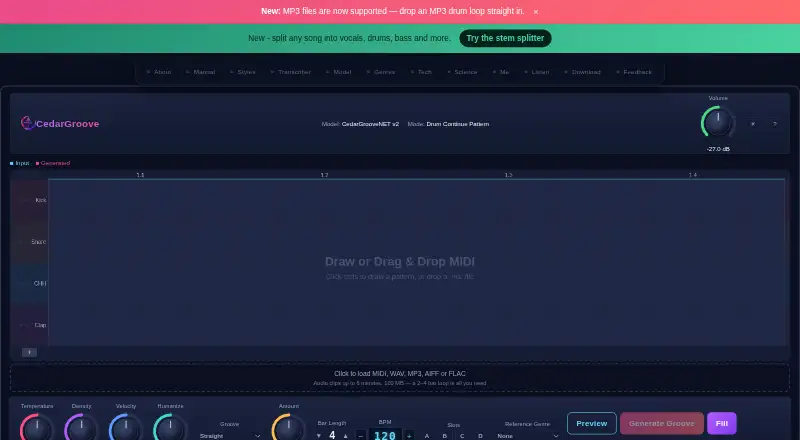
What CedarGrooveNET is
CedarGrooveNET converts drum audio into MIDI and can generate continuations of drum patterns. It accepts WAV, MP3, AIFF, FLAC, and standard MIDI files. Its DrumTranscriber v2 Transformer maps drum events onto an editable 16th-note grid spanning 11 drum classes. An encoder-decoder LSTM generates pattern continuations with controls for temperature, density, velocity, and humanize. The maker lists Drum & Bass, House, and Rock, with 10 sub-style presets for each. The editor supports drawing and changing hits, undo and redo, row locking, pattern slots, and synthesized browser previews. MIDI exports use the Type 0 Standard MIDI format and General MIDI drum map on channel 10; listed compatible DAWs include Logic Pro, Ableton Live, FL Studio, Pro Tools, Cubase, and Reaper. CedarGrooveNET is free and available in browser and macOS versions. The macOS app runs locally and offline on macOS 13 or later, on Apple Silicon and Intel Macs. Audio longer than six minutes is rejected, and transcription analyzes up to the first 16 bars. It handles drums only, not pitched instruments, vocals, melodies, or full songs.
Good
- Free browser and macOS versions.
- Exports Type 0 Standard MIDI files.
- Provides editable drum grids across 11 drum classes.
- Includes pattern-generation controls and genre presets.
- macOS app runs locally and offline.
Watch out
- Transcribes drums only, not pitched instruments or vocals.
- Rejects audio clips longer than six minutes.
- Analyzes only the first 16 bars.
- MIDI exports require an email-link unlock.
Who it suits
CedarGrooveNET suits musicians who want to transcribe drum parts, edit drum patterns, or generate continuations for MIDI workflows. It is not suited to transcribing pitched instruments, vocals, melodies, or complete songs.
Verdict
CedarGrooveNET focuses on drum transcription and pattern continuation, with editable grids and MIDI export. Its drum-only scope and audio-length limits matter if you need to process other instruments or longer recordings.
Plans and prices
From CedarGrooveNET's own pricing page, checked 4 Oct 2026.
| Plan | Price | What it gives you |
|---|---|---|
| Free | Free | Browser and macOS app · MIDI exports unlocked by email link · Audio clips up to 6 minutes · Free; no subscription or credit card |
The facts
Each one read from CedarGrooveNET's own pages, with the date it was checked.
What it does
- Audio and MIDI input
- It accepts WAV, MP3, AIFF, FLAC, and standard MIDI files.checked 4 Oct 2026
- Audio limit
- Audio clips longer than 6 minutes are rejected, and the maker says the transcriber analyzes up to the first 16 bars.checked 4 Oct 2026
- Drum transcription
- The DrumTranscriber v2 Transformer maps drum events onto an editable 16th-note grid across 11 drum classes.checked 4 Oct 2026
- Editing and preview
- The grid supports drawing and editing hits, undo and redo, row locking, pattern slots, and synthesized browser previews.checked 4 Oct 2026
- Export and DAW compatibility
- It exports Type 0 Standard MIDI files using the General MIDI drum map on channel 10; the maker lists Logic Pro, Ableton Live, FL Studio, Pro Tools, Cubase, and Reaper as compatible DAWs.checked 4 Oct 2026
- Offline use
- The macOS app runs locally and offline, without cloud services or an account; it supports macOS 13 or later on Apple Silicon and Intel Macs.checked 4 Oct 2026
- Pattern generation
- An encoder-decoder LSTM generates drum-pattern continuations, with controls including temperature, density, velocity, and humanize.checked 4 Oct 2026
- Privacy
- For browser transcription, audio is held in memory and not written to disk; the maker says only a sanitized filename and byte size are logged and no third-party cloud service is involved.checked 4 Oct 2026
- Purpose
- CedarGrooveNET transcribes drum audio to MIDI and can generate continuations of drum patterns.checked 4 Oct 2026
- Scope limit
- CedarGrooveNET transcribes drums only and does not transcribe pitched instruments, vocals, melodies, or full songs.checked 4 Oct 2026
- Styles
- The maker lists Drum & Bass, House, and Rock as supported genres, with 10 sub-style presets for each.checked 4 Oct 2026
- Support
- The maker invites users to submit feature requests and bug reports through a feedback form.checked 4 Oct 2026
The company
- Maker
- The creator identifies himself as Paul and describes CedarGrooveNET as a deep learning side project; the page does not state a headquarters or founding date.checked 4 Oct 2026
The full review of CedarGrooveNET
CedarGrooveNET is a free specialist for converting drum recordings into editable MIDI and extending existing drum patterns. It suits producers who build beats in a DAW and want control over individual hits rather than a finished audio track. Its strongest case is focused drum work with no subscription cost; broader song transcription and long-form audio require another tool.
Overview
The workflow is deliberately narrow: import a supported audio or MIDI file, inspect the result on a 16th-note drum grid, revise it, generate a continuation if useful, and export a Standard MIDI file. That makes it a practical bridge from a recorded groove to a programmable beat. It is not designed to separate or transcribe an entire arrangement.
Audio clips longer than six minutes are rejected, and the transcriber analyzes only the first 16 bars. Short loops, beat sketches, and selected excerpts are therefore a much better fit than full performances. CedarGrooveNET transcribes drums only, not pitched instruments, vocals, melodies, or complete songs.
Key features
Drum transcription and editing
DrumTranscriber v2 maps detected events across 11 drum classes onto an editable 16th-note grid. Drawing and editing hits, undo and redo, row locking, and pattern slots give you practical correction and variation tools when an automatic result needs adjustment. Synthesized browser previews provide a quick way to hear the pattern before committing it to a DAW.
Input covers WAV, MP3, AIFF, FLAC, and standard MIDI files. The six-minute rejection threshold and 16-bar analysis window favor concise material, while the 11-class grid provides more useful separation than a single undifferentiated rhythm lane. Users needing melodic or vocal transcription should look elsewhere.
Pattern continuation and arrangement
An encoder-decoder LSTM generates continuations from drum patterns. Temperature, density, velocity, and humanize controls let you trade repetition for variation and tighten or loosen the feel. The maker lists Drum & Bass, House, and Rock, with 10 sub-style presets for each, giving genre-oriented starting points rather than an unrestricted style system. Beat arrangement tools are included, but there is no stem export, so the output remains centered on MIDI drum programming.
MIDI export and privacy
Exports are Type 0 Standard MIDI files using the General MIDI drum map on channel 10. The stated compatibility list includes Logic Pro, Ableton Live, FL Studio, Pro Tools, Cubase, and Reaper, making the export suitable for common production setups. Browser transcription keeps audio in memory rather than writing it to disk; only a sanitized filename and byte size are logged, with no third-party cloud service involved.
Pricing
The Free plan costs nothing, is billed Free, and requires neither a subscription nor a credit card. It includes the browser and macOS app, audio clips up to six minutes, and MIDI exports unlocked by email link. There is no free trial because the product is already free. The trade-off is not a paid feature ladder but the fixed processing limits: longer audio is refused, and drum-only transcription remains the product's boundary.
Platforms
CedarGrooveNET runs on the web and as a macOS app. The desktop version supports macOS 13 or later on both Apple Silicon and Intel Macs, works locally and offline, and needs no cloud service or account. The browser route is convenient for supported clips and keeps audio in memory during transcription; the Mac app is the better choice when offline operation matters.
Who it's for
Choose it for beatmakers, producers, and electronic musicians who want to extract drum hits from short recordings, edit them on a grid, and continue the idea with generated variations. It is especially suitable when standard MIDI export into a listed DAW is the intended endpoint and when a free, account-free offline Mac workflow is valuable.
Do not choose it as your main tool for full-song analysis, pitched-instrument or vocal transcription, recordings beyond six minutes, or workflows that require audio stems. Its genre presets and drum-focused controls are useful for rhythm production but do not replace a broader arrangement or transcription environment.
Pros and cons
- Pros: Free use with no subscription or credit card; editable 11-class 16th-note grid; continuation controls for temperature, density, velocity, and humanize; Type 0 MIDI export on the General MIDI drum map; offline macOS operation; browser audio kept in memory without third-party cloud processing.
- Cons: Audio over six minutes is rejected and analysis stops at 16 bars; transcription covers drums only; no stem export; MIDI export requires an email-link unlock; browser and desktop workflows do not extend the supported input scope.
Alternatives
Browse the AI Beat Makers list when you want to compare a wider field of beat-generation software.
Rewind AI Beat Maker is the better direction for users who need Android or iOS access, an API, or token-based generation with daily allowances. Choose InsMelo AI Beat Maker for a mobile-and-web beat-maker workflow with a credit-based free tier. Soundverse AI Beat Maker suits creators seeking song creation, voice cloning, and stem splitting rather than drum-only MIDI transcription.
Veena Studio AI Drum Generator is worth considering for browser or mobile drum generation with projects and uncapped, watermark-free exports on its free plan. Songen is a better fit for iOS and macOS users focused on generated loops and saved tunes. DrumBot AI offers a web-based groove workflow with daily generations, audio analyses, and limited MIDI/WAV exports.
AIBeatMaker fits users who prefer cloud tracks, streaming, and song-oriented generation, while Beat Shaper is an option for unlimited free generations and MP3 downloads for personal, non-commercial use.
Verdict
CedarGrooveNET is an easy recommendation for producers who need free, focused drum transcription, editable MIDI, and pattern continuation from short clips, especially on an offline Mac. Look elsewhere if your recordings run past six minutes, your material includes melody or vocals, or you need stems or full-song transcription.
Alternatives to CedarGrooveNET
- 1

Soundverse AI Beat Maker
Free planAndroidiOSWebAPI8.2Free plan - 2

AIBeatMaker
Free planWeb7.3From $10 a month - 3
Rewind AI Beat Maker
Free planAndroidiOSWebAPI7.3From $5 a month - 4
Veena Studio AI Drum Generator
Free planAndroidiOSWeb7.3From $20 a month - 5

Songen
Free planiOSmacOS7.0From $89.99 a year - 6

DrumBot AI
Free planWeb6.7From $67.10 a year