Blinkadz
Blinkadz creates personalized videos in bulk from CSV data and templates.
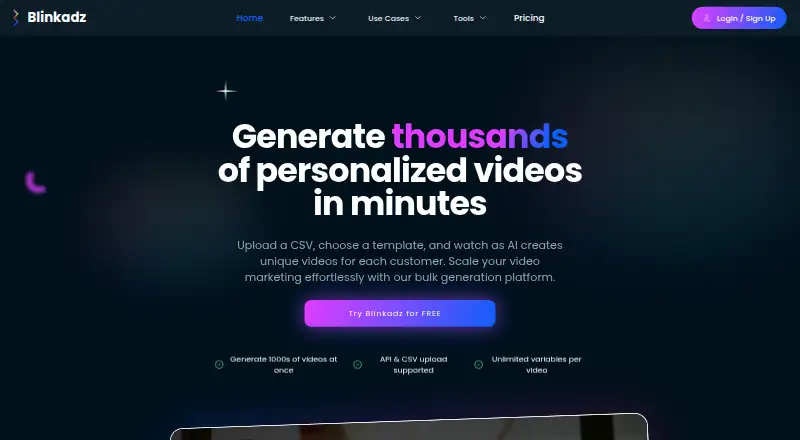
What Blinkadz is
Blinkadz creates personalized videos in bulk from CSV data and templates. Users upload a CSV, map its columns to template variables, and generate a video for each row. The homepage says unlimited variables can be mapped, including names, offers, products, and images. Users can choose professional templates or create custom ones, and finished videos can be downloaded instantly. Blinkadz also describes an AI workflow that can plan scenes, generate footage, add captions and music, and allow edits before export. It says ads can be exported for Meta, TikTok, or YouTube. Listed audiences include marketing agencies, sales teams, real estate professionals, and e-commerce businesses. The product runs on the web and offers a free signup with 20 credits; the Pay as you go plan is listed as free and includes 80 credits for generating videos, music, and images, plus avatars and stock images. Enterprise pricing is custom. REST API integration is described, but API access is also listed as coming soon and unavailable. Analytics, webhooks, and other features are also marked as coming soon.
Good
- Generates personalized videos from CSV rows.
- Supports unlimited variable mapping, according to the homepage.
- Offers templates and custom template creation.
- Completed videos can be downloaded instantly.
Watch out
- API access is listed as unavailable and coming soon.
- Engagement analytics are unavailable.
- Enterprise pricing is custom and not listed.
Who it suits
Blinkadz suits marketing agencies, sales teams, real estate professionals, and e-commerce businesses that need personalized video variations from CSV data. It may also fit enterprise users seeking custom deployment or support arrangements.
Verdict
Blinkadz centers on template-based bulk video personalization and downloadable outputs, with free signup credits listed. Note that API access and analytics are not currently listed as available.
Plans and prices
From Blinkadz's own pricing page, checked 8 Oct 2026.
| Plan | Price | What it gives you |
|---|---|---|
| Pay as you go | Free | 80 credits · generate videos, music, images · avatars · stock images |
| Enterprise | Priced on request | 24 x 7 support · dedicated account manager · custom SLAs and integrations · on-premise deployment · custom monitoring, features, and training · Custom pricing |
The facts
Each one read from Blinkadz's own pages, with the date it was checked.
What it does
- Ad destinations
- The site says generated ads can be exported for Meta, TikTok, or YouTube.checked 8 Oct 2026
- API status
- The homepage describes REST API integration, but also lists REST API access as coming soon.checked 8 Oct 2026
- Audience
- Blinkadz identifies marketing agencies, sales teams, real estate professionals, and e-commerce businesses as target users.checked 8 Oct 2026
- Bulk generation
- Users can upload a CSV, map its columns to template elements, and generate a personalized video for each row.checked 8 Oct 2026
- Coming soon
- Analytics, multi-platform publishing, a content calendar, and social listening are listed as coming soon.checked 8 Oct 2026
- Contact
- The contact page lists Blinkadz at an address in Jaipur, Rajasthan, India, and gives [email protected] as its email.checked 8 Oct 2026
- Creation workflow
- The site says AI plans scenes, generates footage, adds captions and music, and lets users edit before export.checked 8 Oct 2026
- CSV processing
- Users can upload CSV files and map their columns to template variables.checked 8 Oct 2026
- Current features
- The homepage lists CSV bulk upload, unlimited variable mapping, professional templates, bulk video generation, and instant download as available today.checked 8 Oct 2026
- Downloads
- Instant video download is listed among the features available today.checked 8 Oct 2026
- Enterprise deployment
- The enterprise offering lists on-premise deployment and custom monitoring solutions.checked 8 Oct 2026
- Enterprise support
- The enterprise offering lists 24 x 7 support, a dedicated account manager, and custom SLAs.checked 8 Oct 2026
- Integrations
- The site says API integrations are intended for CRMs, automation platforms, and custom applications; it does not name specific integrations.checked 8 Oct 2026
- Personalization
- The homepage says users can map unlimited variables, including names, offers, products, and images.checked 8 Oct 2026
- Product
- Blinkadz describes itself as an AI video ad generator that turns a prompt or product link into ads and can create personalized variations from a CSV.checked 8 Oct 2026
- Support contact
- The contact page lists [email protected] and business hours of Monday through Saturday, 10:00 AM to 6:00 PM IST.checked 8 Oct 2026
- Templates
- The product offers professional templates and says users can create custom templates.checked 8 Oct 2026
- Use cases
- The homepage describes use cases for real estate agents, sales teams, marketing agencies, and e-commerce businesses.checked 8 Oct 2026
- Webhooks and analytics
- Webhook notifications and an advanced analytics dashboard are listed as coming soon.checked 8 Oct 2026
- What it does
- Blinkadz generates personalized videos in bulk from CSV data and templates.checked 8 Oct 2026
Money
- Free credits
- The homepage says new users can sign up for free and receive 20 credits to try the platform without a credit card.checked 8 Oct 2026
The company
- Headquarters
- The contact page gives the address as Third floor, Sansthan Path, Jhalana Gram, Malviya Nagar, Jaipur, Rajasthan 302017, India.checked 8 Oct 2026
The full review of Blinkadz
Overview
Blinkadz is a web-based AI video ad creator that turns prompts or product links into editable ads and can produce personalized versions from spreadsheet rows. It is best suited to teams that need many tailored creatives and can manage their own downloads. Its strength is the template-and-CSV workflow; it is a weaker fit for teams that need integrated publishing or campaign measurement.
The creation flow is broad: AI plans scenes, generates footage, adds captions and music, and allows editing before export. Ads can be exported for Meta, TikTok, or YouTube. That gives marketing teams a route from a brief to channel-ready creative, but export is still a handoff: Blinkadz does not provide multi-platform publishing or engagement analytics today.
Key features
CSV-driven personalization
Users upload a CSV and map its columns to template variables, then generate a separate video for each row. Blinkadz says variable mapping can include names, offers, products, and images, with no stated variable cap. This suits campaigns that need tailored messages across a contact or product list; the value depends on having clean spreadsheet data and a suitable template.
Templates and editing
Professional templates provide a starting point, and users can create custom templates. Dynamic scenes and personalized calls to action support more than a simple name swap, while the AI-assisted scene, footage, caption, and music workflow can reduce the number of steps needed to assemble an ad. Users can edit before export, which matters when generated creative needs a final brand or message check.
Downloads, integrations, and measurement
Instant video download is a current feature, and the site says ads can be exported for Meta, TikTok, and YouTube. CSV upload is the stated data-import method. Blinkadz describes REST API integrations for CRMs, automation platforms, and custom applications, but API access is not currently available. Webhooks and analytics, along with a content calendar, social listening, and multi-platform publishing, are also forthcoming rather than part of the present workflow. Teams needing automated delivery, campaign reporting, or publishing from one place should choose a tool that already supports those jobs.
Pricing
Pay as you go
The Pay as you go plan is free and includes 80 credits for generating videos, music, and images, plus avatars and stock images. New users can also sign up without a credit card and receive 20 credits to try the platform. The two credit figures are distinct offers; the listed plan does not state how long its credits last or what a typical video consumes, so this tier is most useful for an initial evaluation rather than predictable campaign budgeting.
Enterprise
Enterprise uses custom pricing. It adds 24 x 7 support, a dedicated account manager, custom SLAs and integrations, on-premise deployment, and custom monitoring, features, and training. Those options are aimed at organizations with deployment or service requirements beyond a self-serve workflow; a price cannot be compared with the free tier without a custom quote. Blinkadz describes the product as paid and offers a free trial, but does not state a trial duration or a separate recurring paid-plan price.
Platforms
Blinkadz is available on the web. API is named as a platform, but access is not currently available, so teams should not treat the API label as a usable integration option today. Videos are delivered as downloads.
Who it's for
Marketing agencies can use the row-based workflow to make variations for different clients or offers, while sales teams and real estate professionals can tailor video messages to prospects or listings. E-commerce businesses can apply product and offer data across a batch of creatives. These are strongest fits when a team already works comfortably with CSVs and can handle export and distribution separately.
Blinkadz is less suitable for teams whose core requirement is an automated CRM connection, webhook-driven operations, publishing schedules, or performance analytics. Its contact page lists [email protected] and business hours Monday through Saturday, 10:00 AM to 6:00 PM IST; enterprise customers can opt for round-the-clock support.
Pros and cons
Pros
- Bulk personalization from CSV: column mapping and per-row generation can save repeated setup when a campaign needs many tailored video variants.
- Flexible creative starting points: professional and custom templates, dynamic scenes, personalized calls to action, and editing before export give teams room to shape the output.
- Free entry point: the free plan includes 80 credits, and new signups receive 20 trial credits without a credit card, allowing an initial look before committing to a custom-priced enterprise offer.
Cons
- No working API access: despite the integration plans, API access is not currently available, limiting teams that need to connect generation to existing systems now.
- No analytics or publishing workflow: videos are downloaded, while analytics, webhooks, content calendar, social listening, and multi-platform publishing remain forthcoming.
- Credit economics are unclear for ongoing use: the free allowance is stated, but there is no stated credit lifespan or per-video consumption to help plan campaign volume.
Alternatives
Video Personalization Software is a useful category overview for comparing tools before choosing a specific workflow.
- VSPAGY may suit teams that want a free 14-day trial with 2,000 credits and API and webhook integration included in its Free plan, rather than Blinkadz’s download-first workflow.
- FirstPitch is worth considering for buyers who want a free allowance of five AI-personalised videos per month plus basic recording, landing pages, and view analytics.
- BHuman is an alternative for teams seeking a free 15 shared credits and access to its templates, AI Studio, and Speakeasy.
- Gan.AI offers a free plan with 10 AI videos monthly, 100 generative credits, and 10 personalization credits, making it a comparison point for teams weighing separate generation and personalization allowances.
- GLX Studio may be preferable for teams that want to preview its Story Builder on a free Starter tier or consider a Teams plan at $149 a month.
- KoldFrame is a better comparison for users who prioritize a stated monthly rendering allowance: its free plan includes 50 rendered videos per month, public video pages, GIF and thumbnail generation, and CSV exports.
- Individ offers 50 credits (50 videos) for new accounts, with no credit card required and credits that never expire; its one-time paid Credits plan may appeal to users avoiding a recurring subscription.
- OneDay is another alternative to compare.
Verdict
Blinkadz is a sensible choice for agencies, sales teams, real estate professionals, and e-commerce businesses that need to create many tailored video ads from CSV data and are comfortable downloading the results for separate distribution. Its combination of templates, variable mapping, and per-row generation is the main reason to choose it. Look elsewhere if API connections, analytics, webhooks, or integrated publishing are requirements today rather than future plans.
Getting started
- Visit the Blinkadz website.
- Sign up for free to receive 20 credits without a credit card.
- Upload a CSV file and map its columns to template elements.
- Choose a professional template or create a custom template.
- Generate personalized videos and download or export them.
Limits worth knowing
The Pay as you go plan is listed as free and includes 80 credits. Enterprise pricing is custom; its listed offering includes 24 x 7 support, a dedicated account manager, custom SLAs and integrations, on-premise deployment, monitoring, features, and training.
Questions
What does Blinkadz do?
It creates video ads from prompts or product links and generates personalized video variations from CSV data.
What does the free option include?
New users can sign up for free and receive 20 credits without a credit card. The Pay as you go plan is listed as free and includes 80 credits for videos, music, and images, plus avatars and stock images.
Which platforms does Blinkadz support?
Blinkadz is available on the web and via API is listed as a platform, but API access is unavailable. Generated ads can be exported for Meta, TikTok, or YouTube.
Can it personalize videos in bulk?
Yes. Upload a CSV, map its columns to template elements, and generate a video for each row.
What does Enterprise offer?
Enterprise uses custom pricing and lists 24 x 7 support, a dedicated account manager, custom SLAs and integrations, on-premise deployment, and custom monitoring, features, and training.
How can I contact Blinkadz?
The contact page lists [email protected] and business hours Monday through Saturday, 10:00 AM to 6:00 PM IST.
Alternatives to Blinkadz
- 1
FirstPitch
Free planWebAPIExtension7.3From $49 a month - 2
Gan.AI
Free planWebAPIExtension7.3From $24 a month - 3
GLX Studio
Free planWebAPI7.3From $149 a month - 4

Impossible
WebAPISelf-hosted6.9From $0.04 a month - 5

BHuman
Free planWebAPI6.8From $19 a month - 6
KoldFrame
Free planWeb6.7From $60 a month