Autodesk Inventor
Autodesk Inventor is Windows software for 3D mechanical design, documentation, simulation, and model-based definition.
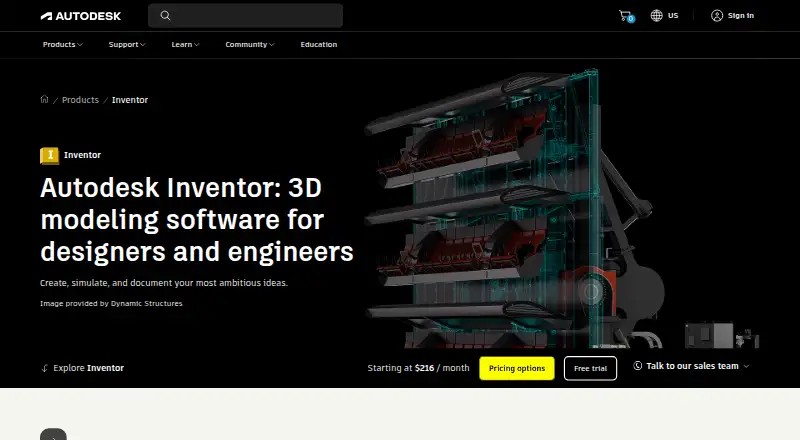
What Autodesk Inventor is
Autodesk Inventor is Windows software for 3D mechanical design, documentation, simulation, and model-based definition. It brings together parametric, direct, freeform, and rules-based design methods, with tools for assemblies, sheet metal, and surfaces. Inventor can open designs from other CAD systems without translation. Part exports include DWG, IGES, JT, OBJ, STEP, and STL, among other listed formats; assemblies add RVT, while drawing formats include DWG, IDW, DWF/DWFx, and DXF. Connections include Revit family data, Vault, Factory Design Utilities, and Inventor Nastran. Automation options include iLogic, the Inventor API, and Autodesk Platform Services. The software is paid, with a 30-day trial rather than a permanent free tier. Listed monthly, annual, and three-year prices appear as placeholders, not figures. A subscription permits installation on up to three devices, but only the named user may sign in and use Inventor on one computer at a time. Subscribers can also install the three previous versions.
Good
- Combines parametric, direct, freeform, and rules-based methods.
- Includes assembly, sheet-metal, and surface tools.
- Opens designs from other CAD systems without translation.
- Supports simulation and model-based definition.
- Connects with listed design and automation tools.
Watch out
- Runs on Microsoft Windows only.
- No permanent free tier; trial lasts 30 days.
- Displayed subscription prices are placeholders.
- A named user can use it on one computer at a time.
Who it suits
Inventor suits mechanical design users working on Windows who need modeling, documentation, simulation, or model-based definition. Its assembly, sheet-metal, surface, and automation tools may be relevant to product-design workflows.
Verdict
Inventor covers several mechanical design methods and connects with a range of Autodesk design and automation tools. Before choosing it, consider its Windows requirement, trial-only free access, and user and device restrictions.
Plans and prices
From Autodesk Inventor's own pricing page, checked 27 Sep 2026.
| Plan | Price | What it gives you |
|---|---|---|
| Flex | — | Buy tokens and access Inventor for 24 hours at a time. |
| Free Trial | Free | 30-day free trial. |
| Inventor Monthly | — | Monthly subscription; no-contract option. |
The facts
Each one read from Autodesk Inventor's own pages, with the date it was checked.
What it does
- Admin features
- Flex includes default group assignments for simplified user management.checked 27 Sep 2026
- AI security
- Autodesk states that its AI development, deployment, and use are responsible, ethical, and secure.checked 27 Sep 2026
- Assembly design
- Yeschecked 23 Sep 2026
- Autodesk benefits
- Autodesk offers Business and Enterprise success plans with support, coaching, reporting, and licensing options.checked 27 Sep 2026
- Automation integrations
- Inventor supports iLogic, its API, and Autodesk Platform Services for automation and ecosystem connections.checked 27 Sep 2026
- Cloud collaboration
- Yeschecked 23 Sep 2026
- Core features
- The software provides mechanical design, documentation, simulation, and model-based definition tools.checked 27 Sep 2026
- Design integrations
- Inventor connects with Revit family data, Vault, Factory Design Utilities, and Inventor Nastran.checked 27 Sep 2026
- Design methods
- Inventor combines parametric, direct, freeform, and rules-based design.checked 27 Sep 2026
- Displayed pricing
- The page shows monthly, annual, and 3-year price placeholders rather than figures.checked 27 Sep 2026
- File import and export
- Import: Autodesk states Inventor supports opening non-native CAD data. Export formats documented for parts include DWG, DWF/DWFx, IGES, JT, OBJ, RFA, SAT, STEP, STL, CATIA V5, Parasolid, and Pro/ENGINEER; assemblies additionally include RVT. Drawing formats include DWG, IDW, DWF/DWFx, and DXF. Format support varies by data type and version.checked 23 Sep 2026
- Install limit
- A subscription allows installation on up to 3 computers or other devices.checked 27 Sep 2026
- Modeling method
- hybridchecked 23 Sep 2026
- Non-native data
- Inventor can directly open designs from other CAD systems without translation.checked 27 Sep 2026
- Online support
- Autodesk provides 24x7 online support options and resources.checked 27 Sep 2026
- Previous versions
- Subscribers can install and use the 3 previous versions.checked 27 Sep 2026
- Refund policy
- Annual and multi-year subscriptions have a 30-day return policy; monthly subscriptions have 15 days.checked 27 Sep 2026
- Sheet-metal tools
- Yeschecked 23 Sep 2026
- Support benefits
- Subscription and Flex purchases include 8x5 support, single sign-on, and usage reporting.checked 27 Sep 2026
Money
- Free plan
- Nochecked 23 Sep 2026
- Free tier limits
- The page describes a 30-day free trial, not a permanent free tier.checked 27 Sep 2026
- Free trial
- Inventor is available as a free 30-day trial.checked 27 Sep 2026
Where it runs
- Supported OS
- Inventor runs on Microsoft Windows.checked 27 Sep 2026
- Supported platforms
- Windowschecked 23 Sep 2026
Alternatives to Autodesk Inventor
- 1
Rhino 3D
Free planiOSAPILinuxmacOS8.8Free plan - 2

Onshape
Free planAndroidiOSWeb8.6From $1,500 a year - 3
SOLIDWORKS
WebmacOSWindows8.3From $48 a year - 4
Shapr3D
Free planmacOSWindows8.1From $299 a year - 5

Plasticity
Free planLinuxmacOSWindows7.9$175 one-time - 6

OpenSCAD
Free planOpen sourceWebAPILinuxmacOS7.9Free plan