
Audiola
Audiola is a free desktop audio studio for Windows, macOS, and Linux.
What Audiola is
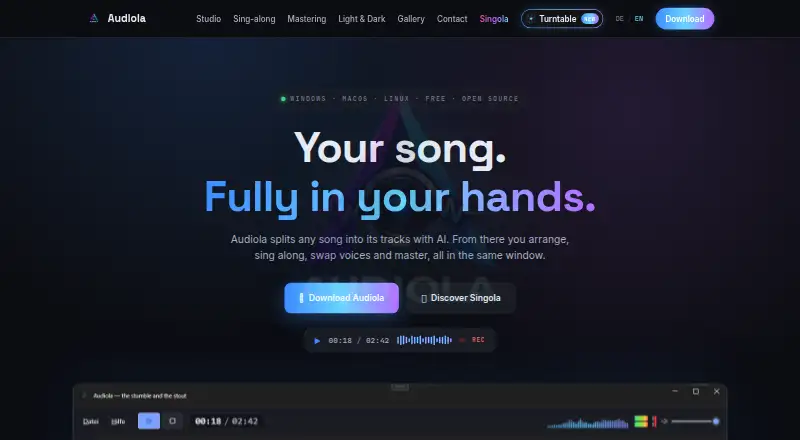
Audiola is a free desktop audio studio for Windows, macOS, and Linux. It can separate songs into vocals, drums, bass, guitar, piano, and other stems using Demucs on the user's machine, without cloud processing or uploads. In its multitrack editor, users can cut, move, fade, and loop clips, with undo history, snapping, and effects. A karaoke view displays lyrics and the original melody, scores a performance, and can tune a recorded take toward that melody. Mastering tools include EQ, compression, loudness targeting per EBU R128, live A/B comparison, and 14 profiles. Audiola also supports local or ElevenLabs voice profiles, voice swapping, and speech tracks from text; users are advised to use only their own or licensed voices. Tracks can be placed in a 7.1.4 spatial bed, which the maker says can be exported. Exports include WAV, MP3, and AAC-M4A. Audiola is listed as free, with a contact form for questions and feedback that does not require an account.
Good
- Stem separation runs locally without cloud processing or uploads.
- Editor includes clip tools, undo, snapping, and effects.
- Karaoke view scores singing and can tune recorded takes.
- Mastering offers EQ, compression, and 14 profiles.
- Exports WAV, MP3, and AAC-M4A.
Watch out
- Voice profiles may use ElevenLabs rather than local creation.
- Users are told to use only their own or licensed voices.
- Available as a desktop app for Windows, macOS, and Linux.
Who it suits
Audiola suits desktop users who want to separate and arrange song stems, practice singing, or work on voice and mastering tasks in one studio. Its local stem processing may suit people who do not want songs uploaded for separation.
Verdict
Audiola combines stem separation, multitrack editing, karaoke, voice tools, and mastering in a free desktop app. Consider its voice-use restriction when working with voice profiles or swaps.
Plans and prices
From Audiola's own pricing page, checked 5 Oct 2026.
| Plan | Price | What it gives you |
|---|---|---|
| Audiola | Free | Windows, macOS, and Linux desktop app |
The facts
Each one read from Audiola's own pages, with the date it was checked.
What it does
- Downloads
- Audiola downloads are listed for Windows x64, macOS Apple Silicon and Intel, and Linux x64.checked 5 Oct 2026
- Mastering
- Mastering includes EQ, compression, loudness targeting per EBU R128, live A/B comparison, and 14 profiles.checked 5 Oct 2026
- Privacy
- The maker says Demucs stem separation runs locally on the user's machine with no cloud or upload.checked 5 Oct 2026
- Purpose
- Audiola is an audio studio for separating songs into tracks, arranging them, singing along, swapping voices, and mastering.checked 5 Oct 2026
- Sing-along
- Its karaoke view shows lyrics and the original melody, scores singing, and can tune a recorded take toward that melody.checked 5 Oct 2026
- Spatial audio
- Tracks can be placed in a 7.1.4 spatial bed, and the maker says spatial audio can be exported.checked 5 Oct 2026
- Stem separation
- Demucs separates songs locally into vocals, drums, bass, guitar, and piano, without cloud processing or uploading.checked 5 Oct 2026
- Studio editing
- The multitrack studio supports cutting, moving, fading, and looping clips, with undo history, snapping, and effects.checked 5 Oct 2026
- Support
- The maker says Audiola is free and stays free, and offers a contact form for questions, bug reports, and feature requests without requiring an account.checked 5 Oct 2026
- Voice tools
- Users can create voice profiles locally or via ElevenLabs, swap a clip's voice, and generate speech tracks from text.checked 5 Oct 2026
- Voice-use restriction
- The maker says to use only your own or licensed voices.checked 5 Oct 2026
Alternatives to Audiola
- 1

LALAL.AI
Free planAndroidiOSWebAPI8.3From €6.75 a month - 2

AudioShake
Free planAndroidiOSWebAPI8.1From $20 a month - 3

Fadr
Free planAndroidiOSWebAPI8.1From $100 a year - 4

MVSEP
Free planAndroidiOSWebAPI8.1Free plan - 5
Pymss
Free planOpen sourceAndroidiOSWebAPI7.8Free plan - 6
Sonura
Free planWebmacOSWindows7.3From $10 a month