
Achievement Watcher Next
Achievement Watcher Next is a free Windows achievement tracker that brings achievements, rarity, and playtime from launchers, local saves, and supported emul…
What Achievement Watcher Next is
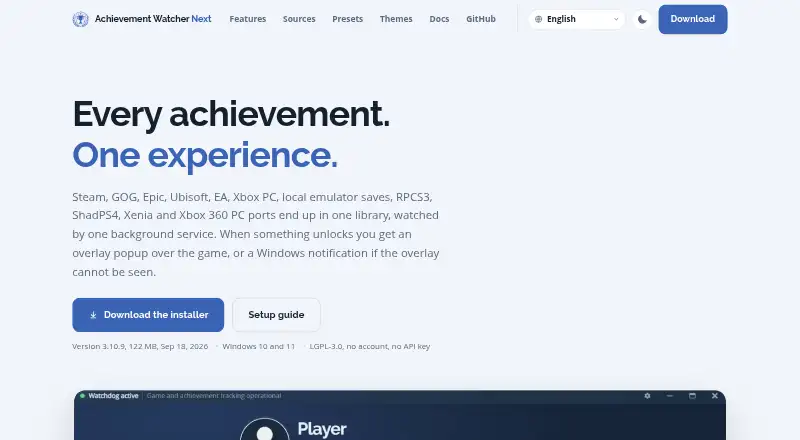
Achievement Watcher Next is a free Windows achievement tracker that brings achievements, rarity, and playtime from launchers, local saves, and supported emulators into one library. It covers sources such as Steam and compatible saves, GOG, Epic, Ubisoft, EA, Xbox PC, console emulators, RetroAchievements, Games for Windows LIVE, and some mod patches. The library offers search, filters, rarity tiers, progress achievements, covers, collections, and unlock history. Achievement lists and product details are cached locally, so the library can work offline. Automatic notifications use an in-game popup when visible or a Windows notification otherwise, without duplicating an unlock alert. A Ctrl+Shift+K overlay provides searchable achievement lists, rarity badges, hidden descriptions, and gamepad navigation. The project says reading achievements is read-only, needs no account of its own or Steam Web API key, and does not upload library data, playtime, folders, or screenshots. Epic unlock-state retrieval can use an optional account connection. It is Windows-only, for Windows 10 and 11, and is available as an installer or portable ZIP.
Good
- Combines achievement sources in one library.
- Cached data supports offline library use.
- Overlay supports gamepad navigation.
- No account or Steam Web API key required.
- Installer and portable ZIP are available.
Watch out
- Windows 10 and 11 only.
- Epic unlock-state retrieval may use an optional account connection.
- Some emulator repairs can modify game files.
Who it suits
It suits Windows players who want achievements and playtime gathered across launchers, local saves, and supported emulators. Players who want an offline-capable library or controller navigation may also find its features useful.
Verdict
Achievement Watcher Next brings broad achievement tracking and offline library access to Windows. Its platform scope is limited to Windows, and Epic unlock-state retrieval may involve an optional account connection.
Plans and prices
From Achievement Watcher Next's own pricing page, checked 11 Oct 2026.
| Plan | Price | What it gives you |
|---|---|---|
| Free | Free | LGPL-3.0 · Windows 10 and 11 · Download from GitHub releases |
The facts
Each one read from Achievement Watcher Next's own pages, with the date it was checked.
What it does
- Account and API requirements
- The maker says the app needs no account of its own or Steam Web API key; Epic unlock-state retrieval can use an optional account connection.checked 11 Oct 2026
- Customization
- The app includes nine notification presets and a designer for custom layouts, colors, motion, completion treatments and sounds.checked 11 Oct 2026
- Distribution
- The maker provides an installer and a portable ZIP through its GitHub releases, and says the installed app updates itself.checked 11 Oct 2026
- Game sources
- It reads Steam, compatible Steam saves, GOG Galaxy, Epic Games, Ubisoft Connect, EA Desktop, Xbox PC and Microsoft Store, plus RPCS3, ShadPS4 and Xenia.checked 11 Oct 2026
- In-game overlay
- The overlay can show searchable, filterable achievement lists with rarity badges and hidden descriptions, and supports gamepad control.checked 11 Oct 2026
- Integrations
- Achievement lists and artwork may be fetched from public platform endpoints and services including Steam, SteamHunters, Exophase, SteamDB and SteamGridDB.checked 11 Oct 2026
- Intended users
- The project describes AW Next as a Windows achievement tracker for players using launchers, local game saves, or supported emulators.checked 11 Oct 2026
- Library
- The library includes search, filters, rarity tiers, progress achievements, covers, collections, and unlock history.checked 11 Oct 2026
- Local data
- Settings and app data are stored under `%APPDATA%\Achievement Watcher Next`, and upgrades preserve them.checked 11 Oct 2026
- Notable limit
- The maker lists Windows 10 and 11 and describes the product as Windows-only.checked 11 Oct 2026
- Notifications
- Automatic mode uses an in-game popup when visible and a Windows notification when it is not, without sending both for the same unlock.checked 11 Oct 2026
- Offline use
- Achievement lists and product metadata are cached locally, and the library can work offline.checked 11 Oct 2026
- Overlay and controller
- The in-game overlay opens with Ctrl+Shift+K and supports search, filters, rarity badges, and gamepad navigation.checked 11 Oct 2026
- Privacy
- The documentation says AW Next has no analytics or telemetry and does not upload the user's library, playtime, folders or screenshots.checked 11 Oct 2026
- Purpose
- AW Next brings achievements, rarity, and playtime from launchers, local saves, and supported emulators into one Windows library.checked 11 Oct 2026
- Release
- The GitHub releases page identifies version 3.11.2 as the latest release, dated October 9.checked 11 Oct 2026
- Repairs
- Emulator repair tools can modify game files, but the project says repairs require confirmation and create backups.checked 11 Oct 2026
- Repair safeguards
- Achievement reading does not write to game files; repair tools that do change files require confirmation and make a backup.checked 11 Oct 2026
- Security and privacy
- The project says achievement reading is read-only, requires no account, and uses no Steam Web API key; stored sign-in secrets are encrypted with a per-install key held by Windows.checked 11 Oct 2026
- Streaming
- An OBS Browser source can display the same unlock popup, preset, and artwork, and shows nothing between unlocks.checked 11 Oct 2026
- Support
- The maker invites bug reports and ideas and accepts translations; security vulnerabilities should be reported through the repository's private vulnerability form.checked 11 Oct 2026
- Supported sources
- The project lists Steam, Steam-compatible saves, GOG, Epic, Ubisoft, EA, Xbox PC, console emulators, RetroAchievements, Games for Windows LIVE, and some mod patches.checked 11 Oct 2026
The full review of Achievement Watcher Next
Achievement Watcher Next is a Windows tracker that combines achievement progress from launchers, local saves, and supported emulators. It is aimed at PC players with libraries spread across several ecosystems, especially those who want offline access and a free, locally stored library. Its source coverage and overlay are strong reasons to choose it, while Windows-only availability and source-specific limitations narrow its audience.
Overview
AW Next consolidates achievements, rarity, playtime, covers, collections, and unlock history in one library instead of forcing separate launcher views. Its scope spans Steam and compatible saves, GOG Galaxy, Epic, Ubisoft Connect, EA Desktop, Xbox PC and Microsoft Store, Games for Windows LIVE, RetroAchievements, RPCS3, ShadPS4, Xenia, and some mod patches. That breadth is valuable for players who move between storefronts and emulators, though results still depend on supported save formats and source compatibility.
Achievement lists and product metadata are cached locally, so library browsing remains possible offline. This makes it a practical reference on unreliable connections, rather than merely an online account dashboard.
Key features
The library offers search, filters, rarity tiers, progress achievements, covers, collections, and unlock history. Automatic mode shows an in-game popup when one is visible and falls back to a Windows notification when it is not, without sending both alerts for the same unlock.
The overlay opens with Ctrl+Shift+K and provides searchable, filterable achievement lists, rarity badges, hidden descriptions, and gamepad navigation. It is well suited to checking objectives without leaving a game, but it remains a Windows desktop feature rather than a cross-device companion.
Nine popup presets and thirteen interface palettes provide meaningful styling choices, with designers for custom presets and themes. An OBS Browser source can mirror the unlock popup and artwork for streams, staying blank between unlocks so it does not occupy the broadcast continuously.
Achievement reading is read-only, requires no AW Next account, and does not need a Steam Web API key. Epic unlock-state retrieval can use an optional account connection. The documentation says there is no analytics or telemetry and that the app does not upload the library, playtime, folders, or screenshots. Sign-in secrets are encrypted with a per-install key held by Windows.
Repair tools for emulators can change game files, but they require confirmation and create backups. Normal achievement reading does not write to game files. An installer and portable ZIP are provided through GitHub releases, and the installed version updates itself. Settings and app data remain under %APPDATA%\Achievement Watcher Next across upgrades.
Pricing
Free — free. The complete product is offered under the LGPL-3.0 for Windows 10 and 11, with downloads supplied through GitHub releases. There is no trial because there is no paid tier to evaluate, no seat allowance, renewal charge, or quota stated. This is the right fit for players who want the full desktop feature set without a subscription; readers needing another operating system cannot turn the free plan into broader platform access.
Platforms
AW Next supports Windows 10 and Windows 11 only. Its multi-source coverage is broad within Windows, including PC launchers, Microsoft Store and Xbox PC, and supported console emulators, but there is no macOS, Linux, Android, iOS, or web client.
Who it's for
Choose it if your achievements are divided among Steam, GOG, Epic, Ubisoft, EA, Xbox PC, local saves, or emulators and you want one searchable, offline-capable library. It also suits streamers who need configurable unlock popups in OBS and players who prefer read-only collection with no telemetry. Look elsewhere if your primary device is outside Windows, if you require a shared web or mobile profile, or if your source is not among the supported integrations.
Pros and cons
Pros
- Wide Windows source coverage: launcher, local-save, emulator, RetroAchievements, and legacy support can unify otherwise separate progress.
- Offline library: cached lists and metadata remain usable without an active connection.
- Useful in-game access: keyboard and gamepad-friendly overlay surfaces filtered lists and hidden descriptions while playing.
- Privacy-focused operation: no account or Steam key is required, with no telemetry or library uploads described.
- Streamer controls: nine presets, thirteen palettes, custom designers, and an OBS source allow targeted presentation.
Cons
- Windows boundary: Windows 10/11 exclusivity rules out users seeking cross-platform access.
- Source dependence: emulator repairs and achievement retrieval vary by compatible saves and integrations; Epic may require an optional account connection.
- File-changing repair tools: although confirmation and backups reduce risk, users must still approve operations that modify emulator game files.
Alternatives
RetroAchievements is the better choice for a free, internet-dependent community service that works across Android, iOS, Linux, macOS, web, and Windows, rather than a Windows-local multi-launcher library.
Trophy Hub suits readers who want all features free across Android, iOS, web, and Windows, with no ads and 1 GB of cloud storage.
Game Rover is aimed at Android, iOS, and web users who prefer a freemium tracker with a 200-game free cap, monthly platform sync, four lists, and limited Scout AI messages.
PocketPSN is a mobile and web option centered on PlayStation Stars collectibles, custom lists, timestamps, filtered friend leaderboards, and forum discussions.
AchieveAll provides Android and web tracking, syncing, communities, and a feed, with optional paid presentation features.
Backloggr is for iOS and macOS users seeking library import, game and trophy tracking, backlog tools, and paid customization.
EveryGameStat offers a free web and Windows service with account linking, a player card, library, and leaderboard.
GameSave is a Linux and Windows freemium alternative whose core app is free and whose extra pages use earned Credits, with a paid monthly Pro tier.
Verdict
Achievement Watcher Next is a strong recommendation for Windows players who want one free tracker across launchers, local saves, and supported emulators, particularly when offline browsing, privacy, overlay controls, or OBS output matter. Choose another service when cross-platform access or a web-and-mobile profile is more important than this unusually broad Windows integration.
Alternatives to Achievement Watcher Next
- 1
RetroAchievements
Free planOpen sourceAndroidiOSWebAPI8.7Free plan - 2

Game Rover
Free planAndroidiOSWeb8.0From $14.99 a year - 3

Trophy Hub
Free planAndroidiOSWebWindows7.9Free plan - 4
PocketPSN
Free planAndroidiOSWeb7.9From $20 a year - 5
Backloggr
Free planiOSmacOS7.7From $8.99 a year - 6

AchieveAll
Free planAndroidWeb7.6From €39.99 a year